Author: TohumAB

  • Stage 8: Launch, Operations & Maintenance (Life After the Launch Button) 🚀

    Stage 8: Launch, Operations & Maintenance (Life After the Launch Button) 🚀

    Launch day! You made it from a spark of an idea to a certified, manufactured IoT product. Take a moment to celebrate – that’s a huge accomplishment. But the journey doesn’t end when you ship the first units. In many ways, Stage 8 is the beginning of your product’s life in the wild. This stage covers everything after the launch: how you deploy updates, monitor your fleet of devices, support real users, and eventually retire the product gracefully when its time is up. A successful IoT product requires ongoing TLC (tender loving care) post-launch to keep things running smoothly and customers happy.

    In this chapter, we’ll explore the key components of life after the launch button, why they’re important, and how to handle them with confidence and a bit of fun. Let’s dive in!

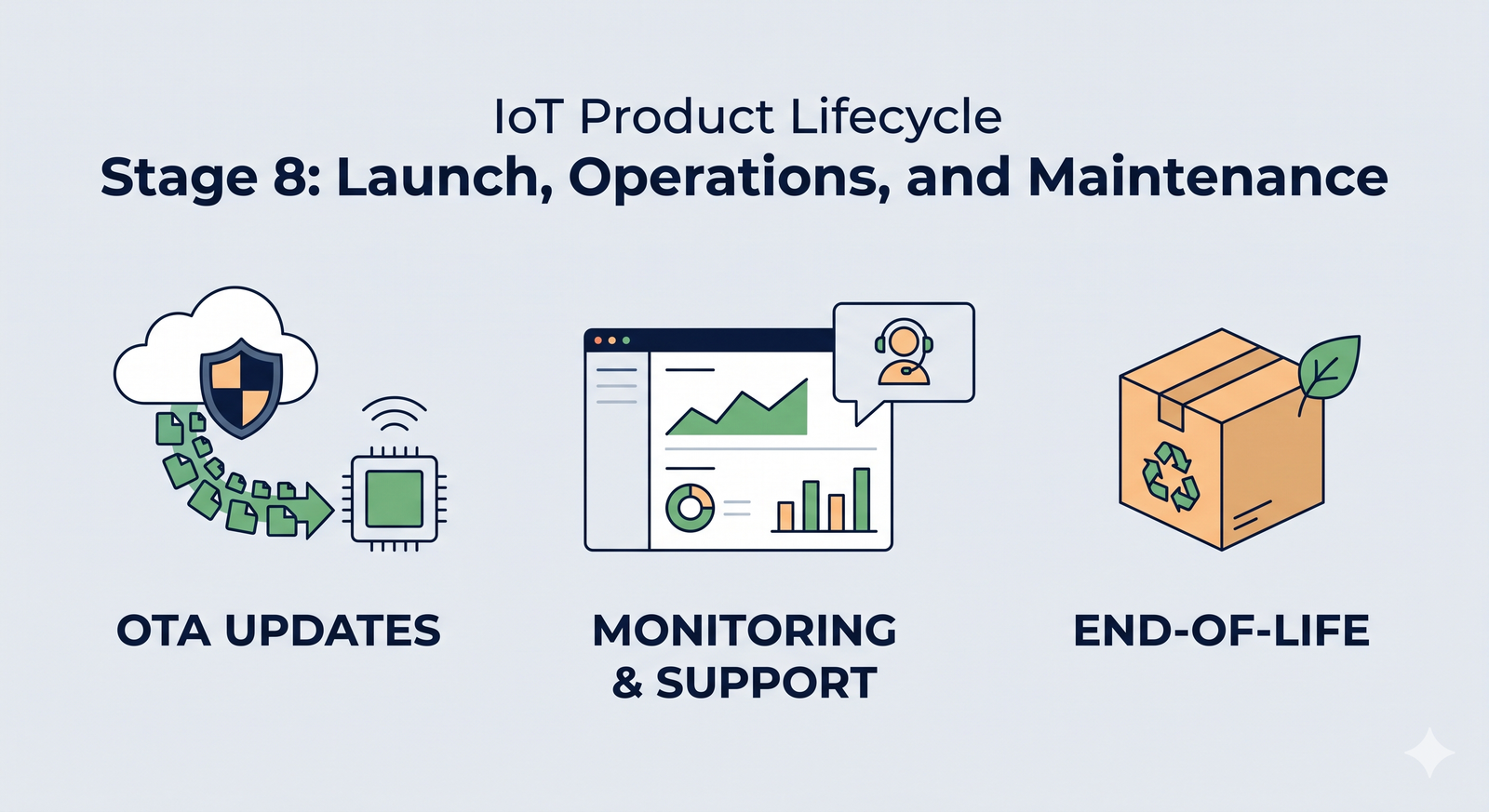
    OTA Updates: Keeping Your Devices Fresh and Safe 🌐

    One of the superpowers of IoT devices is that they can improve over time through software. Unlike old-school gadgets that stayed the same forever, IoT products are expected to evolve, get new features, and fix bugs via updates. This magic happens through Over-the-Air (OTA) updates – essentially, beaming new firmware or software to devices remotely. Setting up a robust OTA update pipeline is critical for a modern IoT product’s success. Here’s why and how to do it right:

    • Continuous Improvement: Think of OTA updates as your product’s lifeline after launch. They let you roll out new features or performance improvements to delight users long after they bought the device. (Ever had a gadget suddenly gain a cool feature after an update? That’s OTA at work!)
    • Bug Fixes & Security Patches: No matter how much testing you did, bugs can slip through, or new security vulnerabilities might be discovered. OTA updates enable you to fix issues on devices out in the field without recalling them. For example, if a critical security flaw is found in your smart home camera, a swift OTA patch can fix it for all users – potentially averting a disaster.
    • Reliability with Fail-Safes: When designing your OTA mechanism, make it reliable and fail-safe. Imagine a user’s power or internet cuts out mid-update – you don’t want the device to be permanently bricked (rendered non-functional). A common best practice is to use dual firmware partitions or a similar approach: the device downloads the new firmware to a secondary slot, verifies it, then switches over. If something goes wrong (like a bad update or interrupted download), the device can fall back to the last known-good version. This way, there’s always a safety net and customers aren’t left with dead devices.
    • Security First: Always implement updates securely. Updates should be cryptographically signed by you (the manufacturer) so that devices will only accept genuine, trusted firmware. This prevents bad actors from installing malicious software on your devices. Additionally, encrypt the update data in transit. In non-tech speak: lock it up so only the device can read it, and it knows the update definitely came from you. Security builds user trust – nothing will scare your customers more than a headline about a hacker hijacking unsecure IoT gadgets.
    • Staged Rollouts: Picture this scenario: you have 10,000 devices in the field. You excitedly push an update to all of them at once… and oops 😨, a new bug in that update causes the devices to reboot endlessly. Now all 10,000 customers are unhappy at the same time. To avoid this nightmare, do staged rollouts. For instance, update a small batch (say 100 devices) first and monitor them for a day or two. If all looks good, update the next 1,000, watch again, then push to everyone. Staged rollouts act like a early warning system – if there’s a problem, only a tiny percentage of users are affected and you can pause the rollout, fix the issue, and then continue.
    • Rollback Plans: Even with staging, always have a rollback plan. This means the ability to quickly send out the previous firmware version if the latest update has a serious issue. It’s like an undo button for your product’s software. Knowing you can rollback gives both your team and your users confidence – it’s the safety parachute if an update goes wrong.

    Real-world example: Many smartphones and smart TVs update themselves at night. If a bad update slips through, companies often stop the update and sometimes even revert devices to the last version automatically. Your IoT toaster or smart sensor might not be as famous as an iPhone, but your users will appreciate the same level of care and continuity!

    In short, OTA updates are your safety net and secret weapon for keeping devices useful, secure, and up-to-date without ever having to physically touch them again. Invest time in a solid OTA system and it will save you countless headaches (and dollars) down the road.

    Observability & Monitoring: Keeping a Watchful Eye 👀

    Once your devices are out in the real world, you can’t just set them free and ignore them. Think of your deployed IoT devices as a fleet of little explorers sending data from various corners of the world (or your city… or your customers’ living rooms). Observability and monitoring are how you keep a watchful eye on these explorers to ensure everything is working as expected. This component is all about knowing what’s happening with both your devices and the cloud services that support them. Here’s what to consider:

    • Device Health Monitoring: It’s wise to have your devices periodically report back on their “vitals.” For example, a device might send health data like battery level, memory or storage usage, signal strength, temperature, or any device-specific metric (e.g., a water sensor might report battery and last test status). By collecting these, you can spot issues proactively. If a sensor’s battery is suddenly draining faster than expected, an alert can flag it and you might discover a firmware issue causing a power drain – and fix it before lots of devices die early. Or if a batch of devices shows temperature readings spiking, maybe there’s an environmental issue or a hardware fault. Essentially, treat each device like a patient that needs occasional check-ups!
    • Connectivity and Uptime: Monitor how often your devices are online and communicating. If a device goes offline for an unusual length of time (say, more than an hour or a day, depending on normal behavior), that could indicate a problem: maybe it lost network connectivity, got damaged, or the user unplugged it. Setting up alerts for offline devices helps your support team proactively reach out or investigate (“Hi Customer, we noticed your smart sprinkler hasn’t checked in for two days – is everything okay?”). This level of attentiveness can impress customers, showing that you’re on top of things.
    • Cloud and Server Monitoring: Your IoT devices usually talk to some cloud service or server. It’s equally important to watch the cloud side. Use logging, dashboards, and alerts to track things like server CPU/memory usage, database performance, API response times, and error rates. If the error rate on an API suddenly doubles, something might be wrong with recent code or there’s a spike in usage. Monitoring helps you catch these hiccups early before users flood your support line saying “the app is super slow” or “my device isn’t syncing data.” Many IoT platforms provide fleet dashboards that show how many devices are connected, active, or if any are reporting errors. Consider also having a public status page if you offer a service – it’s a transparency tool so your users can check if there’s a known outage or maintenance window.
    • Scaling and Performance: Monitoring isn’t just about catching problems – it’s also about planning for success. If your user base is growing, great! But can your infrastructure handle it? Keep an eye on capacity. It’s much nicer to proactively scale up your database or servers because you see growth trends, rather than have everything grind to a halt one day because, surprise, 10× more devices came online than yesterday. (Nice problem to have, but still a problem if you’re unprepared.) With good observability, you’ll see the traffic or load increasing and can respond by beefing up resources or optimizing code.

    Imagine this: Your company releases a smart home hub, and suddenly a popular YouTuber gives it a stellar review. Overnight, thousands of new users come online. If you’ve got monitoring in place, you’ll notice the surge in connections and perhaps increased latency on your servers. Instead of waking up to a crashed system, you’ll get an alert when things approach a redline and can scale up – all while most users happily use the product unaware of the behind-the-scenes heroics. That’s the beauty of observability: when done right, the best drama is the drama that never happens because you caught it early!

    To sum up, keeping a close eye on device health and cloud performance is like being an air traffic controller for your IoT fleet – guiding each plane (device) and making sure the whole system runs without a hitch. It’s a continuous responsibility, but it pays off in reliability and user satisfaction.

    Customer Support & Feedback Loop: Listening to the Real World 📢

    Now that real users are interacting with your product daily, you’ll start getting a wealth of feedback from the field. Some of it will be praise (“This smart lamp is amazing!”), some will be bug reports (“It disconnects every night at 2am…”), and some will be feature requests (“Can it also do X?”). How you handle this feedback and support your customers is a make-or-break factor for your product’s reputation and ongoing success.

    Here’s how to establish a strong support and feedback loop:

    • Set Up Clear Support Channels: Make it easy for users to reach you or find help. This could be a support email, a ticketing system on your website, a community forum, a chatbot, or even social media channels dedicated to support. For a consumer IoT product, maybe you have a help center and a support email. For an enterprise IoT system, you might have a dedicated account manager or phone line. The key is being accessible when users need help or have questions.
    • Timely and Helpful Responses: Especially early on, every user’s issue is important. Respond promptly to support requests, even if it’s just to say “Got it, we’re investigating.” People are generally patient if they know they’re heard. Use what you learned in Stage 7 (Testing & certification) to troubleshoot issues – some might be user error, some might be real bugs you missed. Either way, guiding users and fixing their problems builds trust. A friendly, helpful tone goes a long way (think of how you’d want a company to talk to you if you had an issue).
    • Capture Feedback Systematically: Don’t let those feature ideas or complaints vanish into a black hole. Set up a way to log them – for example, maintain a product backlog or spreadsheet for feedback, or use a tool (there are product management tools where you can tag and track user requests). This way, you can spot trends (if 50 users all request the ability to have your smart speaker do “X”, that’s a strong signal!). It also helps in prioritizing what to improve next.
    • Feed It Back Into Development: Now that you have real-world input, loop it back into your development cycle. In agile methodology, your backlog is a living thing – and now it’s going to have new items from real users. Perhaps customers are finding a particular feature hard to use, so you decide to tweak the UI in the next update. Or users collectively suggest a new use case you never thought of – that might become a marquee feature in version 2 of the product. For example, suppose you launched a smart thermostat and users keep asking if it can also control a fan. That might inspire an add-on feature or at least an entry in the “nice-to-have” list for future products.
    • Community and Documentation: As your user base grows, you might find it useful to create a community forum or FAQ where common issues and fixes are documented. Sometimes power users or early adopters will even help answer questions for others. Encourage that! A good documentation site or even short how-to videos can reduce the support burden by helping users help themselves. But also keep an eye on community discussions – they can surface issues or ideas quickly.
    • Learn from Defects and Returns: If a device is returned or reported defective, treat that as golden feedback too. Do a little CSI investigation on it. Was there a batch of bad components from manufacturing? Did a part wear out or break because of a design flaw? For instance, maybe you find out that 5% of your smart locks have a motor that fails in cold weather – that’s critical info for a hardware revision or a firmware adjustment. Feeding these findings back to your engineering and manufacturing teams will help improve product quality in the next iteration.

    The goal here is to create a virtuous cycle: user feedback -> improvements -> happier users -> more positive feedback -> and so on. By actively listening and iterating, you not only make your current product better, you also build trust with your customers. They’ll feel like you have their back and are continuously working to give them a better experience.

    Remember, launching the product isn’t the finish line; it’s the start of a new phase where your users become an integral part of the development team (in a sense). Embrace their voices. Some of the best product ideas come from the people using them in ways you never imagined!

    Maintenance Releases: Polishing and Upkeep 🔧

    After the big launch, and once users are aboard, you’ll likely shift into a rhythm of maintenance releases. These are smaller updates compared to the massive initial development push, but they are vital for keeping the product running smoothly and users satisfied. Maintenance releases typically include bug fixes, minor improvements, security patches, and the occasional small feature tweak.

    Why plan for maintenance releases? Because software is never truly “done.” Issues will pop up that weren’t caught before, and technology around you will change (maybe a phone OS update requires your app or firmware to adapt). It’s good to be prepared:

    • Regular Cadence vs. As Needed: Decide if you’ll have a regular schedule (e.g., a patch every month or quarter) or just push updates as needed. A regular cadence can be nice because users know when to expect updates (like how your laptop might get a monthly security update). On the other hand, for critical fixes (e.g., a severe security vulnerability), you’ll want to release as soon as the fix is ready. Often, a mix of both is used: critical hotfixes ASAP and routine minor updates on a predictable schedule.
    • Resourcing: Plan and budget resources for maintenance. It’s common that the main development team starts to move on to the next big project or version 2.0 after launch. However, you should always have someone (or a small team) in charge of maintaining the launched product for at least the promised support period. This might be a subset of the engineers who rotate on support duty, or a dedicated sustaining engineering team. They’ll triage incoming bugs, work on those patches, and verify that updates don’t break anything.
    • Scope Management: Maintenance updates usually focus on quality more than new features. It’s tempting to keep shoveling in cool new ideas, but remember that existing customers value stability. So, you might prioritize fixing that occasional device freeze or improving connection stability over adding a brand-new feature mid-cycle. New features are great, but if half the users are dealing with a pesky bug, squashing that bug should likely come first.
    • Testing Maintained Updates: Even though these updates are “small,” run them through your testing process (Stage 7’s lessons) diligently. Sometimes a one-line change can have surprising ripple effects. Don’t skip regression testing just because it’s “only a minor fix.” It saves you embarrassment and customer frustration.
    • Communication: When you do release an update, communicate it (if applicable) to your users. Release notes, no matter how brief, are appreciated. For example: “Version 1.0.3 – fixed Wi-Fi reconnection bug, improved battery life estimation, and added Portuguese language support.” It doesn’t have to be marketing fluff – just clear info so people know their device got even better (or at least more reliable).

    By planning for maintenance, you demonstrate that your product isn’t a fire-and-forget endeavor. Users will feel reassured knowing their purchase stays supported and improves over time. It’s like giving your product regular oil changes and tune-ups so it continues humming along nicely.

    End-of-Life Planning: Graceful Goodbyes 💤

    It might sound odd to think about the end right when you’ve just launched, but part of responsible product management is considering the full life cycle of your IoT product. Eventually – whether it’s in a few years or a decade – your product will reach an End-of-Life (EOL) stage. This could be due to a newer model replacing it, market changes, or key components becoming obsolete. Planning for EOL from the start ensures that when the time comes, you handle it thoughtfully, minimizing negative impact on your users and the environment. Here’s what to keep in mind for a graceful product retirement:

    • Customer Notification: Decide how you will inform customers that the product or its cloud service is being retired. No one likes sudden surprises. Will you send an email to all users? Post an announcement on your website or in your app? Provide a year’s notice or a few months? Setting expectations is crucial. For example, “We will be discontinuing support for the XYZ Hub as of December 2026” – and do this well in advance so people aren’t caught off guard.
    • Support Timeline: Typically, companies promise support (like firmware updates or customer service) for a product for a certain number of years. Ensure you meet those commitments. Even after you stop selling the device, you might continue to maintain the cloud service or issue critical patches until the EOL date. Plan resources for that tail period.
    • Data and Service Migration: If your IoT product has a cloud component that’s shutting down, what happens to user data? It’s a good practice to offer a data export or migration path. For instance, if you have weather sensors that log data to your cloud, provide users a way to download their historical data before the service goes dark. If you’re releasing a new product or moving to a new platform, help users transition their data or accounts if possible. Nothing builds goodwill like helping customers not lose their valuable data.
    • Local Functionality vs. E-Waste: Consider what happens to the physical devices when the cloud service ends. Will they still have any functionality, or do they become paperweights? It can be a thoughtful touch (and PR win) to design a “graceful degradation” mode. For example, maybe your smart home hub can still do basic local operations even after cloud support ends, or a smart camera could still work on a local network. If devices will truly stop working, be upfront about it and perhaps offer a discount on an upgraded product or an open-source firmware alternative if enthusiasts want to keep it alive. The key is to avoid the scenario where customers feel their expensive gadget suddenly turned into useless junk overnight.
    • Environmental Responsibility: IoT products often contain batteries and electronic components that shouldn’t just be tossed in the trash. As part of EOL, consider including guidance on recycling or disposal. Some companies even set up take-back programs (e.g., you send the old device back to them for proper recycling, sometimes in exchange for a coupon or just as a service). At minimum, provide info: “This device contains a lithium battery and should be recycled according to local electronics recycling programs.” This demonstrates responsibility and can earn respect from eco-conscious users.
    • Component Obsolescence Management: From an engineering perspective, keep an eye on the components inside your device throughout its life. Manufacturers of chips and sensors will sometimes issue notices if a part is becoming NRND (Not Recommended for New Designs) or is approaching end-of-life. If you catch wind that, say, the Wi-Fi module you use will be discontinued next year, you have decisions to make: buy a last stockpile to cover future warranty replacements? Spin a product revision with a new module? Or perhaps that aligns with sunsetting the product. Keeping tabs on this ensures you’re not caught in a situation where you suddenly can’t produce or repair your device due to a part going extinct.

    Why go through all this trouble for EOL? Because handling the end of a product responsibly maintains trust with your customers. There have been cases in the tech world where companies abruptly shut down a smart product’s service, instantly bricking devices and angering users. You don’t want to be that company. Instead, by communicating early, offering options, and wrapping things up with care, you turn a potentially sad moment into one of mutual respect. Your customers will remember that, and it influences whether they buy from you again or recommend your next product.

    Transition to Operations Mode: Nurturing Your Product 🌱

    By Stage 8, you’ve effectively transitioned from “build mode” to “operations mode.” In the early stages, your focus was on designing, developing, and manufacturing the product. Now the focus shifts to running and maintaining the product in the real world. This transition often comes with changes in team structure and mindset:

    • Team Shuffle: You might spin up a dedicated Ops/SRE (Site Reliability Engineering) team or a DevOps group that watches over the cloud infrastructure and device fleet. Meanwhile, the core development team might already be prototyping the next big thing. There should be some overlap though – it’s valuable to have developers on-call or at least available to consult when tricky issues from the field arise, since they know the guts of the system.
    • Processes and Playbooks: In operations mode, having processes is key. Create playbooks for common situations: “If a device is reported offline, do X”, “If the server error rate goes above Y, do Z”, “If an update bricks a device, here’s how to recover it.” These are learned over time and documenting them turns mishaps into easily tackleable tasks. It reduces panic and guesswork when something eventually goes wrong at 3 AM on a Sunday (because, Murphy’s Law, it will).
    • Mindset Shift: During development, the mantra was probably “ship the product!” Now the mantra becomes “keep the product running smoothly!” It’s a bit like the difference between building a rocket and then mission control taking over to monitor its journey. Your perspective broadens from one-off tasks to ongoing vigilance. Some team members might prefer this steady, careful ops work; others might find it tedious and move to new development – that’s natural. But everyone should appreciate that this phase is as important as the launch. A poorly managed product can tarnish all the hard work put into building it.

    Think of it like raising a child. The birth (launch) is a huge milestone and worthy of celebration, but the child (product) still needs nurturing through its life. You don’t just leave a newborn on its own after leaving the hospital, right? 😄 Likewise, your IoT product needs care and attention as it grows in the customer’s hands.

    Why Stage 8 Matters for Long-Term Success 🏆

    By following best practices in this post-launch stage – robust OTA updates, vigilant monitoring, responsive support, planned maintenance, and thoughtful end-of-life strategy – you dramatically increase the chances of your product being seen as reliable, high-quality, and customer-friendly over the long haul. When Stage 8 is done right, users might not notice all the work you’re doing behind the scenes (and that’s a good thing, because it means things just work!). However, they will definitely notice if Stage 8 is done poorly: devices that don’t get fixes for annoying bugs, outages with no communication, products that get abandoned without warning… those are the things that make headlines and hurt reputations.

    Conversely, a well-run IoT product will have users saying, “Wow, this thing just keeps getting better!” or “Even two years later, they’re still updating and supporting it. Money well spent.” That kind of goodwill translates into brand loyalty, positive reviews, and repeat customers for your next product.


    And with that, our IoT development journey comes to a close. From a simple concept all the way to maintaining a living, breathing product in users’ hands – you did it! 🎉 Congratulations on reaching the finish line… or rather, the new start line of product operations. It’s been a long road through stages 1 to 8, and now you know what it takes not just to build an IoT product, but to support it through its lifespan.

    Before we wrap up this guide, in the next section we’ll tackle a couple of common questions and pro tips that cut across all these stages. But for now, give yourself a pat on the back for coming this far. Onward to a successful launch and a smooth post-launch life for your IoT creation! 🚀🏆
  • Stage 7: Compliance, Certification & Manufacturing Transfer

    Stage 7: Compliance, Certification & Manufacturing Transfer

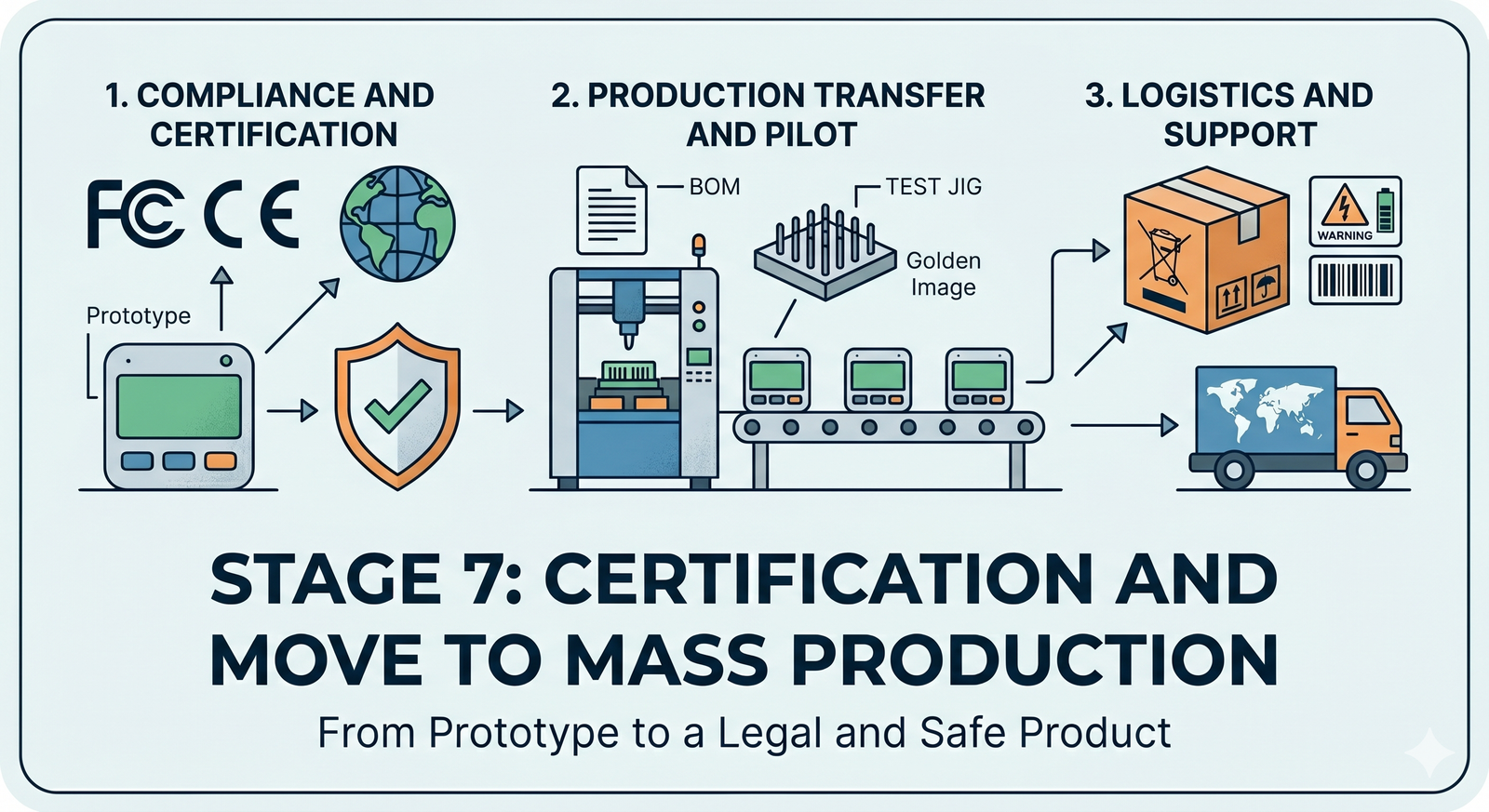
    Congratulations – we’re almost at the finish line of development! Stage 7 is all about preparing for the official launch and mass production of your IoT product. Up to now, you’ve been focused on making sure the device works – now it’s time to ensure it also plays by the rules. That means meeting all external requirements (laws, regulations, industry standards) and setting up a smooth path to manufacture at scale. It’s a mix of paperwork, lab tests (yes, more tests!), and planning for mass production. Not as glitzy as writing code or designing circuits, perhaps, but absolutely crucial. Think of it as the final quality gate that turns your cool prototype into a real product people can buy and use safely and legally.

    Regulatory Compliance & Certification

    Before your device can hit the market, it must obey the law of the land(s) where you sell it. Regulatory compliance is about proving your gadget won’t break radio laws or wreak electromagnetic havoc. For example, if your IoT device uses radio frequencies (Wi-Fi, Bluetooth, cellular, etc.), you’ll likely need approval from bodies like the FCC in the USA and CE (Conformité Européenne) marking in Europe, among others. These certifications ensure your device doesn’t interfere with other electronics and stays within legal emission limits. It’s not just a bureaucratic hoop – it’s literally about not knocking planes out of the sky or messing up your neighbor’s TV signal (extreme case, but you get the idea!).

    Inside an RF anechoic test chamber, engineers verify that an IoT device meets radio frequency emission standards. Anechoic chambers are shielded rooms lined with electromagnetic-absorbing material, providing a controlled environment for compliance testing.

    Why go through all this? Because skipping compliance can lead to disastrous consequences. Regulators can hit you with hefty fines (missing even one required certification or label can mean penalties over $150,000 per violation), and they can bar your product from being sold at all. In fact, many retailers or distributors won’t even carry your product if it lacks the proper FCC, CE, or other certification marks – instantly shrinking your market. There’s also the risk of forced product recalls or stop-sales if a competitor or inspector reports you. Picture this: you’ve happily shipped your first batch of devices, and suddenly you have to halt everything because an inspector asks for your test results and notices no certification labels. Not fun. You’d be scrambling to get emergency testing done, paying rush fees, and possibly redesigning on the fly if something fails. This nightmare scenario has happened in real life, and it always costs more time and money than doing things right upfront. The bottom line is that compliance is about protecting your business and your customers – it proves your device is safe and won’t cause trouble in the wild.

    So, what kind of certifications might you need? It depends on your product’s functions and target markets:

    • RF Emissions (FCC, CE/RED, IC, etc.): If your device contains any radio transmitter or even a microprocessor that emits radio noise, it must meet radio frequency (RF) emission standards. In the U.S., FCC Part 15 rules usually apply, dividing devices into Class A (industrial) or Class B (residential) with limits on emissions. The FCC tests check that your gadget isn’t spewing out radio energy beyond allowed levels and not interfering with other devices. Canada’s IC (Industry Canada) is similar to FCC, and often testing can be done together. In Europe, the Radio Equipment Directive (RED) and EMC Directive are key; passing them allows you to mark the product with the CE symbol (a legal must-have for electronics in EU). Each country or region has its nuances – e.g. UKCA for the UK post-Brexit, VCCI for Japan, RCM for Australia – so you’ll need to research based on where you launch.
    • Pre-Certified Modules: One saving grace: if you built your device using pre-certified radio modules (say a Wi-Fi or cellular module that’s already certified), you can leverage that to simplify testing. It’s not a free pass, but it can expedite or reduce the certification tests needed for your final product. Essentially, the module’s own certification covers the radio part, as long as you integrate it in a compliant way. (You still have to ensure your overall device doesn’t do something crazy like use the module in an unintended manner or with an antenna that violates conditions.) Pro tip: Doing optional pre-scans in Stage 6 was wise – walking into the formal certification lab cold is like taking a final exam without any practice tests. It’s better to catch and fix issues (like that one spurious emission at 2480 MHz) before the official lab test.
    • EMC Testing: Even if your product is not intentionally transmitting radio waves, it must pass EMC (Electromagnetic Compatibility) tests. These ensure it doesn’t emit excessive electromagnetic noise that could affect other devices, and that it’s sufficiently immune to outside interference. In other words, your IoT sensor shouldn’t freak out or reset when someone nearby operates a blender or two-way radio. EMC tests cover radiated emissions (noise through the air), conducted emissions (noise on power lines), and immunity to surges, ESD (static zaps), etc. Certifications like CISPR 22/32 (for IT equipment) or EN 301 489 (for radio device EMC in Europe) might apply. The lab will stick your device in an anechoic chamber or use antennas and probes to measure all this. It’s quite the science fair experiment – but necessary to earn that stamp of approval.

    Getting through regulatory testing often means filling out forms, paying lab fees, and shipping a few prototype units off to an authorized lab for a couple of weeks. Plan for this in your schedule. It can take multiple rounds if things fail and need fixing. But once you have that FCC/CE/etc certificate in hand, you can proudly slap those logos on your product and know you’re clear to sell. You’ll also create a compliance folder with all test reports and a signed Declaration of Conformity (for CE) to keep on file – think of it as your product’s “passport” proving it’s a law-abiding citizen in gadget-land.

    Safety Certifications

    Regulatory compliance is one side of the coin; safety certification is the other. This is about making sure your device won’t physically harm users or their property. Different products have different safety standards, but here are common ones:

    • Electrical Safety (IEC/UL Standards): If your product plugs into mains power or has a rechargeable battery or basically does anything with electricity that could shock, burn, or catch fire, there are established safety standards. For consumer electronics and IT devices, IEC 62368 (and its UL equivalent in the US, UL 62368) is the modern safety standard replacing the older 60950 and 60065 standards. It covers everything from making sure the plastic enclosures won’t melt or ignite under fault conditions, to requiring proper insulation and isolation on high-voltage parts, to controlling temperature of accessible surfaces. If your IoT gadget is more specialized (like lab equipment, industrial controllers, etc.), other standards might apply (e.g. IEC 61010 for laboratory equipment, or IEC 60204/ISO 13849 for machinery safety). To get certified, you might need to send units to a safety lab (like UL or TÜV) where they will literally try to abuse your device – shorting things, overloading it, poking it with finger probes – to ensure it fails safely (e.g. blows a fuse without electrocuting the test dummy). Be prepared: meeting safety standards can force design changes. Common tweaks include adding fuses or thermal cutoff switches, widening PCB creepage distances, using flame-retardant materials, and adding warning labels for users. It’s all about preventing electric shocks, fires, and injuries. Boring? Maybe. Important? Definitely – it’s way better than seeing your product on the evening news because it caused a house fire or gave someone a nasty jolt.
    • Battery and Charging Safety: If you use lithium batteries (common in IoT devices), there are specific safety tests (UN 38.3 for transport, UL 1642/IEC 62133 for device battery safety, etc.). These ensure batteries won’t explode or leak under normal and some abuse conditions. Airlines and shippers will also require you to certify that your lithium batteries meet UN 38.3 standards before they’ll transport bulk quantities. So don’t skip the battery testing – lithium energy is amazing, but as some hoverboard and smartphone incidents showed, it can be dangerous if not properly contained.
    • Specific Use-Case Standards: Depending on application, there may be additional safety certifications. For example, a smart thermostat or a medical wearable might need UL 60730 or FDA approval respectively for functional safety (ensuring a failure doesn’t put people at risk). An industrial IoT sensor that could trigger machinery might need to comply with functional safety standards (ISO 13849 or IEC 61508 SIL ratings) to guarantee it fails in a safe manner. If your device is going into cars, automotive-grade requirements (like ISO 26262 for functional safety, or E-mark for automotive electronics) could be mandatory. These are deep topics on their own, but the takeaway is: understand your domain’s safety expectations and plan to meet them. It’s part of being a responsible product developer – you want your device to be as safe as possible for users.

    In practice, getting a safety certification means documentation and testing. You’ll prepare a lot of design documents (schematics, PCB layouts, part datasheets) for the safety engineers to review. They might conduct tests like hi-pot (high potential) where they apply high voltage to ensure insulation holds up, or drop tests to check enclosures. If something fails, you’ll need to fix the design and possibly retest. This process can take time – often parallel it with regulatory testing to save overall calendar time. Once you pass, you can mark your device with the safety logos (like the UL mark) and sleep better at night knowing your product won’t turn into a safety hazard.

    Environmental and Other Certifications

    Beyond radio and safety, there’s a grab-bag of other certifications and compliances often needed for electronics:

    • Ingress Protection (IP Rating): Planning to call your device “waterproof” or “dustproof”? You’ll want an IP rating to back that up. The IP code (like IP67) is an official way to state resistance to solids and liquids. For example, IP67 means dust-tight and water resistant to immersion at 1m for 30 minutes. To certify this, you might send units for testing where they blow talcum powder at it and dunk it in water. If you claim any ruggedness in marketing, better have the certification so customers and partners trust it. It’s also just good practice – you don’t want early users finding out the hard way that their “outdoor sensor” wasn’t actually weather-proof.
    • RoHS (Restriction of Hazardous Substances): RoHS is a big one globally (especially EU) – it restricts the use of certain toxic substances (like lead, mercury, cadmium, certain flame retardants) in electronics. By the time you’re manufacturing, you should ensure all your components and solders are RoHS compliant. Most modern components are, but if you used something old-school (like a leaded solder or an old part with lead in plating), you might need to swap it out. Getting RoHS certification often involves collecting declarations from all your part suppliers confirming they don’t contain the banned substances. Without RoHS, you can’t legally sell in Europe and many other regions. In fact, earning the CE mark inherently requires RoHS compliance – the CE mark indicates the product meets safety, health, and environmental requirements, including RoHS for hazardous materials. So don’t treat this as optional. The good news is it’s usually not too painful if you’ve sourced parts wisely.
    • WEEE (Waste Electrical and Electronic Equipment): In Europe, if you sell electronics, you also need to comply with WEEE directives, which basically require you to label products with the “crossed-out trash bin” symbol and possibly provide take-back or recycling programs. This symbol signals to users not to toss the gadget in regular trash when it dies, but to dispose of it in e-waste recycling. There’s not a test for WEEE, but it’s a legal labeling and registration requirement. Each country may require you to register and report volumes of electronics sold for recycling purposes.
    • Chemical and Environmental Regulations: If your device has a battery, many countries require a battery recycling symbol or documentation. If your device uses wireless in certain bands, places like Japan or South Korea have specific certification marks (telecom regulatory approvals) that you might need to get – often by submitting paperwork or additional testing in-country. If you’re selling to consumers in California, you may need to consider Proposition 65 (which mandates warning labels if your product contains any listed harmful chemicals – often this affects things like if your product has a brass connector with lead, you need a warning label in CA). While these are not “functional” tests, they are legal requirements to plan for.

    In short, now’s the time to handle all these boxes to check: from making sure you can legally ship your product (hazmat documents for batteries) to ensuring all required recycling and restriction symbols are on your product or packaging. It may feel like tedious bureaucracy, but each certification or compliance step exists for a reason – be it protecting the environment, users, or the public. By handling it in Stage 7, you avoid nasty surprises like your shipment being held up in customs because a required mark or document is missing.

    Manufacturing Handoff (From Prototype to Production)

    While your engineering team wrestles with certification paperwork and tests, you should also be gearing up to build your product at scale. This is the point where you transition from a development/prototype mindset to full production mode. It involves coordinating with your manufacturing partners (or in-house production team) and making sure everything is in place for an efficient production line. Key tasks include:

    • Finalize the Bill of Materials (BOM): By now, you need a rock-solid BOM with manufacturer part numbers for every component. Double-check that all parts are available in the volumes you need and have second-source options for any critical or long lead time parts. Nothing is worse than planning a 10,000 unit build and discovering a key chip is backordered for 52 weeks. Work with your supply chain folks or Contract Manufacturer (CM) to secure inventory or find alternates. Also lock down the PCB fabrication files and assembly drawings – these are the blueprints your manufacturer will follow to procure bare PCBs and assemble the components.
    • Assembly Line Setup: If you’re working with a CM, you’ll provide them with all the manufacturing data: the Gerber files (PCB design files), the pick-and-place files (which tell the machines where to put each component), and an Assembly Instruction document. The CM will program their pick-and-place machines to populate your boards. Modern automated lines can place components incredibly fast and accurately. Pick-and-place machines will grab tiny resistors, chips, etc., and place them onto the PCB solder paste with precision. (Watching one in action is mesmerizing – a blur of components flying onto boards in seconds. A modern pick-and-place machine, like the open-source model shown above, uses programmed coordinates to rapidly place electronic components onto PCBs.) After placement, the boards go through a reflow oven to solder everything in place. You might also need processes like wave soldering for any through-hole parts, or hand assembly for any odd parts that machines can’t do. Part of Stage 7 is ironing out these processes with the manufacturer. They might do a DFM (Design for Manufacturability) review and come back with suggestions – e.g. “move these test pads” or “that USB connector is hard to solder, maybe tweak the footprint.” Be open to their feedback; it can save a lot of headaches in production.
    • Production Test Fixtures (Jigs): Remember in Stage 6 we talked about testing and maybe even built a basic test jig for development? In manufacturing, testing each unit (or at least each batch) is critical for quality control. You’ll typically design a test fixture – often called a “bed of nails” tester – that the assembled boards plug into or sit on for testing. This fixture will have pogo pins (spring-loaded contacts) that touch test pads on your PCB, allowing quick electrical testing of all the important signals. When a board is placed in the jig, you can automatically flash the firmware onto it (the final production firmware, often called the golden image because it’s the verified version), and run a test routine. The test might check: do all sensors read within expected range? Does the radio connect? Do LEDs light up? Does pushing a button register correctly? All these can be automated with a combination of test software and maybe some custom circuitry in the fixture. For example, if your device has a microphone, the fixture might have a small speaker to play a test sound and see if the mic picks it up. Designing a good test fixture is an art – it needs to be robust, easy for factory workers to use, and cover as much of the device’s functionality as feasible. The goal is to catch any assembly defects (like a mis-soldered pin or a bad component) before the product leaves the factory. It’s much cheaper to fix a unit while it’s at the factory than to handle a customer return later.
    • Provisioning and Calibration: Many IoT products need per-unit data programmed in. This could be calibration data (maybe each sensor is calibrated and the values stored in flash), or security credentials like keys and certificates for cloud connection. Stage 7 is when you implement the system to inject these during production. For instance, you might generate a unique ID and key pair for each device and flash it at test time, then upload the public keys to your cloud database so the device can authenticate later. Security is paramount here – you need to ensure the process is secure so that keys aren’t intercepted or duplicated. Sometimes manufacturers offer secure programming services or you might use an HSM (Hardware Security Module) to manage keys. Either way, plan this out thoroughly. It’s easy to overlook, but a secure provisioning process means your devices will be trustworthy and not easily cloned or hacked. Many a rushed product has fallen victim to hackers because of sloppy key handling – you don’t want your IoT camera to become part of a botnet due to a default or leaked credential.
    • Manufacturing Documentation: Alongside hardware, prepare the paperwork that guides the assembly and quality process. This includes assembly drawings (showing how the device is put together mechanically), and an inspection criteria document. The inspection criteria defines what counts as an acceptable unit versus a reject. For example, you might allow minor cosmetic scratches on an internal PCB, but not on an external casing. Or you’ll specify that a solder joint must not have excess solder beyond a certain amount. This helps the factory’s quality inspectors know what to look for. Also set the quality control (QC) plan: will you test 100% of units? (Common for complex electronics.) Will you do sample batch inspections? What’s the acceptable failure rate before a batch needs review? Having these plans ensures everyone’s on the same page about quality expectations.

    In essence, manufacturing handoff is about translating the knowledge in the heads of your engineering team into a reproducible, scalable process that factory folks can execute. The clearer and more thorough you are now, the smoother production will ramp up.

    Pilot Production Run

    Before you jump into making tens of thousands of units, it’s wise to do a pilot run (a.k.a. trial run or pre-production run). This could be on the order of 50–200 units – not mass production, but more than just a couple prototypes. The idea is to use this small batch to iron out any last wrinkles.

    During the pilot run, you’ll closely observe the manufacturing process: Did any unexpected assembly issues occur? (Maybe that fancy new sensor is tricky to solder and needs a tweak in the reflow profile.) Did the test fixture reveal a lot of failures on a particular test? (Perhaps a certain component is marginal and you need to tighten its tolerance or find a better supplier.) You’ll work with the CM to fine-tune the process. It’s much better to discover and fix these issues in a batch of 100 units than when you’ve committed to 10,000. For example, if the assembly machine was accidentally placing a capacitor backwards, you can catch it in the pilot and update the machine programming, rather than shipping out a huge batch of non-functional devices.

    Pilot units are also incredibly useful for other purposes: you can use some for final certification testing (labs often require multiple samples, and these should be production-quality), some for internal verification (make sure the final product off the line still meets all specs and performance metrics), and some for beta testing with friendly users. Those early users can provide feedback on both the product’s function and any packaging or usability issues, giving you a chance to tweak little things before the big launch.

    Realistically, you might do a couple of pilot runs (sometimes called EVT/DVT/PVT – engineering validation test / design validation test / production validation test builds) as you approach full scale. Each is a chance to improve. By the end of the pilot build(s), you should have high confidence in your manufacturing line’s ability to produce consistent, quality devices at whatever rate you need.

    Logistics and Supply Chain Considerations

    With certifications and production lining up, also spare a thought for logistics: getting the product to customers and supporting it afterward. This strays slightly into business territory, but it’s very much connected to product development in practical ways:

    • Packaging: How will your product be packaged for sale? This includes the retail box (if applicable), any protective foam or inserts, and accessories like cables or power adapters. As the product architect, you should ensure the packaging is suitable and safe – e.g., anti-static bags for electronics, padding to survive drops during shipping, etc. If you promised a “cool unboxing experience,” now’s the time to design that. Remember to include any required regulatory information in the box or manuals (e.g., FCC/CE statements, warranty info, disposal instructions). Some regions require certain info to be printed in user manuals or quick start guides.
    • Labeling and Serial Numbers: Each device should have a unique serial number or identifier, usually on a sticker or laser-marking on the device. This is vital for tracking units, handling returns, and managing firmware updates (you may need to know which batch or version a unit is). Work with the manufacturer to set up a scheme for serial numbers – they can often print and apply serial labels as part of production. Also, all those logos and marks from compliance? Make sure they’re properly placed on the product or its label. For example, FCC ID, CE mark, UKCA mark, the trash-can WEEE icon, FCC/IC statements – these often go on a regulatory label on the device or in the manual. There are guidelines for size and visibility (the CE mark, for instance, must be a certain minimum size and easily visible). Getting this right avoids issues at customs or in audits.
    • Shipping and Distribution: Plan how finished goods will get from the factory to warehouses or end customers. If your manufacturer is overseas, factor in transit time, import duties, and regulations. Ensure you have the proper export paperwork – for example, some countries need an FCC certificate on file for customs to clear an electronic import. If your product contains a battery, the shipping carton needs appropriate lithium battery warning labels. These nitty-gritty details can delay shipments if overlooked. On the distribution side, coordinate with whoever will sell or fulfill the product. They might have barcoding requirements or specific box size constraints. It’s a good idea to test a sample shipment: have the factory send you a few units packaged as they would be for mass shipping, and see if everything arrives in good shape and is easy to unpack, scan, etc.
    • After-Sales Support Setup: While not exactly part of manufacturing, it’s wise to set up processes for returns (RMA), repairs, and firmware updates at this stage. For returns, decide if you’ll swap units out or attempt repairs – and communicate with the design team if there are any design features to make this easier (like a way to easily reset or reprogram a bricked device). For firmware updates, ensure your cloud service or app can handle updating devices in the field, and that the firmware includes a secure bootloader if relevant. Essentially, imagine the product 6 months post-launch: how will you manage issues? If you have these answers now, you can build in any needed tools or instructions.

    Stage 7 might feel like a lot of bureaucracy compared to the creative fun of coding and circuit design. And yes, a chunk of it is about paperwork, checklists, and following rules. But this stage is the critical bridge from a handful of prototypes in your lab to a real, trustworthy product in your customers’ hands. Diligently dotting the i’s and crossing the t’s now will prevent nasty surprises later – whether that’s legal roadblocks, safety hazards, or manufacturing snafus. Plus, you’ll likely sleep better at night knowing your device isn’t going to, say, interfere with aircraft communication or spontaneously combust on a user’s nightstand (imagine finding that out after launch… no thanks!).

    By the end of Stage 7, you should have all necessary certifications passed (or in final progress), and a manufacturing plan that’s ready for prime time. Your product is technically and legally ready to launch. That’s a huge accomplishment. Give yourself and the team a pat on the back – but keep the momentum, because the next and final stage is taking this product to market and managing it through its lifecycle (the real world, here we come!).

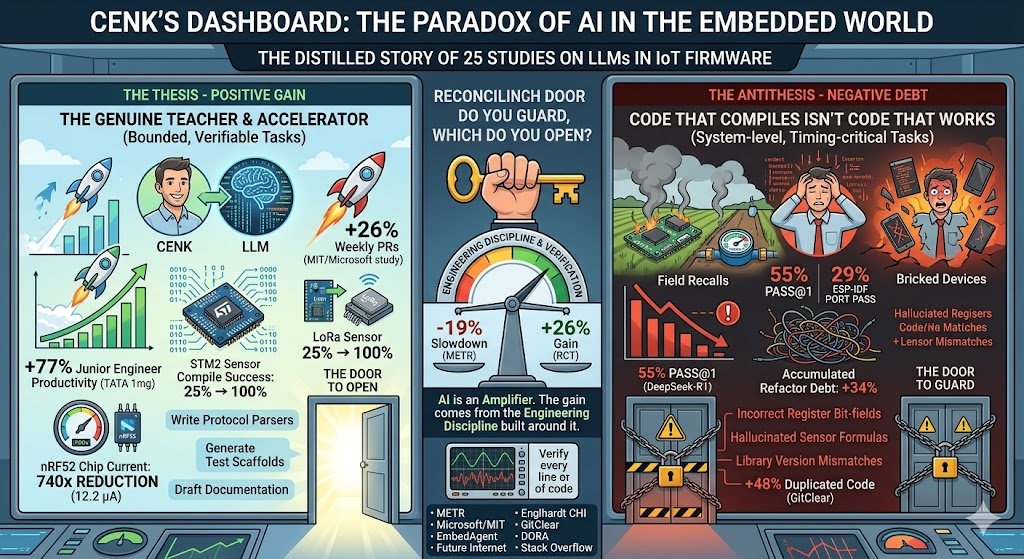
  • Cenk’s Dashboard: The Paradox of AI in the Embedded World

    Cenk’s Dashboard: The Paradox of AI in the Embedded World

     The distilled story of 25 studies.

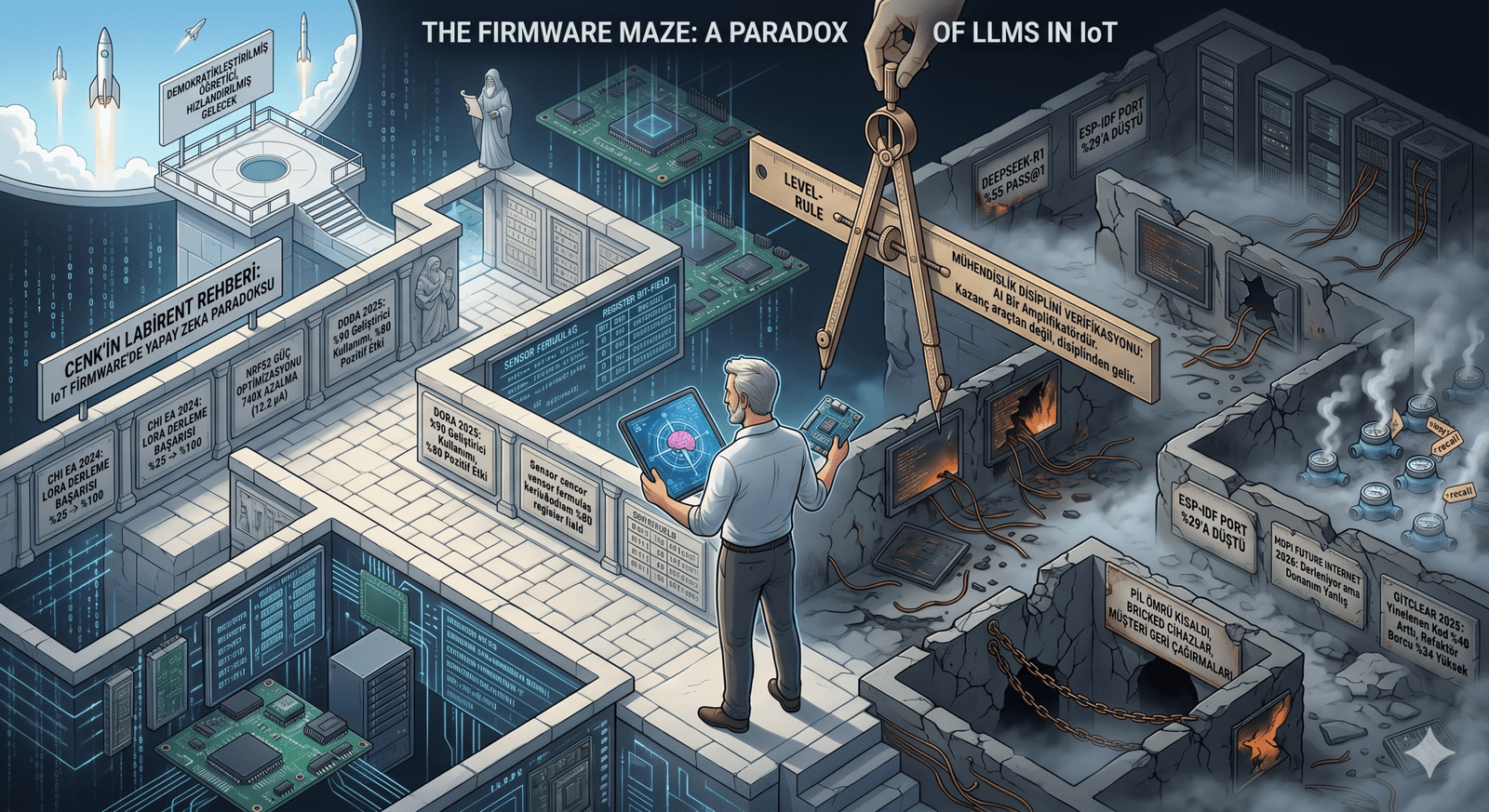
    Tuesday morning, 9:14 AM. In a small IoT startup in Ankara, Cenk, a senior firmware engineer, stares at his screen. He needs to set up DMA-based ADC sampling on an STM32 board. He asks Claude — the code arrives, compiles, flashes. Sensors produce data. Cenk smiles. The following week, twelve smart water meters in the field start freezing randomly. The culprit: a peripheral clock misconfiguration. The compiler couldn’t catch it; silicon did. Cenk looks at his dashboard and asks himself: is this tool actually speeding us up, or just making us feel fast?


    Cenk isn’t alone. Two of 2025’s most striking studies openly contradict each other. In METR’s controlled experiment, 16 experienced open-source developers took 19% longer to complete tasks when using AI tools — they had predicted a 24% speedup beforehand, and afterward still believed they had been 20% faster. That same year, a joint RCT by Microsoft, MIT, and Princeton with 4,867 developers measured a 26% increase in weekly PRs. Two studies, two opposite directions. Which one dominates in the embedded systems world?

    The tool genuinely teaches, accelerates, democratizes

    The evidence is strong. In the Englhardt study at CHI 2024, the human–AI workflow pushed LoRa sensor compilation success rates from 25% to 100% — even users with zero hardware experience could build working sensors. In the same study, GPT-4 reduced the nRF52 chip’s current draw by a factor of 740× through context-specific power optimization — down to 12.2 microamperes. In TATA 1mg’s year-long study of 300 engineers, junior developers saw productivity gains of up to 77%. Per DORA 2025, 90% of developers now use AI; 80% report positive productivity effects.


    Code that compiles isn’t code that works

    In the June 2025 EmbedAgent benchmark, DeepSeek-R1 achieved only 55% pass@1 across 126 embedded tasks; cross-platform porting dropped it to 29% on ESP-IDF. Even more striking: Claude-3.7-Thinking spent 78% of its reasoning tokens not on planning, but on fixing its own buggy code — the overthinking effect. A 2026 paper in Future Internet tested 27 LLMs on a full IoT stack (sensor → InfluxDB → Grafana); nearly all produced firmware that compiled but was hardware-wrong. Library version mismatches, incorrect register bit-fields, hallucinated sensor formulas.
    The embedded world has a peculiarity: bugs live far away. In a web app, a bug refreshes the page; in firmware, a bug bricks ten thousand devices in the field. GitClear’s analysis of 211 million lines of code shows duplicated code rose 48% from 2020 to 2024; in AI-heavy repos, accumulated refactor debt is 34% higher. For IoT teams, this isn’t a luxury problem — memory is tight, battery is tight, OTA updates are expensive. Bloated code means shorter battery life means customer recalls. In the Stack Overflow 2025 survey, “actively distrust AI” jumped from 31% to 46%.

    Which door do you guard, and which do you open?

    Both sides are right — under different conditions. Here is the hypothesis that emerges from the intersection of five studies: LLMs deliver strong gains in IoT on bounded, verifiable, throwaway tasks. Write a protocol parser, generate a sensor calibration function, scaffold a regression test, draft documentation. Outside that boundary — system-level design, timing-critical routines, multi-component integration, safety-critical modules — capability collapses dramatically. The gain comes not from the tool but from the engineering discipline built around it. As DORA puts it: AI is an amplifier.

    Cenk sits in the second field test the following Tuesday. This time, the team verifies every DMA line the LLM wrote on an oscilloscope. Two extra hours of work, cheaper than a week-long field recall. His dashboard is still open; productivity numbers are rising — this time slower, but durable. In 2026, the real question for IoT teams isn’t “should we use AI?” The real question is: which door do you guard, and which do you open? Because what separates −19% from +26% isn’t the model — it’s the discipline of using it.

    Sources:

    • METR arXiv:2507.09089
    • Cui et al. Microsoft/MIT RCT
    • EmbedAgent arXiv:2506.11003
    • MDPI Future Internet 18(2):94
    • Englhardt CHI EA 2024
    • GitClear Code Quality Report 2025
    • DORA 2025
    • Stack Overflow Developer Survey 2025
    • Khare et al. arXiv:2509.19708.
  • End‑to‑End IoT Product Development Playbook -Stage 6: Verification & Validation – Did We Build the Right Thing (and Does It Actually Work)?

    End‑to‑End IoT Product Development Playbook -Stage 6: Verification & Validation – Did We Build the Right Thing (and Does It Actually Work)?

    Introduction to the V&V Phase

    Welcome to the final boss of IoT product development: Verification & Validation (V&V). This is where we answer two deceptively simple questions. Verification asks, “Did we build the thing right?”—does the product meet its specified requirements. Validation asks, “Did we build the right thing?”—does the product actually meet user needs in the real world. Treat them as complementary superpowers: one keeps you honest to the spec, the other keeps you honest to the customer

    Timing-wise, V&V kicks in post-integration and post–design freeze. By now, you’ve proven hardware and software can talk; you’re done adding features; and you’re ready to put the whole stack under a spotlight. Think of this phase as the final exam and graduation recital rolled into one: the device performs, the cloud sings harmony, and the app smiles photogenically. The goal is evidence—repeatable test results, traceable to requirements and user scenarios—that lets you ship with confidence rather than crossed fingers (IEEE, 2017; NASA, 2016).

    Layers of Testing: A Multi-Layered Gauntlet

    An IoT product is a stack: hardware (sensors, power, radio), firmware (embedded logic), and cloud/app (APIs, databases, dashboards). We verify each layer on its own merits, then validate the end-to-end system against user stories. Passing each layer is like beating a “mini-boss” on the way to the big fight.

    Hardware Verification: Torture Tests for Your Gadget

    Functional testing with fixtures (test jigs). First, prove the assembled device does what the schematic promised. A bed-of-nails fixture or pogo-pin jig makes fast work of exercising GPIOs, reading sensors with known stimuli, flashing firmware, and verifying power rails. Automate it so every board gets the same impartial interrogation. You’re building the same muscle you’ll need for end‑of‑line production tests later; your future manufacturing team will thank you (NASA, 2016).

    Stress and reliability testing (HALT). Next, the gym—and then some. HALT (Highly Accelerated Life Test) cranks temperature, vibration, and electrical stress well beyond normal operating conditions to flush out weak links before your customers do (Hobbs, 2008; Thermotron, n.d.; Accendo Reliability, n.d.). The point isn’t to “pass” so much as to discover: learn where the design cracks, fix the root cause, and build margin. If your device is rated 0–50 °C, you want to know how it behaves at −20 or +70 so the real world feels easy.

    Regulatory pre‑scans (EMC/ESD). Formal certifications (EMC emissions/immunity, ESD, radio, safety) can torpedo schedules if you discover problems at the lab. Do pre‑compliance checks now: measure radiated/conducted emissions in a basic setup, zap the device with ESD, and probe noisy lines. Early, iterative scans reduce risk and over‑engineering alike (Tektronix, n.d.; Interference Technology, 2017; Keysight, n.d.). If you hear an unexpected RF squeal, you can still add filters, tweak firmware duty cycles, or adjust PCB return paths—at prototype cost, not production cost.

    Benchmark vs. specs. Finally, check the deal you made with yourself. If you promised ±0.5 °C accuracy, prove it in a chamber against a calibrated reference. If you promised one‑year battery life, measure current in all modes and project realistically (including retries, OTA updates, and “oops, Wi‑Fi is flaky” scenarios). Verification at this level is the receipt for your Stage 1 requirements (NASA, 2016).

    Firmware Testing: Code Under a Microscope

    Unit tests. Firmware’s “atoms” are functions and modules; unit tests give them a conscience. Use a host‑based test runner or MCU‑aware framework to validate computations, state machines, and boundary conditions. Aim for high coverage—but remember: coverage finds untested code; it doesn’t prove tests are good. A policy like “~80%+ branch coverage” is pragmatic; chasing 100% often yields diminishing returns and brittle tests

    Integration tests on device. Put drivers, RTOS tasks, and comms stacks together and exercise them on real hardware. Feed a known voltage to an ADC and check the reported value; publish a synthetic payload and assert the device ACK flow; power‑cycle mid‑transfer and confirm correct recovery. Automate what you can so every firmware build faces the same impartial gauntlet (NASA, 2016).

    Static analysis and coding standards. Tools that read code without running it catch entire classes of bugs (buffer overflows, null dereferences, race hazards) and enforce rules (e.g., MISRA‑C subsets). In Stage 6, drive critical issues to zero and justify any waivers. This is cheap insurance for devices that must run unattended for months (IEEE, 2017).

    Fuzz and stress. Be an “evil user.” Fuzz inputs at the UART/USB/MQTT boundary, drop and restore networks repeatedly, overflow queues, and run for days to smoke out leaks and lockups. If you ship OTA, simulate bad connectivity, low battery, and mid‑update resets; make sure rollback works. The aim is not to show off—it’s to force rare states and prove the firmware fails safely and recovers predictably

    Cloud/API and UX Testing: The Other Half of the Puzzle

    Automated API tests. Every public interface—REST, MQTT topics, WebSocket endpoints—deserves executable tests for happy paths and weird edges (invalid payloads, expired tokens, missing fields). Bake them into CI; if an endpoint contract drifts, you’ll find out before customers do

    Security testing (OWASP). Apply OWASP Top 10 thinking to your web app and OWASP API Security Top 10 (2023) to your device and app APIs: broken access control, auth flaws, insecure design, and misconfiguration are perennial villains. Scan, pentest, and fix systematically; treat critical vulns as launch‑blockers

    Load testing and scale rehearsal. If you expect 1,000 devices at peak, simulate 2,000; test burst connects after an outage; vary message sizes, QoS, and TLS ciphers. MQTT brokers and back ends often behave differently at scale; better to discover queue starvation and hot partitions now.

    UX testing. Hand the mobile/web UI to fresh eyes. Can a first‑time user onboard a device without tribal knowledge? Are graphs accurate and units consistent? Does the alert say what happened, where, and what to do next? Validation doesn’t care that the database is normalized; it cares that the user smiles and succeeds.

    System Validation: End-to-End Boss Battle

    This is where we stop testing pieces and start testing stories: the thermostat that keeps the workshop warm, the cold‑chain sensor that texts when a fridge warms up, the leak detector that summons a plumber (well, sends an alert). Validation asks: Does the solution, as a whole, fulfill the job it was hired to do?

    End‑to‑end scenario runs. Take each user story from Stage 1 and run it for real. “As a facilities manager, I receive an alert within 60 seconds if freezer temp > −10 °C, and I can see a 24‑hour graph.” Drive the device hot, verify cloud ingestion, confirm alert delivery, and watch the UI. Repeat across networks, time zones, and device states.

    Requirements Traceability Matrix (RTM). Now, bring receipts. An RTM maps every “shall” to one or more verification artifacts (test case, analysis, inspection) so nothing is forgotten and nothing extra sneaks in. Here’s a plain‑text sketch:

    • R1: “Device shall connect to Wi‑Fi within 30 s.” → Test TC‑10 “Wi‑Fi timing” → Pass
    • R2: “System shall store hourly sensor readings for 12 months.” → Tests TC‑21 (retention), TC‑22 (query) → Pass
    • R3: “App shall display current sensor value within ±1 °C of reference.” → Tests TC‑30 (chamber), TC‑31 (UI format) → Fail (UI rounding bug; fix tracked)

    The RTM gives you a one‑glance coverage map from requirement to proof, which auditors, safety assessors, and your future self will love

    Beta trials (field validation). Lab success is necessary but not sufficient. Put devices in real environments with real users for a few weeks. You’ll learn things your lab can’t replicate: odd Wi‑Fi setups, creative human behaviors, environments at −15 °C, or the startling brightness of an LED in a dark bedroom. Close‑beta or open‑beta, collect structured feedback and crash/telemetry logs. Prioritize findings that block setup, data trust, or core value

    Pass/fail criteria and severity. Decide up front how you’ll exit Stage 6. A common bar is 0 open Severity‑1 issues, all requirements verified, and performance targets met. Severity frameworks such as IEEE 1044‑2009 help you keep bug impact discussions objective: Sev‑1 = showstopper/unsafe/unusable; Sev‑2 = major function impaired; Sev‑3 = minor/has workaround; Sev‑4 = cosmetic (IEEE, 2009). Use this to drive triage and go/no‑go with a clear head.

    Practical Advice and Final Thoughts

    Celebrate the passes; learn from the fails. A HALT‑hardened board, a firmware fuzz that runs for 72 hours crash‑free, an API test suite all green—those are mini‑victories. For failures, be grateful you found them here; the cheapest bug is the one you fix before customers meet it.

    Keep the user in the loop. It’s easy to “win the lab” but lose the living room. Beta feedback about setup confusion, noisy alerts, or mismatched units often yields small changes with huge perceived quality wins

    Treat V&V as an investment. Pre‑compliance and load rehearsals feel like extra work—until they save a month in certification or keep your launch day from sagging under a surprise device storm

    Document like a pro. Archive test plans, results, and RTM evidence. When you return for Stage 7 (compliance and manufacturing transfer), or v2.0 next year, you’ll be glad you left a breadcrumb trail.

    Coverage is a flashlight, not a trophy. Use coverage to find dark corners; don’t frame it as a single metric of quality. Balanced portfolios—unit, integration, end‑to‑end, and property‑based/fuzz—beat any one number

    When you can confidently say “Yes, we built the thing right” and “Yes, we built the right thing,” you’ve cleared the final gate. Onward to certification and launch—with fewer surprises, stronger evidence, and a product the team is proud to ship.


  • End‑to‑End IoT Product Development Playbook -Stage 5: Integration Gates – Making Sure It All Plays Nice Together

    End‑to‑End IoT Product Development Playbook -Stage 5: Integration Gates – Making Sure It All Plays Nice Together

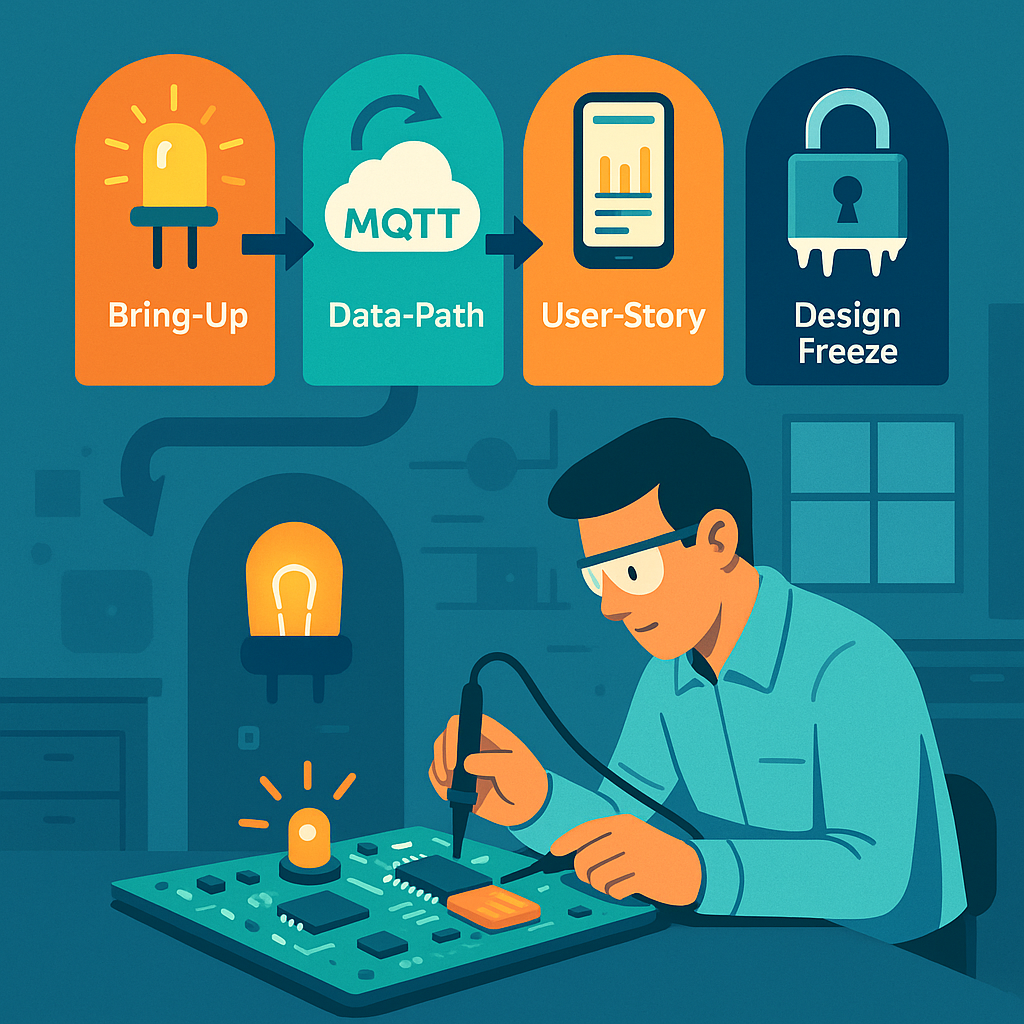
    Picture an engineer hunched over a circuit board in a lab, carefully checking if the device comes to life. Integration Gates are those suspenseful moments in IoT development when all the pieces are finally combined and tested together.

    By the time you reach Stage 5: Integration, you’ve built hardware prototypes (from Stage 3) and developed iterative software/firmware builds (from Stage 4). Now it’s showtime – hardware, firmware, cloud services, and user applications all meet each other. Integration Gates are the key milestones in this stage – think of them like “checkpoint bosses” in a video game. You don’t advance to the next level until you’ve proven certain capabilities at each gate. These gates turn what could be a scary big-bang system integration into a step-by-step confidence builder. It’s a mix of excitement and anxiety as you power everything on and watch for sparks (hopefully only metaphorical ones!). The idea is to catch problems early and incrementally, rather than discovering a pile of issues right before launch. Given that IoT products involve multiple components developed somewhat independently – hardware, firmware, cloud, mobile apps – unexpected compatibility issues often pop up when everything is integrated. Integration Gates help prevent “half-baked” subsystems from cluttering up the final system by enforcing that each piece meets certain criteria before moving on.

    Let’s walk through the typical integration gates in an IoT project, and see why each is important. At each gate, we’ll verify that different parts of the system “play nice” together:

    Bring-Up Gate – Getting the Basics Working

    The first sign of life – a simple dev board with an LED blinking is often the Hello World of hardware integration.

    The Bring-Up Gate is the first (and very basic) integration test with the real hardware. The goal at this gate is humble and fundamental: Does the microcontroller (MCU) on our board boot up and run code? This is akin to checking the patient’s pulse 🩺 – is the device alive at all? Here’s what happens at this gate:

    • Flashing Firmware & Booting: You attempt to flash the initial firmware onto the device and then reset it. Does it start executing code? A common practice is to load a firmware that makes an LED blink or sends a simple "Hello, world" message over a serial console. If you see that little LED blinking on your board, you know the heart is beating. It confirms that the core hardware (power supply, clock, MCU) is operational and that your programming toolchain can successfully load code into the device’s memory.
    • Basic Hardware Functionality: Next, you check that the device can perform a few rudimentary tasks on its own. For example, can it read a basic sensor on the board or at least measure something like its own battery level or supply voltage? Can it communicate over a debug interface (such as printing to a serial console or logger)? At this point, you’re ensuring that fundamental I/O and peripherals are working – e.g. GPIO pins can toggle (hence the LED blink test), the CPU isn’t crashing, and maybe the buttons or basic sensors respond.

    Essentially, the Bring-Up Gate is confirming the board is not a “brick.” Passing this gate means the patient is alive and responsive: the hardware is powered properly, the MCU runs code, and you have a working line of communication for further testing. This might sound trivial, but it’s a huge relief the first time it happens. Often, engineers hold their breath when powering on a custom board for the first time – if something is wrong (say, a miswired power rail or an incorrectly soldered chip), the board might do nothing or show erratic behavior. By blinking an LED or printing a message, you’re victoriously yelling, “It lives!”

    Why it matters: Bring-up is the safety net that catches fundamental issues early. If the board doesn’t boot or the firmware can’t run, that’s a show-stopper which you need to fix now. Maybe the power circuitry is faulty, or the oscillator for the clock isn’t oscillating – better to find out immediately. Only after you pass this gate do you proceed to more complex integration. In project terms, this gate verifies some of the most basic requirements (remember those Stage 1 specs about hardware power and processing?). It ensures your hardware design and basic firmware can support the next steps. After a successful Bring-Up Gate, you can confidently say, “Alright, the lights are on and someone’s home. Onward to sending some real data!”

    Data-Path Gate – From Device to Cloud (The Core Journey)

    After confirming the device is alive, it’s time to test the core reason the whole IoT system exists: getting sensor data from the device all the way to the cloud. The Data-Path Gate focuses on the end-to-end data pipeline. This is where you prove that your IoT device can actually fulfill its primary mission of collecting data and transmitting it to a backend service.

    Imagine our device is a temperature sensor. At the Data-Path Gate, you would do something like this: trigger the sensor to take a reading (perhaps by heating the sensor slightly or simulating a change in temperature), and then watch the system to see that this reading travels from the sensor -> device -> network -> cloud -> database. It’s a full vertical slice of functionality. You want to verify a number of things along this path:

    • Sensor Integration: The firmware is able to read data from the sensor correctly. For instance, if the sensor says the room is 25°C, the device’s software should obtain that value (and maybe timestamp it).
    • Network Transmission: The device successfully sends the data over its communication interface. Whether it’s Bluetooth Low Energy, Wi-Fi, cellular, LoRaWAN, or another wireless link, that radio or network module needs to work now. At this gate, you test that the device can connect to the network (pair with a gateway or join Wi-Fi, connect to cellular, etc.) and actually transmit the sensor data outward. You might send the data as a packet via MQTT, HTTP, or whatever protocol your IoT system uses.
    • Cloud Reception and Storage: On the other end of that transmission, your cloud backend (server, IoT platform, etc.) should receive the data and deposit it in the right place – for example, in a cloud database, data lake, or time-series storage. Here you’ll check that the data arrives intact and is stored or queued as expected. If the temperature was 25°C, does the cloud record show 25°C (and not some gibberish)? Are the timestamps correct?

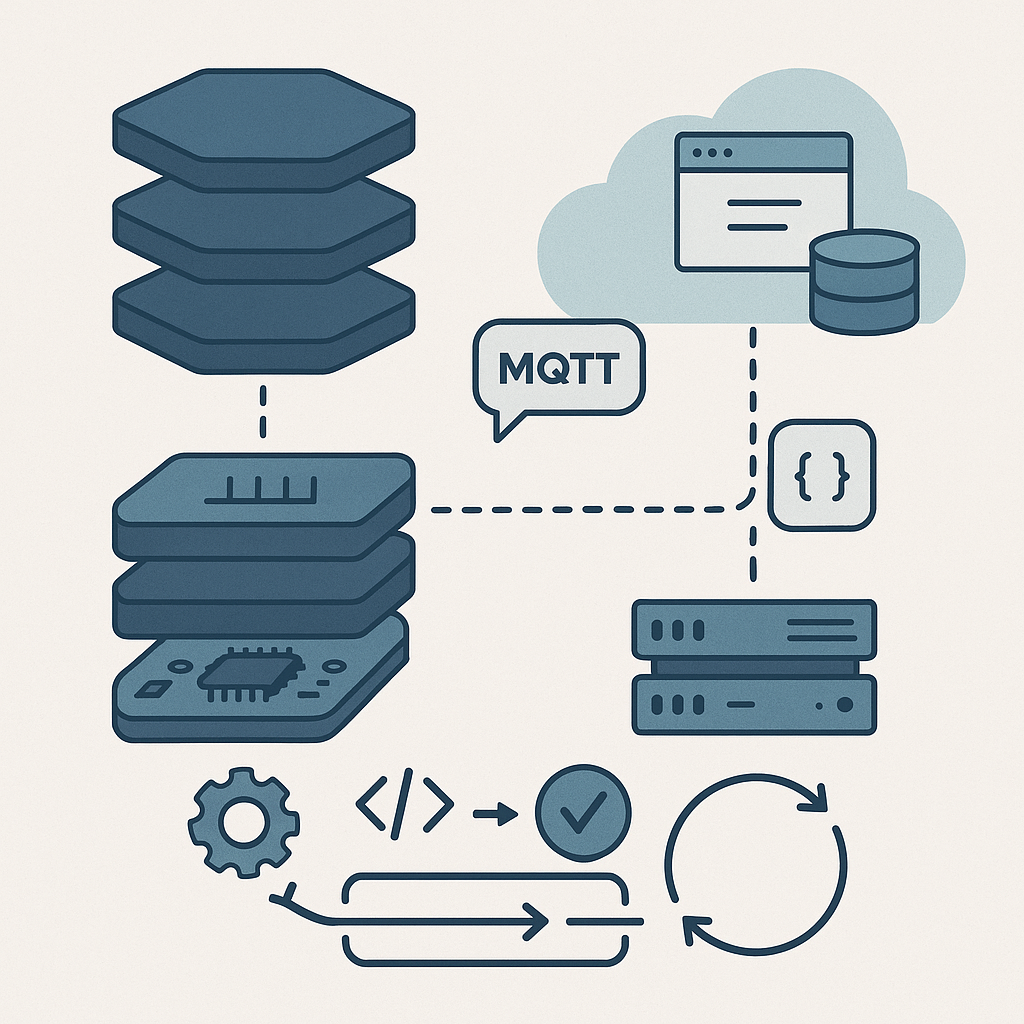
    A typical IoT data path: devices gather sensor readings, communicate over the internet, and update cloud services or databases, which in turn feed user applications. The Data-Path Gate proves this whole pipeline works in your product.

    Passing the Data-Path Gate usually means the end-to-end data pipeline works in practice, not just in theory. It’s a major milestone because it demonstrates that your architecture is sound: the device’s hardware and firmware can talk to the cloud infrastructure. Essentially, you’ve shown that “Yes, our device actually talks to our cloud!” and that the fundamental value proposition – collecting data remotely – is achievable.

    During this phase, you also evaluate data quality and performance: Are the sensor readings making it to the cloud in a timely manner? For example, if your requirement was to send an update every 10 minutes, check that this interval is being met. Verify that the data isn’t corrupted or lost in transit. Perhaps you generate a known test pattern or range of sensor values and confirm the cloud receives the same pattern. If something is off (maybe the values look wrong due to a unit conversion bug, or messages take too long due to network issues), you catch it now. It’s much easier to tweak and fix these issues at this stage than to discover later that your device has been silently dropping data.

    Real-world example: Suppose you have a humidity sensor that should send data every 10 minutes. At the data-path test, you notice the cloud is receiving irregular updates – sometimes 10 minutes, sometimes 30 minutes apart. Investigating now might reveal a power-saving feature in the firmware that put the device to sleep longer than expected, or perhaps a connectivity dropout. You can then adjust the firmware or network settings before proceeding. Without a Data-Path Gate, such a problem might only be noticed during a full system test or pilot trial, which could be chaotic to debug.

    In terms of requirements, by the time you pass the Data-Path Gate, all those specifications related to data transmission and sensing (the ones defined back in Stage 1) should be verified as “met in testing.” You can check off requirements like “Device shall transmit temperature readings to cloud database within X minutes of sensing” as done. This gives everyone confidence that the backbone of the IoT system is solid.

    User-Story Gate – End-to-End User Experience Check

    Now we step fully into the user’s shoes. It’s not enough that data lives in a cloud database – the User-Story Gate asks: Can a real end user actually benefit from this data? In other words, does the whole system deliver a meaningful use case from the user’s perspective.

    At this gate, you integrate the front-end application (which could be a mobile app, web app, or other user interface) with the rest of the system. The idea is to demonstrate a real-world scenario or user story working seamlessly with your IoT device and cloud. For example, a common user story might be:

    “As a user, I open the mobile app and see the current temperature reading from my device, and I get an alert if the temperature exceeds 30°C.”

    To pass the User-Story Gate, you would actually do that:

    • Open the app or dashboard as an end user.
    • Confirm that you can view the live data coming from the device (which, thanks to passing the Data-Path Gate, is populating the cloud backend).
    • Perhaps manipulate something to trigger an alert or action: for instance, force the temperature high and see if the system sends a notification or highlights the reading in the app’s UI.

    In practice, this might involve building a simple UI screen that fetches data from your cloud database or via an API. If our product is an IoT home thermostat, the user-story test might involve seeing the current temperature on a smartphone app, along with a graph of the last 24 hours, and maybe toggling a setting to ensure the device can receive commands too (if applicable). The key is that the product becomes demo-able in a meaningful way. You could take your device and app to a non-engineer – say a project stakeholder or a friendly beta tester – and they would be able to use it in a basic but real scenario.

    Why it matters: This gate is often the first time everything (hardware, firmware, cloud, and user interface) is working together. It’s a true integration test of the full system including the human element. From a development perspective, it forces the team to connect all the dots:

    • The app needs to have the correct endpoints or database access to retrieve the data.
    • The cloud backend needs to expose the data in a form the app can use (for example, REST API or WebSocket).
    • You also check that data is not only present but makes sense to the user. Is the unit of measure clear? Is the data updated reasonably fast on the UI after the device sends it? If a user has to wait too long to see an update, that might be a problem to address (maybe the update frequency needs tuning or the app needs to poll more often or use push notifications).

    By passing the User-Story Gate, you demonstrate that your IoT product isn’t just a theoretical system—it actually delivers value to an end user. This is a huge morale booster for the team. It’s often the point where the project becomes real for people outside the dev team. You might gather around to show the company’s product manager, “Look, here’s your data on the app!” and that’s a moment of celebration.

    From a project management angle, at this gate you’ll verify requirements related to user experience. For example, if you had a requirement that “A user shall be able to view the device’s readings remotely via a mobile application”, well, now you can mark that as tested and met. You might also test basic user-level functionality like account login, device provisioning (did the user need to pair the device or add it to their account?), and any alerts or notifications. Essentially, you’re checking off the user-facing functionality items on your checklist.

    Additionally, this gate can reveal any last-mile issues: maybe the data format needs tweaking for the UI, or perhaps you discover that the average user can’t interpret a raw sensor reading and you decide to add some more info or adjust the UI. Those insights are invaluable and are much easier to handle now than if discovered after a product launch.

    Design-Freeze Gate – Locking Down the Final Design

    The Design-Freeze Gate is a slightly different beast than the previous integration gates. Up to now, each gate was about demonstrating new end-to-end capabilities. Design freeze, however, is about reaching a point of confidence and saying, “Alright, no more big changes – this is the design we’re going to finalize and push towards production.” In the context of an IoT project, this typically means both the hardware design and the firmware/software feature set are declared “frozen” (no further changes except critical fixes).

    By the time you’re approaching design freeze, you’ve likely gone through one or more iterations of your hardware. For example, you might have built an EVT (Engineering Validation Test) prototype and then a DVT (Design Validation Test) unit in earlier stages. Each iteration got you closer to the final form. A design freeze generally happens when you believe the current design is good enough to advance into the final manufacturing steps. This includes things like ordering the production PCBs, committing to the enclosure design and tooling, and finalizing the component selection. On the firmware side, design freeze means you have implemented all planned features – from here on out, you plan to do only bug fixes, optimizations, or cosmetic tweaks. No new features that would alter the system’s behavior in a major way.

    Why freeze the design? Because after this point, changes become very expensive or time-consuming. Imagine you freeze and then send your PCB design out for a mass production run of 10,000 units, and then you realize you forgot a critical sensor or wired something incorrectly – that’s a nightmare scenario. The goal is to avoid that by thoroughly vetting the design before freezing. Once you freeze, any modification might mean spinning a new circuit board (with all the cost and delay that entails) or updating a mold for the enclosure, or redoing certifications. One manufacturing guide notes that by the final pre-production stage (often called PVT – Production Validation Test), the product design is indeed “frozen” because it’s already been validated by prior testing (EVT/DVT) and changes at that point could disrupt the production linetitoma.com. In other words, you freeze when you are confident that the design meets requirements and can be produced at scale without issues.

    Before declaring design freeze, teams often perform a comprehensive review. This might involve revisiting the original requirements and verifying that every single requirement has been addressed and tested at least once. Any outstanding issues should be very minor or have acceptable workarounds. For example, maybe during DVT you discovered a minor issue like an LED being a bit dim – but it doesn’t affect functionality, and you decide that’s acceptable. Or perhaps a certain sensor’s reading was slightly noisy, and you addressed it in firmware by averaging readings. The design freeze review will catalog all these findings and solutions. It’s also common to run final performance tests and reliability tests at this stage (like battery life measurements, environmental tests, etc.) to be sure nothing was overlooked.

    A part of design freeze is also ensuring you meet all regulatory and certification requirements. By now, you should have either completed or be ready to complete tests for things like EMC (electromagnetic compatibility), safety (e.g. UL certification), radio certifications (FCC, CE, etc.), and any industry-specific standards. The hardware design should include any tweaks needed to pass these (for instance, added shielding or filter components to reduce noise, which you would have verified in DVT). Once you freeze, you’ll send hardware off for official certification if you haven’t already – doing that after freeze is logical because you don’t plan to change the design that could alter compliance.

    Passing the Design-Freeze Gate is a significant milestone. It signals that the team believes the current product design meets the requirements well enough to proceed to manufacturing and launch. After this gate, the project typically moves into a new phase: building pilot production units, final verification testing on those units (often called PVT as mentioned), and ramping up manufacturing. The mindset shifts from development to production and deployment.

    In summary, at Design-Freeze Gate, you lock in the following:

    • Hardware is final: No further changes to schematics or PCB layout. You’re ready to order the “real” manufacturing run with this design. (If a problem is found later, it might result in a Version 2.0 down the road or a patch, but not now).
    • Firmware is feature-complete: All planned features are implemented. Any new ideas go to a future roadmap; for now, you focus on fixing bugs and polishing what’s there. You might branch the code in version control, labeling this as a release candidate.
    • Documentation is updated: You’ll freeze things like the BOM (bill of materials), production test plans, user manuals drafts, etc., reflecting the final design.
    • No loose ends in requirements: The requirement checklist from Stage 1 should be essentially all green. Maybe a few low-priority enhancements are deferred, but anything critical is done or you consciously sign off that it won’t be done.

    Design freeze can feel a bit nerve-wracking – you’re essentially betting that you’re satisfied enough with the product to go out to the world. But it’s also exciting; it means you’re entering the home stretch of the project.

    Managing Integration Gates and Reviews (Staying on Track)

    How do teams actually manage these gates? Typically, milestone review meetings are held at each gate. The format is often formal: you gather the key stakeholders (product managers, engineers, QA, etc.) and review a checklist of criteria that must be met for the gate. Remember those Stage 1 requirements and the acceptance tests or verification methods you defined for each? This is where they become really useful. For each integration gate, you map which requirements or goals should now be fulfilled and verified.

    For example:

    • Before Bring-Up Gate: Requirements about basic hardware functionality (e.g., “MCU shall boot and execute firmware”, “Device shall provide a hardware interface for debugging”) should be tested and checked off.
    • By Data-Path Gate: All requirements related to sensor data capture and transmission (e.g., “Device shall measure temperature within ±1°C accuracy”, “Device shall transmit data via Wi-Fi to cloud within 1 minute”) must show as met. You would demonstrate tests for each of those during the review.
    • By User-Story Gate: Requirements related to user interactions (e.g., “User shall be able to view current and 24h history of data via the app”, “System shall alert user when data goes out of range”) should be completed and demonstrated.
    • By Design-Freeze Gate: Essentially all remaining requirements should be either met or formally agreed to be out-of-scope. This includes hardware durability, regulatory compliance, battery life, etc. Also, any open bugs of severity High/Critical should be resolved or have a plan, since after this you don’t want surprises.

    During the gate review, each item on the checklist is discussed. If it’s met, great – you provide evidence (test results, demo, etc.). If something is not met, the team has to decide: is this a deal-breaker for moving forward? In a disciplined process, you do not simply wave it off with “Oh, we’ll fix that later, let’s move on.” Instead, you log it as an action item and address it before fully considering the gate passed. Maybe it means delaying the schedule slightly to fix the issue or come up with a workaround. This discipline prevents a pile-up of unresolved problems at the very end. It’s so tempting to say “That part’s not working yet, but it’s minor, we’ll handle it eventually.” The integration gate approach urges you to resist that temptation! Each gate is like a safety net catching problems when they’re easier (and cheaper) to fix – i.e., now, not when you’re in a panic right before launch.

    Teams often use project tracking tools or simply spreadsheets for these checklists. For instance, you might have a spreadsheet with all requirements as rows, and columns indicating status at Bring-Up test, Data-Path test, etc. It provides a clear snapshot of where you stand at each milestone. Some organizations also assign a “gatekeeper” role – a person (or committee) who must sign off that the criteria are met. This ensures accountability. It’s not meant to be bureaucracy for its own sake, but rather a way to maintain quality and avoid rushing ahead with latent flaws.

    Another practice at integration gates is to reflect on lessons learned so far. Maybe at the Data-Path Gate review, the team discusses “What problems did we hit getting data to the cloud, and how can we prevent similar issues going forward?” These discussions might lead to adjustments in the development process or test coverage for the next stages. For example, if you found a lot of problems with network connectivity, you might beef up that part of your test plan for future units or add additional monitoring.

    Step-by-Step Integration vs. Big-Bang: Why Gates Matter (Wrap-Up)

    Integration Gates might seem like extra checkpoints that slow things down, but in reality they de-risk your project in a big way. Without gates, you might be tempted to build each part of the system in isolation and only try everything together at the very end – that’s the classic big-bang integration. In complex IoT projects, big-bang integration is a recipe for sleepless nights and nasty surprises. By contrast, the gated approach breaks the problem into manageable chunks. At each gate, you’re effectively saying “We’re not proceeding to the next phase until we’re confident in the current one.” This approach has proven valuable in both hardware and software industries to catch issues early.

    Think of it like climbing a mountain via base camps. Each Integration Gate is a base camp where you check your equipment and health before ascending higher. You wouldn’t attempt the summit if you realized you forgot your oxygen mask at base camp 2 – similarly, you don’t want to attempt full production if you haven’t verified your device can talk to the cloud since Stage 5!

    By the time you hit the Design-Freeze Gate, you should feel a sense of accomplishment: you’ve systematically ironed out the major kinks. The device boots reliably, it communicates properly, users can use it and find value, and the design is solidified. Of course, the journey isn’t over – after design freeze comes stages like certification testing, pilot production runs, and eventually mass production and deployment. But thanks to the integration gates, you enter those final stages with much higher confidence. You’ve essentially built up the system’s reliability step by step, instead of throwing everything together blindly.

    It’s also worth noting the positive psychological impact on the team. Each gate passed is a mini-celebration opportunity 🎉. In a long hardware project, morale can dip during the grind, so these milestones give a chance to acknowledge progress. When the first board boots up (Bring-Up Gate) – that’s often donuts or high-fives all around. When data shows up in the cloud (Data-Path Gate) – maybe a team lunch to celebrate. When the first end-to-end demo works (User-Story Gate) – that’s a huge validation of everyone’s efforts. By the final design freeze, you might finally allow yourself a toast (though perhaps hold off on the expensive champagne until everything is truly in mass production!). These small wins keep everyone motivated and aligned.

    In conclusion, Stage 5: Integration Gates ensure that all the components of your IoT product “play nice” together before you move forward. They enforce a structured way to validate functionality incrementally, catch and resolve issues early, and align the team on meeting the product requirements. It transforms a potentially daunting integration process into a series of achievable steps. So when you embark on developing an IoT product, remember to tackle those checkpoint bosses one by one – you’ll save yourself a lot of headaches and have more reasons to celebrate along the way. Now, onward to the next stage (and eventually, to product launch glory)! Each gate conquered brings you one level closer to a successful IoT product. Level up! 🚀

    Sources: The importance of phased validation in IoT developmenttitoma.com, and typical IoT system architecture involving devices, communications, cloud, and user apps. Integration challenges often arise when separately developed components come together – a problem mitigated by using integration gates to gatekeep progress.

  • End‑to‑End IoT Product Development Playbook -Stage 4: Firmware & Cloud Software Development

    End‑to‑End IoT Product Development Playbook -Stage 4: Firmware & Cloud Software Development

    Welcome to the right-hand side of the V! In the classic V-model of product development, the left side is about design (which we tackled in previous stages) and the right side is about implementation and testing. In Stage 4, we dive into developing the firmware (the software running on your IoT device) and the cloud software (servers, databases, APIs, user interfaces) that together bring your product to life. Unlike hardware development, which is relatively inflexible once printed on a circuit board, software development is highly iterative and agile. In fact, you may have already written bits of firmware back in Stage 3 while testing your hardware design. Now it’s time to ramp that up. The beauty of software is that it’s like clay – easy to mold and change on the fly – so we can iterate quickly and refine continuously. This stage will run in parallel with any remaining hardware work, each informing the other as needed.

    Stage 4 can be thought of in two main parts: first planning the software architecture and design (to set a strong foundation), and then an ongoing cycle of development sprints where we build, test, and repeat until the software is solid. Let’s break it down.

    4.1 Software Architecture & Design

    Before everyone jumps into coding like there’s no tomorrow, it’s wise to sketch out a game plan for the software architecture – for both the firmware on the device and the cloud components. Think of this like planning a road trip. You wouldn’t just start driving without a map; similarly, we sketch out the major components and how they interact before we write thousands of lines of code. This is analogous to the system architecture we did in Stage 2, but now at the code level. Good software architecture planning will save you from the dreaded “spaghetti code” monster later on. Here are the key things to establish in this phase:

    Firmware Architecture (Layered Approach and RTOS Considerations)

    Define the structure of your embedded code by layering it. A common approach in firmware is a layered architecture, which helps organize code logically and makes it easier to maintain. For example, at the lowest level you might have a Board Support Package (BSP) or hardware abstraction layer – this contains low-level drivers specific to your microcontroller and hardware peripherals. Above that, you might have device drivers or modules for your sensors and actuators (handling things like reading a temperature sensor or driving an LED). Above the drivers, you could have a services layer – this might implement communication protocols, data processing algorithms, or other logic that processes the raw data. Finally, at the top, you have the application layer, which is the brains of your device: it ties everything together to fulfill your product’s purpose (e.g. reading sensor values, making decisions, sending data to the cloud, and reacting to commands). Consider drawing a simple diagram (UML component diagram or even just boxes and arrows on a whiteboard) to visualize these layers. This helps everyone on the team understand the separation of concerns – like building a house with a foundation, framing, and roof, each layer has its job.

    Another big architectural decision on the firmware side is whether to use an RTOS (Real-Time Operating System) or not. An RTOS is like having a small operating system on your device that can run multiple tasks seemingly at the same time (via scheduling). If your device only does one thing at a time, you might not need an RTOS. But most IoT gadgets have a lot going on concurrently – for example, reading sensors periodically, listening for incoming messages (from cloud or user input), updating a display or LED, and handling network communication. With an RTOS, you can design your firmware as a set of tasks or threads. For instance, you could have one task dedicated to sensor sampling, another dedicated to handling communications (sending data or receiving commands), and another for housekeeping or user interface updates. As part of your architecture design, outline these tasks and how they will communicate with each other – common mechanisms include message queues, event flags, or shared data protected by mutexes (to avoid conflicts). Deciding this early will help ensure your firmware doesn’t become a tangle of interwoven code where everything depends on everything else (a.k.a. spaghetti code). Instead, you’ll have clear interfaces: maybe the sensor task puts new readings into a queue, and the communication task picks them up to send to the cloud. If you design these interfaces clearly now, coding will be much smoother and you’ll thank yourself later when it’s time to troubleshoot or extend the firmware.

    Why all this architectural fuss for firmware? Because it makes your life easier down the road. With a good layered design and task structure, you can modify one part (say, swap out a sensor driver or tweak an algorithm) without breaking everything else. It also makes it easier for multiple developers to work together without stepping on each others’ toes – one person can develop the sensor driver while another works on the cloud communication code, as long as you’ve agreed how those parts interface (e.g. the data format of a sensor reading message). In short, a little planning here helps avoid a lot of pain later.

    Cloud Architecture (Server, Database, and Application Structure)

    Now let’s consider the cloud side. The IoT device doesn’t live in isolation – it’s usually talking to some cloud service or server. Similar architectural thinking is needed here: sketch out the major components of your cloud software. For example, you might have an API server that receives data from devices and also serves requests from user applications. There will likely be a database where you store device data (sensor readings, device statuses, user info, etc.). There may be additional services or microservices doing data processing or analytics – for instance, analyzing the data for anomalies, triggering alerts or actions when certain conditions are met (e.g. send an email if a temperature reading is too high), or performing aggregations for reporting. On top of this, consider the client applications: perhaps a web dashboard or a mobile app that users interact with. Those clients will communicate with the server (often via the API) to display data and send user commands (like a user pressing a button to turn on their IoT light bulb from their phone).

    It’s helpful to draw a diagram of this ecosystem – the C4 model (Client-Container-Component-Code) is a popular way to diagram software architecture. At least draw the Container level: show the device, the server, the database, and the client app, and how data flows between them. For example, your diagram might have an arrow from Device to Cloud API (“sends sensor data via HTTP/MQTT”), an arrow from Cloud to Database (“stores data”), and an arrow from Client App to Cloud (“user requests data or sends command”), and so on. This visual map ensures everyone (firmware developers, cloud engineers, frontend developers, etc.) has a clear mental model of how things connect. It’s much easier to discuss and catch design issues early with such a diagram in hand. Perhaps you discover in this stage that you need an additional component – for instance, a message broker or IoT platform service – to handle scaling to many devices. Better to think of it now than when you’re deep in coding.

    One more aspect: think about scalability and reliability in your cloud design. If you expect 100,000 devices connecting eventually, can your chosen database and server design handle it? If a server goes down, what happens (do you have redundancy)? Those details might be fleshed out more in a later stage, but the high-level design should account for major concerns like that up front. For example, you might decide to use a cloud IoT platform (AWS IoT, Azure IoT Hub, etc.) instead of building everything from scratch, which would become part of your architecture decision.

    Communication Protocols & Data Formats (Device-Cloud Communication)

    An IoT product inherently involves communication between the device and the cloud. Part of the software design is deciding how they talk to each other and in what language (protocols and data formats). There are a few common protocol choices in IoT: for example, will your device use MQTT, HTTP/REST, CoAP, or maybe something like WebSockets? Each has its pros and cons. MQTT is a lightweight publish/subscribe protocol great for IoT because it’s efficient and works well over unreliable networks – many IoT systems use it for device-to-cloud messaging. HTTP/REST is very common and easy to test (since you can hit it with standard web tools) but might have a bit more overhead per message. CoAP is a specialized IoT protocol similar to a lightweight HTTP, often used in constrained networks. The key is to choose one that fits your device’s capabilities and your cloud infrastructure. For example, if you have a super constrained device (8-bit microcontroller on battery), maybe MQTT or CoAP is better than HTTP. If your device is pretty capable (like running Linux or similar), HTTP/REST could be fine and more straightforward.

    Once the protocol is chosen, design the data format for messages. Many projects use JSON because it’s human-readable and easy to work with (most languages have JSON parsers). For instance, a temperature reading message in JSON might look like:

    { "device_id": "ABC123", "timestamp": 1692124800, "temperature_c": 22.5 }
    

    This clearly lays out fields. JSON is a tad verbose though, so if your device needs to send data super efficiently (think thousands of messages or very low bandwidth), you might use a binary format (like Protocol Buffers, CBOR, or a custom binary scheme) to save bytes. The design choice here will affect both firmware and cloud: both sides must agree on the protocol and format. It’s a bit like agreeing on a language before starting a conversation – if the device “speaks” MQTT+JSON and the server expects something else, they won’t understand each other.

    A helpful tool at this stage is to draw a sequence diagram or just write out an example sequence of communication. For example: “Device takes a sensor reading, formats a JSON payload, sends it via MQTT to topic X; Cloud broker receives it, the cloud service processes and acknowledges it, then stores it in the database; later, a user requests data via the app, the cloud API fetches from the database and returns JSON to the app.” Writing this flow out ensures everyone (the firmware dev and cloud dev, especially) are literally on the same page about how the data moves around. It can prevent miscommunications like “Oh, I thought we were using UNIX timestamp in seconds, not milliseconds” or “Were we compressing the data or not?”. Catch those now in design, it’ll save debugging time later.

    Coding Standards and Team Tools (Quality from the Start)

    Now, let’s talk about how we will write code and collaborate, because having the whole team follow common practices is super important. Agree on coding standards for each part of the system. For embedded C development, many teams adopt MISRA-C guidelines – that’s a set of rules for the C language aimed at avoiding unsafe or bug-prone constructs (originally from the automotive industry, but widely useful in any critical firmware). If you’re using C++ in firmware, you might decide which features of modern C++ are allowed or banned (to keep things safe for embedded systems – for example, maybe avoiding dynamic allocation at runtime, etc.). For higher-level languages on the cloud side like Python, you’d probably follow PEP 8 style guide, and for JavaScript/TypeScript maybe use a linter with the Airbnb style or whatever is standard. The goal isn’t to be nitpicky, it’s to ensure consistency and catch common pitfalls. When everyone writes in a consistent style, the codebase feels like one product rather than a patchwork, and it’s easier to read and maintain code written by someone else on the team.

    In addition to coding style, choose the tools and infrastructure the team will use. This includes version control and repository setup (almost certainly Git – if you’re not already using it, definitely do, as it’s the backbone of collaborative coding). Decide on the branching strategy: will you use a simple trunk-based development, or GitFlow with feature branches, etc.? Also, set up an issue tracking system if you haven’t (like Jira, Trello, Asana, or GitHub Issues) to manage the tasks and user stories in your sprints. It’s also a good time to set up the Continuous Integration (CI) pipeline: choose a CI service (GitHub Actions, GitLab CI, Jenkins, CircleCI, etc.) and configure it to automatically build and test your code whenever changes are pushed. We’ll talk more about CI in the next section, but the architecture stage is where you make sure all developers have access to these tools and know how to use them.

    Another part of “code culture” is deciding on things like code review practices – e.g., will every pull request require at least one other developer to approve it? Setting these expectations early is healthy. It might feel formal, but it saves you from scenarios where someone’s unreviewed code introduces a nasty bug or security hole that others only catch much later. By agreeing that “we always do code reviews, follow the style guide, and run the tests before merging”, you instill a quality mindset from day one. Modern development is as much about team collaboration and discipline as it is about coding genius.

    Finally, remember that this Stage 4.1 planning is not about drawing pretty diagrams no one ever looks at – it’s about giving the team a shared understanding and a technical roadmap. It’s like planning a road trip route and packing a map: you know where the big turns are and how you’ll navigate, but you can still be flexible with pit stops or detours. Spend a reasonable amount of time on this architecture design, but don’t aim for perfection or detail every last function. You want just enough design that people can start coding in a coordinated way. With this foundation laid, you’re ready to jump into development with confidence.

    4.2 Development Sprints – Iterate and Conquer

    With the architecture blueprint in hand, now the fun begins – writing code, testing it, and seeing your IoT product actually do stuff! We approach this in iterations, typically using sprints as in Agile methodology. A sprint is a short, fixed-length cycle (commonly 2 weeks, but it could be 1 week or up to 4 weeks depending on your team’s preference) where the team commits to delivering a set of features or improvements by the end. The idea is to break down the massive job of “develop all the software” into bite-sized chunks that we can steadily tackle and make tangible progress on.

    This iterative approach has huge benefits: it forces continuous integration of components (so firmware and cloud software are tested together frequently), and it gives you many opportunities to get feedback and adjust course if needed. It’s much better than coding for 6 months and only then trying to see if it all works (which is a recipe for unpleasant surprises). Let’s see how a typical sprint cycle might look for our IoT product development:

    Sprint Planning & User Stories

    Each sprint starts with a Sprint Planning meeting. The team looks at the product backlog – this is the master list of all features, fixes, and tasks to be done, which was initially derived from the requirements we gathered back in Stage 1 (and added to as we learned more in later stages). In planning, the team selects a set of user stories or tasks from the backlog to tackle in the sprint, based on priority and the team’s capacity.

    A user story is a bite-sized description of a feature from an end-user’s perspective, often following the template “As a <user type>, I want <some ability> so that <benefit>.” For example, one story might be: “As a user, I want the IoT device to send temperature data to the cloud every 10 minutes, so I can monitor my room’s temperature remotely.” From this story, the team will figure out what needs to be done on both the device and cloud side: perhaps on the device firmware, we need to read the temperature sensor and send an MQTT message every 600 seconds; on the cloud, we need an API or message handler to receive that data and a place to store it, and maybe a simple interface to display it.

    During sprint planning, the team discusses each chosen story to nail down the acceptance criteria – basically, how do we know when this story is “done” and working? For the above example, criteria might be: “Given a device with a temperature sensor, when it runs for 10 minutes, at least one temperature reading should be visible in the cloud database and on the user dashboard.” Being specific helps the team understand exactly what to build and how to verify it. This is the time to ask questions and clarify details. It’s much better to iron out ambiguities now than to discover later that firmware and cloud folks had different assumptions (like one developer thought it was every 10 minutes when active, another thought it was always, etc.). Once planning is done, everyone should know what chunk of work they’re responsible for in the coming sprint.

    Implementation & Continuous Integration (CI)

    Now we get down to implementation – writing the code to make those user stories come to life. Developers will start coding the firmware features and cloud features identified for the sprint. A key best practice here is to also write automated tests for each new feature as it’s developed. For firmware, this might include writing unit tests for logic that can run on a host machine (for example, if you have a function that parses a sensor reading or a state machine for the device, you can often write a PC-based test for it). For cloud software, it’s usually easier: you can write unit tests for your functions, and integration tests for your APIs.

    As developers write code, they check it into the version control (Git). This is where our Continuous Integration (CI) setup shines. With CI, every time code is pushed or a pull request is opened, an automated build is kicked off on a CI server. The CI will compile the firmware code (perhaps in multiple configurations if needed), run any unit tests you have, and perhaps even deploy the firmware to a simulator or test device. It will also build the cloud software, run all its tests, check coding style (linters), run static analysis tools, and even measure code coverage (how much of the code is exercised by the tests). The goal is to catch any problems immediately. If a developer accidentally introduced a bug that causes a test to fail, the CI system will flag it right away – within minutes of the code being written – so the team can fix it before it becomes a bigger issue. This rapid feedback loop is crucial. It’s much easier to fix a bug you introduced an hour ago (you still remember what you were doing) than a bug from last month (which by then has tangled into many other changes).

    For example, imagine a developer changes the sensor reading code and accidentally introduces an overflow bug for very high values. If you have a unit test that pushes a sensor value to the extreme, the CI will catch that failure and alert the team. The developer can then address it immediately. Without that test, the bug might lurk until a heat wave hits and real sensors report high temperatures, and then the device crashes in the field – oops! CI and testing prevent a lot of these “oops” moments by being diligent and automatic.

    Continuous Integration isn’t just about tests; teams often integrate static analysis tools into CI as well. Static analysis tools examine your source code for potential bugs, security vulnerabilities, or style violations without running it. For instance, they can catch things like “possible null pointer dereference” or “unused variables” or other code smells. Many embedded teams use tools like PC-Lint or Cppcheck or clang-tidy for C/C++, and cloud teams use linters (ESLint for JavaScript, Pylint for Python, etc.) and maybe security scanners. The CI can be configured to fail the build if these tools find serious issues. This sets a quality bar – e.g., “the firmware code must have 0 new warnings and all tests pass for a merge to be allowed.” It might sound strict, but it keeps the codebase healthy.

    Additionally, CI can track code coverage – what percentage of your code is exercised by automated tests. While 100% coverage is often unrealistic (and not all code is equally easy to test), many teams set a target (say, at least 80% coverage) and track it. If a new code drop suddenly drops coverage from 80% to 50%, that’s a red flag – maybe tests were skipped or a lot of untested code was added. By monitoring these metrics sprint by sprint, you maintain high code quality throughout development, instead of trying to “bolt it on” later.

    In summary, implementation in an iterative context isn’t just “write a bunch of code.” It’s write code, continuously integrate that code into a shared codebase, continuously test it, and fix issues as you go. The result is a software system that’s always in a semi-working state, getting a little better each day.

    Incremental Builds and End-of-Sprint Demos

    By the end of each sprint, you aim to have an incremental build of the whole system that is a tangible improvement over the last. Ideally, it’s something you could actually run on a device and a test cloud environment to see the new features in action. A good mantra is “always be ready to demo” at the end of the sprint. For our IoT product example, maybe at the end of Sprint 1, we have a basic end-to-end flow working: the device reads a dummy sensor value (perhaps a fixed number or a random test value) and sends it to the cloud, the cloud receives it and stores it, and we can manually verify the data went through (even if it’s just looking directly at the database or logs). That’s already a huge milestone – it proves the whole plumbing from device to cloud works!

    By Sprint 2, we might replace the dummy value with a real sensor reading from the hardware, and set up a simple web page that displays the latest reading. Now we can actually see live data. By Sprint 3, perhaps we add an alert feature: if the temperature goes above a threshold, the device or cloud triggers an alert (maybe an LED blinks or an email is sent). And so on. Each sprint, we layer on additional functionality: maybe one sprint adds support for remote control (sending commands from cloud to device), another adds a nice UI graph of historical data, etc. After a number of sprints, you’ll have a feature-complete system. But crucially, at each stage, you had a working system to which you were adding. This means if something goes wrong, you know it likely has to do with the most recent additions, which makes debugging easier. It also means stakeholders (like your boss, or the product manager, or even a test user) can see the progress and give feedback throughout.

    Regular demos are a great practice. At the end of each sprint (or even more frequently, like a quick show-and-tell each week), gather the team and any interested stakeholders and demonstrate what’s new. It might be as simple as “Device is now sending real sensor data – watch as I heat the sensor with my hand, and see the number on this dashboard go up in real time!” These demos create a sense of accomplishment and momentum. They also force integration discipline: you can’t demo something that doesn’t actually work together, so it pushes the team to iron out integration issues as they go, rather than postponing integration until the very end. It’s amazing how motivating it is to continually see the product coming to life bit by bit, rather than working in a vacuum for months.

    Testing and Definition of Done Criteria

    We talked about automated tests during development, but it’s worth emphasizing how testing is woven into the very definition of progress in each sprint. A feature or user story is considered “done” only when it meets certain criteria beyond just “the code was written.” Teams often have a Definition of Done (DoD) checklist that might include items like:

    • Code Complete: The feature’s code has been written and it compiles without errors or warnings.
    • Unit Tests: Automated unit tests covering the new code have been written and all those tests pass. (For example, if you wrote a function to calculate an alert condition, there should be tests for normal and edge cases of that function).
    • Integration Tested: If the feature interacts with other components (and most do), it has been tested in a broader context – e.g. the device actually sends a message to the real cloud service and we’ve verified it flows end-to-end. This could involve manual testing or automated integration tests.
    • No Regressions: Existing tests (from earlier features) still pass, meaning you didn’t break anything that used to work.
    • Static Analysis Clear: The static analysis tools show no new critical warnings in the code. In other words, you didn’t introduce a potential memory leak or a risky construct.
    • Peer Reviewed: The code has been reviewed by at least one other developer on the team, and any feedback was addressed. This ensures a second pair of eyes has looked for logic errors, readability, and conformance to standards.
    • Documentation Updated: If this feature requires changes in documentation or diagrams, those have been made. For instance, if you add a new data message format, you update the API documentation or the communication protocol spec accordingly. Or if you decided to add a new microservice in the cloud, you update the architecture diagram.
    • Stakeholder Accepted: Ideally, you’ve demoed the working feature to the product owner or relevant stakeholder and they agree that it meets the requirements (the acceptance criteria we defined earlier). This is the ultimate confirmation that the story is done done.

    That’s quite a list! At first glance it might seem like a lot of boxes to tick, especially to a rookie. But these practices save you from a ton of trouble later. It’s much nicer to catch and fix a bug or a design flaw now, during the current sprint, than to have it sneak through to final testing or (gasp) to production. The Definition of Done basically means “this feature isn’t just half-baked; it’s truly integrated, tested, and ready.” When every bit of your system meets these criteria as you go, the final integration and testing phase (Stage 5) becomes almost anti-climactic – there will be no nasty surprises because you’ve been diligent all along.

    Continuous Documentation (Keep the Maps Updated)

    You probably created some diagrams and docs in the architecture phase (Stage 4.1). Now, as development progresses, it’s important to keep those design documents up to date. Software has a funny way of evolving – maybe you discover a need for a new task in the RTOS for a watchdog function, or the cloud architecture changes to add a caching layer for performance. If you don’t update the architecture docs, they’ll drift from reality and eventually no one trusts them. To avoid the classic problem of stale documentation, treat docs as a living part of the project. Some teams even write their diagrams as code using tools like PlantUML or Mermaid. This way, the “source” of the diagram lives in the repository alongside the code. When a change is made that affects the architecture, the team updates the diagram code and regenerates the image.

    A really slick practice (if your team is up for it) is to integrate documentation into the CI process as well. For example, you could have a check that if certain core files changed (like a message schema or a component interface), and the corresponding documentation file wasn’t updated, the CI reminds you or fails the build. It nudges the developers: “Hey, you changed how the system works – please update the diagram so everyone knows.” It might sound overkill, but keeping docs in sync pays off when a new developer joins or when you come back to the project in six months and try to remember how things are organized. Even if you don’t automate it, at least schedule a quick review of the diagrams every few sprints to make sure they still reflect reality.

    The bottom line is: current documentation is gold. It means anyone on the team (or outside the team, like a compliance auditor or a partner) can look at the docs and trust them. You avoid situations like “Don’t read the wiki, it’s old – Joe has the real info in his head (or in some code comments).” Instead, the knowledge is captured and updated as you go, which is a hallmark of a mature, quality-focused team.

    Regular Demos and Feedback Loops

    We touched on demos in the context of sprints, but let’s emphasize the value of establishing a regular cadence of demonstrating progress. In Agile, this is often the Sprint Review meeting: at the end of the sprint, the team shows what they built to stakeholders (product managers, other teams, sometimes even real users or executives). For an IoT project, a demo could be literal – showing the device and system working together. For example, you might project the web dashboard on a screen and have the physical device on the table. Then do something like trigger the device (press a button or create a condition) and show that the cloud updates in real time. These moments are incredibly validating for the team and exciting for stakeholders. It makes the project feel real and keeps everyone engaged. It’s also a chance to get feedback: maybe a stakeholder says, “That’s cool, but could we also display humidity data in the next version?” or “The alert took a bit long to show up, can we speed that up?”. Early feedback like this is pure gold, because it can be fed into the next sprints, long before the product is final, when changes are much easier to make.

    Don’t worry if in early demos the functionality is very basic – that’s expected. The key is that it’s iteratively improving. The first demo might be just proving one device can talk to one server. The next demo shows a simple UI. Later demos show polish and additional features. If something didn’t work as expected in a demo, that’s fine too, because you discovered an integration issue in front of everyone and now you can prioritize fixing it. (In fact, some teams have a saying: “Demo early, demo often – fail often, fix faster!”) The demo also enforces a bit of discipline: it puts positive pressure on the team to finish work to a shippable state each sprint, rather than procrastinating on integration until later. It’s much better to find out now that the device’s JSON isn’t parsing correctly on the server, than to find that out during a big final test phase. So, treat demos not just as a show, but as part of the development process itself.

    Finally, celebrate those demos! Building an IoT product is hard work, involving many pieces. Every time you get another piece working, even if it’s a small feature, take a moment to appreciate it. High-fives or a round of applause at the end of a sprint review are totally in order 🎉. This keeps morale up and builds team confidence. You’ll find that the energy stays higher when everyone can see the tangible results of their work regularly.


    To summarize Stage 4: Firmware and cloud software development is all about iterative progress and continuous improvement. By investing time in software architecture up front, you give your team a solid blueprint (and avoid coding yourselves into a corner). By using development sprints, continuous integration, and a strong definition of done, you ensure that quality is built in at every step – bugs are caught early, and the software is always one step away from a working product. By the end of Stage 4 (which likely encompasses multiple sprint cycles), you should have a firmware that is feature-complete and tested on real or representative hardware, and a cloud system that is feature-complete and tested in a realistic environment. In other words, the full software side of your product is ready to roll.

    Thanks to this iterative approach, you’ve been able to adjust and improve continuously, rather than betting everything on one big bang at the end. This dramatically reduces risk and makes the development process more predictable and smooth. And let’s not forget – it’s a lot more fun! Instead of a long stretch of uncertainty, you’ve watched your IoT product come to life step by step, from a blinking LED to a fully connected, cloud-integrated smart device. Give yourself and the team a pat on the back – the heavy lifting on the software side is done, and you’ve done it with rigor and agility. Now, onward to the next stage, where we’ll take this well-crafted hardware and software and prepare to launch it into the world!

  • End‑to‑End IoT Product Development Playbook -Stage 3: Electronics & Mechanical Design

    End‑to‑End IoT Product Development Playbook -Stage 3: Electronics & Mechanical Design

    The “Left-Hand Side” of the V)

    Click for previous section: Stage 2

    Now we’re getting to the hands-on fun: designing the actual hardware! Stage 3 is all about electronics and mechanical design, which often go hand-in-hand. If you’ve heard of the V-model in engineering (a classic development process model), the left side of the “V” is all about design and implementation – and that’s exactly where we are now. In other words, we’re focusing on designing the hardware that will later be verified and validated on the right side of the V. (Don’t worry if you’re not familiar with the V-model; the key idea is that hardware design tends to be a sequential process that you should approach with care. Once you print a circuit board or mold a plastic case, making changes is tricky – read: expensive 😬).

    Stage 3 can be broken into a few sub-steps. Importantly, this is also the stage where hardware and software development start working in parallel (more on the software side in the next stage). On the hardware track, here’s how things typically unfold:

    Schematic Capture: The Electronic Blueprint

    Every electronic product begins as a drawing – not the artistic kind, but a schematic. Schematic capture is where the electrical circuit design is sketched out in detail using specialized CAD tools (such as Altium, Eagle, or KiCad). Think of the schematic as the blueprint for your circuit: it shows every component (microcontroller, sensors, capacitors, connectors, and more) and how they’re all electrically connected by nets (wires). It’s like mapping out a city of electronics where each component is a building and the nets are the roads connecting them.

    This step is crucial because it’s much easier (and cheaper) to fix mistakes on a diagram than on a physical board. Once the schematic is drafted, a thorough review is a must. Typically, the engineer will export the schematic to a PDF and circulate it for peer review. Fresh eyes might catch something you missed – for example, “Oops, the temperature sensor’s power pin isn’t connected!” or “That resistor value looks off for the LED current-limiter.” Catching these issues now saves a lot of headache later.

    At this stage some teams also perform an FMEA (Failure Modes and Effects Analysis) on critical parts of the design, like the power supply or safety circuits. FMEA is basically a fancy way of saying “Let’s imagine all the ways this circuit could fail and see what would happen.” For instance, what if the temperature sensor fails short-circuit (i.e., its two leads accidentally connect internally)? Would that just make the sensor read an extreme value, or could it damage the whole board by pulling too much current? By asking these scary “what-if” questions early, you can add protections or decide if the risk is acceptable. This kind of forward-thinking makes the device more reliable in the long run.

    Meanwhile – and here’s where the parallel work comes in – the software/firmware team doesn’t have to wait idly for the hardware to be finished. Based on the schematic, firmware engineers can start creating a HAL (Hardware Abstraction Layer) or at least a skeleton of it. Essentially, they set up the software interfaces for the microcontroller’s peripherals (timers, communication interfaces like I2C or SPI for those sensors, etc.). They might even write unit tests or simulation code for these drivers on a PC. Imagine a developer writing code that fakes sensor readings just to test the logic – this way, the firmware team is already building the foundation. So, by the time the actual circuit board arrives, a lot of the code structure is ready and waiting to be tried on real hardware. This parallel effort means the software folks aren’t twiddling their thumbs; they’re laying groundwork that will make bringing up the hardware easier later.

    PCB Layout: From Schematic to Physical Board

    Once the schematic design is finalized and reviewed, it’s time to turn that electronic blueprint into a real-life circuit board. This is the PCB layout phase. Using another set of CAD tools (often the same suite used for schematics, like Altium or KiCad, which can switch to layout mode), the engineer places each component footprint onto a virtual board and starts routing the copper traces that connect everything. If the schematic is the blueprint, the PCB layout is the step where you decide exactly how that city of components will physically look – like deciding where each building sits and how the roads (wires) will run between them on the actual landscape of the board.

    The outcome of PCB layout is a set of files (famously called Gerber files) that manufacturers use to fabricate the board. Another helpful output is a 3D model (often a STEP file) of the board. This 3D model is super useful for the mechanical design side of things – you can import it into your enclosure design to check that the board and all its components fit inside the product’s housing without any collisions (nobody wants a USB connector poking out where the case has no hole!).

    During PCB layout, it’s critical to keep in mind Design for Manufacturing (DFM) and Design for Test (DFT) guidelines. In simple terms, DFM means designing the board so it can be manufactured reliably and cost-effectively, and DFT means designing it so it can be easily tested later on.

    For example:

    • DFM: Avoid placing components too close to the board’s edge or so tightly packed that assembly machines struggle to solder them. Ensure the layout can be manufactured without issues.
    • DFT: Add test pads or a special connector so you can connect testing equipment or programmers to the board in production. This way, every unit off the line can be easily checked (imagine a convenient plug to program firmware or measure signals on each device).

    It’s much easier to include these measures now than to realize later that you have a thousand finished units with no easy way to verify if they’re fully functional!

    Many teams use a checklist during layout to ensure nothing is forgotten – things like adding fiducials (small marks that help automated assembly machines know how to align the board), maintaining proper clearances between high-voltage parts, labeling important connectors, and so on.

    While the hardware team is busy routing traces and sweating the board details, the parallel software effort continues. The firmware team, knowing the exact sensor models and components from the schematic, can start writing actual driver code (or at least placeholders) against the datasheets of those components. They might use sensor emulators or write dummy code that mimics what the sensor would do. The cloud/backend team, if your IoT product has one, can also get ahead: for instance, setting up a basic cloud database and API endpoints to receive data from the device. Essentially, everyone is prepping their part of the puzzle so that when the first physical boards come in, it’s not a cold start for the rest of the team. By the time the PCB design is sent out for fabrication, your firmware might already have a “hello world” ready for the board and your cloud might have a little test server waiting to log the device’s first data point. This concurrent development really shortens the iteration loop later on.

    Prototype Build: Bringing the Hardware to Life

    With the PCB layout done and checked, it’s now time to go from digital files to physical objects. The first step is to get the boards fabricated. Typically, you send those Gerber files off to a PCB fab (there are many quick-turn PCB manufacturers who can produce boards in days). In parallel, you’ll want to make sure all the components that go on the board (the microcontroller, sensors, chips, etc.) are on hand. Pro tip: Order critical or long-lead-time parts as soon as you’re confident in your schematic and component selection! During global chip shortages, many teams learned this the hard way – you don’t want to be waiting 12 weeks for a particular sensor or radio chip while your boards are sitting there empty.

    Once you have the bare PCBs and all the parts, you assemble a few prototype units. This could be done in-house if you have a well-equipped lab and a steady hand for soldering, or you might use an assembly service to solder all those tiny components on. The result is a set (often a small handful, like 1 to 5 boards) of prototype devices.

    Now comes one of the most exciting (and nerve-wracking) moments in hardware development: bring-up, which is a fancy term for the first time you power on the board and see if it works. It’s common to do this carefully – for example, using a bench power supply with a current limit to avoid frying things if there’s a short circuit somewhere. Everyone in the lab might hold their breath as you flip the switch. Does the board power on without letting out the mystical blue smoke of burnt components? (Hopefully yes!)

    After power-up, you methodically verify the basics. Are all the power rails at the expected voltages? (Check with a multimeter or oscilloscope.) Does the microcontroller (MCU) wake up and run code? A classic first test is often checking if a simple firmware that blinks an LED or sends a “Hello, world” message over a serial port is running. If you see that LED blink or get that message on your computer, it’s a huge victory – it means the heart of your board is alive and kicking.

    Next, you’ll test communication with key peripherals: Can the MCU talk to the sensor over I2C or SPI as planned? Do the sensors return reasonable data? It’s at this stage you might discover issues. Maybe a sensor isn’t reading because of a wiring mistake or a subtle firmware bug. Bring-up is a detective game, where hardware and firmware engineers work together to troubleshoot any problems. For example, if the temperature reading is always zero, the firmware engineer might debug the code while the hardware engineer buzzes out the connections with a multimeter – together they’ll figure out if it’s a software initialization issue or maybe the sensor’s SDA and SCL lines got swapped on the PCB.

    During prototype bring-up, you’re also watching out for any power or thermal issues. Is anything running hotter than it should? (Pro tip: carefully touching chips to feel for heat or using an infrared camera can catch hot spots.) Is the board drawing more current than expected (which could indicate something’s wired incorrectly or a component is faulty)? These tests ensure your prototype is not only working but also safe and performing within expected parameters.

    If your device is meant to communicate wirelessly or meet certain regulatory standards (like FCC emissions for wireless gadgets in the US), this prototype stage is a good time to do some pre-compliance testing. This might mean taking the device to a lab to do a preliminary scan for radio frequency emissions to catch any big problems early. You don’t want to find out at the final certification test that your board is acting like an accidental radio transmitter at an unapproved frequency!

    While the hardware team is busy with bring-up, the firmware team is now in full swing testing their code on the real device. All those drivers and HAL components they started earlier can be loaded onto the actual board. This is where the firmware might need some tuning – maybe the timing assumptions were a bit off, or an interrupt needs adjusting now that it’s on real silicon. If you’re using an RTOS (Real-Time Operating System) on the microcontroller, this is when you start tuning task priorities or timing, since on real hardware you can observe actual performance. The cloud team might also see the first real data coming through the system! For instance, the prototype might actually send a temperature reading up to a test server, confirming that the whole end-to-end flow (device -> cloud -> database) works at least on a small scale.

    Stage 3 often involves a few iterations. It’s rare to get everything perfect on the first try – and that’s totally normal. You might find a mistake on the board (like a trace wired wrong or a component footprint error) that requires a little surgical fix on the prototypes (hello, bodge wires and patchwork fixes!), or it might be significant enough to warrant spinning a revised PCB for the next prototype round. Each iteration is a chance to improve: maybe you reposition a connector that was hard to reach, or you tweak the circuit to reduce noise on a sensor reading, etc. Don’t be discouraged by needing iterations; this is expected in hardware development.

    Throughout this stage, close collaboration between hardware and software teams is vital. When an issue arises, both sides have to put on their detective hats and work together. Is the sensor not reading because the firmware’s wrong, or is there a solder bridge shorting something on the PCB? By communicating findings and hypotheses, the team can zero in on the problem faster. This collaborative troubleshooting is one of the most educational parts of the process – and it often strengthens the team’s understanding of the product as a whole.

    Also, keep one eye on the future: if you plan to eventually manufacture this product at scale, use this prototype phase to think about manufacturing and testing for the long run. Remember DFM and DFT? Now’s the time to validate those decisions. For instance, if you included a programming header, try using it in a simulated production test: can you easily connect and program the board? If you added test pads, are they accessible to a bed-of-nails tester? It’s much easier to adjust your design for testability now than when you’ve got a production line running.

    By the end of Stage 3, you should have one or more working prototype devices and a ton of lessons learned. You’ll have initial data on performance (like how much power does your device actually draw? Does the sensor perform accurately in real-world conditions?). You’ll likely also have a list of fixes or improvements for the next version. Most importantly, you’ve built the physical foundation of your IoT product – something you can hold in your hands and that actually works. 🎉

    And hey, when that first prototype finally comes to life and sends data as expected, it’s perfectly fine to feel a bit like Dr. Frankenstein shouting “It’s alive!” in the lab. We all do a little happy dance at bring-up success. Just maybe don’t literally shout it too loud if you have lab neighbors or interns around – you don’t want to give anyone a heart attack! But definitely take a moment to celebrate – hardware is hard, and you’ve just cleared a huge milestone in your journey from idea to reality.

  • End‑to‑End IoT Product Development Playbook –Stage 2: System Architecture

    End‑to‑End IoT Product Development Playbook –Stage 2: System Architecture

    Plan on Paper Before You Build

    Click for previous section: Stage 1

    With solid requirements in hand from Stage 1, it’s time to switch into architect mode! In Stage 2, we create the high-level game plan for how to meet those requirements. Think of system architecture like designing a city before building any houses or roads. You figure out where the highways and bridges will go before pouring a single drop of concrete. In our IoT project, this means sketching out the overall system on paper or a whiteboard (digital “paper” works too) before any soldering or coding happens. This stage is all about big-picture thinking – making the key decisions now that will shape your product’s design later. By the end of Stage 2, you’ll have a clear blueprint for your IoT product, saving you from costly do-overs down the road.

    Visualize the Whole System with a Block Diagram

    The first step in architecture planning is to draw a block diagram of your entire system. This is like an architect’s floorplan, but for your IoT device and its ecosystem. You sketch out all the major components and show how they connect and communicate. For example, a simple IoT block diagram might look like this:

    • SensorMicrocontroller (MCU/SoC)Wireless RadioCloud ServerWeb/Mobile App (client)

    This chain represents the end-to-end data path. The sensor gathers data and feeds it to the MCU. The microcontroller might do a little processing, then uses a wireless radio (perhaps Wi-Fi, Bluetooth, LoRa, etc.) to send the data to a cloud server. The cloud server stores or analyzes the data and then makes it available to a user interface, like a web dashboard or mobile app. By laying out this flow in a diagram, you (and everyone on your team) can see all the pieces at a glance and understand how data travels through the system.

    Don’t worry about art skills here – even simple boxes and arrows are fine! The goal is clarity. Your block diagram is the big-picture map of your IoT “city.” It helps everyone visualize the overall structure: what the core components are and how they interact. This prevents misunderstandings like someone thinking the device sends data directly to a phone app when you actually intended it to go through a cloud API. When everyone sees the same map, you’re less likely to get lost later.

    Partitioning Decisions: Who Does What (and Where)?

    Once you have the whole system drawn out, the next step is partitioning – deciding which responsibilities live where in your architecture. In other words, figure out who does what: what tasks should be handled by the hardware/device, what should be done in the firmware (on the device’s software), and what belongs in the cloud or server side. This is a crucial design decision because it affects performance, cost, complexity, and even security.

    A few examples of partitioning decisions in an IoT system:

    • Data Processing: Should the raw sensor data be processed or filtered on the device, or sent raw to the cloud for heavy-duty processing? (Processing data on the device reduces bandwidth and cloud load, but requires a more powerful MCU and might use more battery. Sending raw data makes the device simpler, but the cloud backend needs to be robust and your data link needs enough bandwidth.)
    • Data Security: Will you encrypt or compress the data on the device before sending, or handle that in the cloud? Encrypting on the device means better security (the data is protected from the moment it leaves the sensor), but it might demand more from your MCU. If you do it in the cloud, the device can be simpler, but data travels unsecured for a while – which might be unacceptable in sensitive applications.
    • Storage & Intelligence: If the internet/cloud connection is lost, does your device just buffer data locally, or even make local decisions? For instance, can the device operate in a “degraded” mode without the cloud? Deciding this now can influence whether you need extra memory or storage on the device for buffering, or extra logic to handle offline scenarios.

    Partitioning is a balancing act. You want each part of the system to handle what it’s best at. Tiny battery-powered sensors are great for collecting data and maybe doing light processing, but you’d offload heavy number-crunching to a cloud server that has more power. Conversely, if your application needs ultra-fast response or must work without internet, you’d push more intelligence to the device at the edge. There’s no one-size-fits-all answer – you have to weigh the trade-offs based on your requirements from Stage 1.

    It’s completely normal to iterate on these choices. You might start with the idea “our device will do everything – preprocessing, encryption, decision-making!” and then realize that your chosen microcontroller can’t handle that workload (or its memory is too small). That insight in the architecture phase might lead you to shift some tasks to the cloud to simplify the device. Or vice versa: maybe you planned to do processing in the cloud, but network latency is a concern, so you decide to handle more on the device. Catching these issues on paper is infinitely cheaper than discovering them after you’ve written a ton of code or fabricated a PCB that can’t support the needed firmware. So take the time now to divvy up responsibilities smartly.

    Technology Selection: Picking the Right Tools for Each Part

    Now that you have a block diagram and you’ve partitioned responsibilities, it’s time for technology selection. This is where you decide on the actual technologies or components for each block in your diagram (or at least narrow down the options). Think of it like choosing the materials and equipment for each part of a building – steel or wood frame? brick or concrete walls? In IoT terms, some key considerations include:

    • Sensors: What kind of sensor(s) do you need? This flows from your requirements. For example, if you need high precision temperature readings, you might choose a digital temperature sensor with I²C interface for accuracy. If you just need a simple threshold detector, maybe an analog sensor with an ADC will do. Consider factors like accuracy, power consumption, cost, and ease of interfacing with your MCU.
    • Microcontroller (MCU) or System-on-Chip: Choose a brain for your device. Does it need to be ultra-low-power (to run on a coin cell for years)? Does it need lots of processing power or memory (for on-device processing, machine learning, or handling multiple sensors)? How about the ecosystem – do you prefer a certain vendor or need specific development tools? For instance, you might narrow it down: “Probably an ARM Cortex-M4 family MCU, because we need a decent CPU and floating-point for sensor calculations, and it has low-power modes for battery operation.”
    • Connectivity (Wireless Radio): Select how the device will communicate. This depends on range, power, and data needs. If it’s a wearable or something that talks to a smartphone, Bluetooth Low Energy (BLE) might be ideal. If it’s a home gadget and there’s Wi-Fi available, Wi-Fi is convenient for cloud connectivity. For remote or wide-area devices, consider cellular IoT technologies like LTE-M or NB-IoT, or go with long-range unlicensed band radios like LoRa or Sigfox for low bandwidth, long range needs. Each technology has trade-offs: Wi-Fi and cellular give internet access but can consume more power; BLE is low-power but short-range; LoRa is long-range and low-power but only for small data packets.
    • Power Source: Think about how this device is powered. If it’s battery-powered, that choice immediately affects everything else. A device running on a tiny coin cell will need ultra low-power components (both the MCU and radios, and even sensor choice matter here). You might also need to plan for power management features (like sleep modes, or using a power-efficient communication protocol). If it’s mains-powered or plugged in, you have more freedom to use power-hungry Wi-Fi or powerful processors without worrying about draining a battery. Also consider battery type (rechargeable lithium-ion vs replaceable batteries) if relevant, as well as any charging circuitry needed.
    • Other Components: Depending on your system, there may be other tech selections. For example, if your device needs a display or user interface hardware (like LEDs, screens, buttons), list those out now. If you need actuators (motors, relays to control something in the physical world), identify suitable options. At this stage, you don’t necessarily have final part numbers for everything, but you should have a short list of likely candidates for each major component.

    By selecting technologies in the architecture stage, you ensure all the pieces of your system are compatible and meet the requirements. It also helps in rough cost estimation and feasibility. For instance, if you determine you “probably” need a high-end MCU and a specific long-range radio, you can sanity-check that the combined cost still fits your product’s budget, and that those parts can even work together (do they have the right interfaces? any driver support needed?). You might discover here that one radio module you like only comes with a certain microcontroller family or requires an external MCU – good to know now rather than later!

    Also, keep power and size in mind. An IoT device that’s supposed to be tiny and battery-operated (like a wearable or a remote sensor) might force you to pick a system-on-chip that integrates the MCU + radio in one, to save space and power. Or if your device needs to be super cheap, you might lean towards using an all-in-one module that has sensor+MCU+radio combined. This is the stage to juggle these options on paper and see which tech stack best meets the project needs.

    Risk and Cost Analysis: Identify Potential Pitfalls Early

    Even at this early architecture stage, a savvy IoT architect will start thinking about risks and costs associated with the chosen design. It’s way better to flag these issues now than to be unpleasantly surprised later. Here are some things to consider:

    • Component Availability & Lead Times: Is your design relying on a particular component that might be hard to get? In hardware, it’s not uncommon to find the “perfect” chip for your needs, only to discover it has a 30-week lead time or it’s perpetually out of stock 😫. For example, maybe you chose a cutting-edge sensor that meets all your specs, but it’s so new that supply is limited. Early in architecture, identify such parts and have backup options or sourcing plans. The same goes for any single-source components (only one supplier makes it); that’s a risk if they have shortages.
    • Cost Drivers: Look at your block diagram and rough BOM and spot anything expensive. Perhaps that high-end MCU or that cellular module will dominate your cost. Does the product’s business case allow for it? If not, you might need to reconsider or find alternatives now. Also, if you’re planning to scale to large volumes, even small cost differences matter. An extra $2 per device might be fine for 10 prototypes but not for 100,000 units. Catch these cost issues early and adjust the architecture if needed (for instance, maybe you don’t actually need the MCU with 1MB of flash if 256KB and a bit more cloud processing would do).
    • Single Points of Failure: Think about reliability. Does your whole system break if one component fails or goes offline? For example, if your device loses cloud connectivity, does it become completely useless? If yes, perhaps you need some local functionality as a backup (even if just storing data to send later, or basic operation in “offline mode”). Or if your entire system hinges on one cloud server, consider redundancy or at least a plan for downtime. Identifying these weak points now means you can design mitigations – maybe adding a small backup battery for real-time clock or memory to log data when power/network is out, etc.
    • Regulatory and Compliance Issues: An often overlooked risk in architecture is certifications and regulations. Using a certain wireless technology might mean you need to get FCC/CE certification for radio emissions. Or using certain frequency bands could have legal restrictions in some countries. If your device will be used in healthcare or industrial settings, are there standards it must meet (like medical device regulations, or safety ratings)? Highlight any known compliance needs now so you can budget time and money for them later. For instance, if you choose a cellular module, you might need carrier certifications which take time. If you plan to use an unlicensed band like LoRa in a region, ensure you comply with duty cycle limits or power limits. By spotting these early, you won’t be blindsided later in the project when someone says “we can’t ship because we never got device certification.”
    • Integration and Complexity Risks: Identify any areas that feel technically risky. Maybe you’re planning to use a very new IoT platform or an experimental library in your firmware. Acknowledge that as a risk – perhaps plan a quick prototype or research spike to test it out, or have a fallback plan if it doesn’t pan out. Early awareness of “what could go wrong” helps you either design it out or prepare plan B.

    By doing a risk and cost analysis in Stage 2, you walk into development with eyes wide open. If you know the riskiest part of your design is, say, the custom machine learning algorithm on the device, you might tackle that first in development or at least keep monitoring it. If the most expensive component is a certain sensor, you’ll be careful about budget elsewhere. No product is risk-free, but proactive planning separates successful projects from the ones that scramble last-minute to solve avoidable problems.

    Documenting the Architecture Clearly

    At the end of the architecture stage, you’ll want to document your system architecture in a way that’s understandable and shareable for the whole team. This documentation becomes the blueprint everyone will refer to, so it needs to be clear and accessible (not locked in the lead engineer’s head!).

    Key ways to capture and communicate the architecture include:

    • Visual Diagrams: Create diagrams that show the system from different perspectives. You might use a simple block diagram (as discussed) for the high-level context of hardware and major software pieces. Some teams use formal notations like SysML or the C4 model for system context, but that’s optional. The idea is to illustrate how hardware, firmware, cloud services, and users all interact. For the software components (like your device firmware and cloud software), you could draw a UML component diagram or even just a annotated sketch showing which software modules run on the device vs on the server. Don’t be scared by the acronyms – even PowerPoint or hand-drawn sketches with labels like “Sensor reads data -> Processor does X -> Cloud service does Y” can be extremely effective. Use whatever style communicates best to your team.
    • Written Overview: Accompany the diagrams with a brief write-up. Describe each block in your diagram and its role. For example, note “MCU: responsible for reading sensor and encrypting data” or “Cloud: responsible for data storage, analytics, and providing REST API for the app.” This helps ensure nothing is ambiguous. It can be just a few paragraphs or bullet points under the diagram.
    • Preliminary Bill of Materials (BOM): It’s often helpful to start a basic BOM spreadsheet at this stage. List the key components you plan to use (sensor, MCU, radio module, etc.) along with any notes such as estimated cost, vendor, and lead time or availability concerns. This doesn’t need every resistor and capacitor (those details come later in detailed design), but focusing on the major pieces now ensures you’re aware of the cost per unit and any supply chain issues. For example, if your BOM shows the wireless module is $10 each and everything else is $2 combined, you immediately see where cost optimization might be needed. Or if two of your major parts are from the same supplier, note that (maybe it’s convenient, or maybe it’s a risk if that supplier has troubles).
    • Notation & Consistency: If you have multiple people working on this, agree on naming and notation. For instance, if your diagram calls the microcontroller “Device CPU”, make sure the write-up or other docs use the same term (not “microcontroller” in one place and “CPU” in another, which could confuse). Consistent labels and version-controlled documentation (even as simple as a shared document or a wiki page) will make everyone’s life easier. Some teams put the architecture diagrams and notes into a brief Architecture Document that can be circulated for feedback and serves as a reference throughout development.

    The goal of documentation is that any team member (or a new joiner to the project) can look at the architecture and quickly get up to speed on the overall design. It also helps when talking to non-engineering stakeholders – for example, product managers or executives may not dig into your code, but they can look at a high-level diagram and understand the concept of the product. Good architecture documentation bridges the gap between ideas and implementation.

    “Design Twice, Build Once”: Save Time with Early Planning

    There’s a mantra in engineering: “design twice, build once.” In practice, this means it’s far cheaper and easier to catch and fix issues in the design (on paper) than after you’ve built something. Stage 2 is exactly about that philosophy. By hashing out the system architecture before diving into building, you save yourself from expensive rework later on. It’s a lot less painful to move boxes and arrows around in a diagram than to rip up a printed circuit board or rewrite an entire firmware module because you realized too late that the original plan was flawed.

    Use this stage to get all your team members on the same page early. It’s a multidisciplinary effort – hardware engineers, firmware developers, cloud/backend engineers, product managers, you name it. Everyone should have a voice in reviewing the architecture. Encourage team discussions and brainstorming at this point. You might be surprised: a cloud engineer might say, “If the device could tag each sensor reading with a timestamp before sending, it would make my life easier on the server side.” That’s a relatively small ask to include in the device firmware plan – if you know it upfront. Or a hardware designer could point out, “We’re using two sensors now, but if we add a third one we could also measure air quality – is that something we want to leave room for?” These insights can lead to slight tweaks in the architecture, or at least provisions for future expansion, that you wouldn’t have considered if each team worked in isolation. It’s much better to iron out these interface points and feature considerations now than to have “Oh no!” moments later when someone realizes the system can’t easily be changed.

    Being thorough in Stage 2 also builds confidence. By the end of this stage, you should have a clear blueprint: a top-level design that shows how you intend to meet the requirements identified in Stage 1. It’s akin to the architectural drawing of a building – you’re not picking out the paint colors or the exact doorknobs yet, but you know how many floors the building will have, where the doors and windows will be, and how the rooms are laid out. In IoT terms, you know what the devices are, how they connect, what data flows where, and what tech you’re roughly using to do it.

    With that blueprint in hand, you’re now prepared to dive into the next steps of detailed design and implementation with confidence. You’ve essentially created a map for your IoT journey, so you’re far less likely to get lost or blindsided. In Stage 3 and beyond, when you start building hardware or writing code, you’ll constantly refer back to this architecture to guide you. And if changes occur (they always do!), you can update your architecture doc so it remains a reliable reference.

    In short: Stage 2, System Architecture, is where you set yourself up for success. It aligns the team, exposes risks early, and provides a clear game plan. You’ve designed it (maybe even twice 😜), so now you can build it once – and build it right! Keep this blueprint close; it will be your North Star as you move forward in developing your IoT product.

  • End‑to‑End IoT Product Development Playbook -Stage 1: Stakeholder & System Requirements

    End‑to‑End IoT Product Development Playbook -Stage 1: Stakeholder & System Requirements

    First things first!

    Click for previous section: Stage 0

    Alright, you’ve decided your brilliant IoT product idea is a keeper. What’s next? You might be itching to jump straight into building gadgets and coding firmware, but hold your horses. The very first step in any successful project is gathering the requirements. It might not sound as exciting as powering up a new circuit or writing slick code, but trust us – requirements are the foundation for everything to come. Think of Stage 1 as drawing the treasure map before you set sail on your adventure. Skipping this step is like embarking on a voyage with no map – adventurous, perhaps, but likely to end poorly. 😅

    In Stage 1: Stakeholder & System Requirements, we gather input from all key players and lay down a clear definition of what we’re building and why. We’ll define exactly what the product must do, the conditions it must meet, and all the constraints it needs to obey. By investing time in this stage, you’ll save yourself countless headaches later on. Every design decision, every line of code, and every test we run down the road will trace back to these initial requirements. They are your project’s North Star guiding all subsequent efforts. If you charge ahead into design without solid requirements, you risk building the wrong thing or missing something crucial. And let’s face it, nobody wants to realize after months of work that a key feature was overlooked or an assumption was wrong.

    So, in this chapter, we’re going to break down what it means to capture stakeholder and system requirements. We’ll explain why this stage is so important, what types of requirements you need to think about, and how to document them clearly. We’ll also share some examples (and cautionary tales) to illustrate how nailing down requirements early can make or break your IoT project. Ready to dive in? Let’s get those requirements right, right from the start!

    What Exactly Are Requirements?

    So what do we mean by “requirements”? In plain terms, requirements are a detailed description of what your product must do and under what conditions it must do it. They’re like the rulebook or checklist for your project, capturing everything that’s expected from your IoT device before you actually build it. If your IoT product were a story, think of requirements as the plot outline – they ensure all the key elements are defined so the story makes sense in the end.

    Requirements come in a few flavors, each covering a different aspect of your product. The main categories include:

    • Functional Requirements: What the product should do – its features and behaviors.
    • Non-Functional Requirements: The qualities and constraints of the product – how well it performs, how long it lasts, etc.
    • Interface Requirements: How the product will interact with other systems and the outside world.

    We’ll dive into each of these categories in detail next. For now, remember that a good requirement is clear, specific, and testable. It’s not enough to say “the device should be awesome” – that won’t help your engineering team. Instead, you need concrete statements like “The device shall measure temperature from 0°C to 50°C with ±0.5°C accuracy.” Notice how specific that is? Anyone reading it knows exactly what’s expected, and later on you can actually test whether the device meets that criteria. That’s the level of clarity we’re aiming for when writing requirements.

    Functional Requirements

    Functional requirements describe the specific features, functions, and behaviors of your IoT product. In other words, they spell out what the system should do. If someone asks, “What does your device do?”, the answer will be a summary of its functional requirements. These requirements are all about the actions and services your device provides to the user or to other systems.

    For an IoT device, functional requirements often include things like:

    • Data sensing or actions: What data does the device measure or what actions does it perform? (e.g. measures temperature, opens a valve, tracks location)
    • Data accuracy and range: How accurate are those measurements? What range of values can it handle? (e.g. measures temperature from 0°C to 50°C with ±0.5°C accuracy)
    • Frequency or timing: How often does it perform its function? Does it send updates every minute, every hour? How quickly should it respond? (e.g. takes a reading every 10 minutes, or responds to a command within 2 seconds)
    • Data handling: What does it do with the data? Does it send it to the cloud, log it on a memory card, or display it on a screen?
    • Any specific modes or features: For instance, does it have an alarm mode when a threshold is crossed? Can it calibrate itself? Does it support firmware updates over the air?

    Let’s bring this to life with an example. Suppose you’re building a simple IoT temperature sensor for smart home use. Some functional requirements might be:

    • The device shall measure ambient temperature from 0°C to 50°C with an accuracy of ±0.5°C.
    • The device shall take a sensor reading at least once every 10 minutes (update rate).
    • After each reading, the device shall transmit the sensor data to a cloud server within 30 seconds (data latency).
    • The device shall blink an LED and send an alert if the temperature exceeds a user-defined threshold.

    Each of these is a functional requirement describing something the system does. Notice how they’re phrased: usually as “The device shall…” followed by a specific action or behavior. This format makes it easy to later verify that “Yes, the device does indeed do X as specified.”

    Good functional requirements paint a clear picture of capabilities. They ensure the engineering team knows exactly what features to implement. If you have these nailed down, your hardware and software designers can start thinking about how to achieve them (but what to do comes first, which is why we define these requirements now). Without clear functional requirements, you might end up with a product that doesn’t do what the user actually needs. For example, imagine building an elaborate IoT weather station only to realize later that you never included a humidity sensor because no one explicitly stated it as a requirement – oops! Defining functional requirements up front helps prevent those “oops” moments by capturing all the must-have features from the get-go.

    Non-Functional Requirements

    Non-functional requirements specify the qualities, conditions, and constraints of your IoT product, rather than its specific features. They describe how well the product performs, how robust it is, and any limitations it must respect. In other words, even if they don’t describe a feature, they set the guardrails and benchmarks for the product’s overall performance and quality. Non-functional requirements are just as critical as the flashy features – they ensure your device is safe, reliable, and practical in the real world.

    Common non-functional considerations for an IoT device include:

    • Power Consumption & Battery Life: How long should the device run on a given power source? For example, “The product shall run on a single AA battery for at least 1 year.” This ensures your design focuses on low-power components and efficient power management.
    • Reliability & Longevity: How robust should the device be over time? Often expressed as a Mean Time Between Failures (MTBF) or similar. For instance, “The device should operate continuously for at least 5 years without a critical failure.” This might influence component selection and design margins.
    • Security & Privacy: How will you protect data and user privacy? E.g. “All data transmissions shall be encrypted with AES-256” or “User credentials must be stored securely and never transmitted in plain text.” In today’s IoT landscape, security requirements are vital to prevent hacks or data breaches.
    • Environmental & Physical Constraints: The conditions the device must withstand, and any size/weight limitations it faces. For example, “The device shall operate in temperatures from -20°C to +60°C and be water-resistant to IP67” ensures it can survive harsh environments, while “The device shall weigh no more than 100 grams and fit within a 10cm x 5cm x 3cm space” keeps it within the required form factor.
    • Cost Constraints: You likely have a target cost or budget. E.g. “The unit manufacturing cost shall not exceed $50.” This requirement forces trade-offs in design; you might choose a cheaper component to meet this, or avoid an expensive feature.
    • Regulatory Compliance: Many IoT products need to meet certain standards or certifications. For instance, “The device must comply with CE and FCC regulations for wireless communication”, or “Must adhere to ISO 13849 safety standard” if it’s part of a machine system. These are non-negotiable requirements dictated by industry and safety standards.

    That’s a long list, but think of non-functional requirements as the quality attributes your product must have. They might not be the first thing you show on a marketing brochure, but if you ignore them, your product could fail in less obvious ways. Imagine a fantastic sensor that reports data perfectly (functional!), but its battery dies in a day – users will be frustrated. Maybe your device performs great in the lab, but gets knocked offline by the first hacker because security wasn’t built in from the start. These examples show how missing non-functional requirements can undermine your project.

    By defining these qualities up front, you ensure the end product isn’t just feature-rich, but also robust, user-friendly, and viable. Non-functional requirements guide many design decisions: they influence component choices, software architecture (for reliability and security), mechanical design (for durability and size), and even how you’ll test the product. They might be “behind the scenes,” but they are absolutely essential to meet stakeholder expectations and to succeed in real-world deployments.

    Interface Requirements

    Interface requirements define how your product connects and interacts with the outside world – both physically and logically. Think of interfaces as the touchpoints between your device and everything else: other hardware, power sources, enclosures, users, and software systems. This category ensures that your IoT device will fit in and communicate properly within its intended ecosystem.

    Here are some aspects covered by interface requirements:

    • Electrical Interfaces: This includes any electrical connections or signals. For example, does your device need a specific type of power input (USB-C, battery terminals)? Does it output an analog voltage (like a 0-5V signal) or provide a digital interface (I²C, SPI, UART) to other hardware? A requirement might be “The device shall have a USB-C port for power and data connectivity” or “It shall provide a 0-5V analog output proportional to the sensor reading.”
    • Communication Interfaces: How will your device talk to the cloud, to a smartphone, or to other devices? This covers networking and protocols. For instance, “The device shall connect to the cloud via Wi-Fi and use MQTT protocol to publish sensor data,” or “It shall support Bluetooth Low Energy (BLE) to communicate with a smartphone app.” If there’s a need for an API, you’d specify that too (e.g. “The cloud service shall provide a REST API endpoint for retrieving the device’s data”).
    • Mechanical Interfaces: The physical form and fit of the device. How big can it be? How will it be mounted or enclosed? For example, “The device’s PCB shall be 5cm x 5cm to fit into a standard enclosure,” or “It shall have mounting holes compatible with a GoPro-style mounting bracket.” If it needs to be waterproof or dustproof, that’s both an environmental requirement and a mechanical interface consideration (e.g. “The enclosure shall be rated IP67 for water and dust resistance”). Essentially, this ensures the device will physically integrate wherever it’s supposed to go.
    • User Interface (UI) & Controls: If your IoT product has elements that users interact with (buttons, screens, LEDs, etc.), those can be captured as interface requirements too. For example, “The device shall include a physical reset button accessible to the user,” or “It shall have an LED indicator that blinks during data transmission.” These define how users get information from the device or input commands to it.

    By nailing down interface requirements, you clarify how all the pieces of your project will plug together. Imagine you’re designing a sensor that’s supposed to attach to an industrial machine – a mechanical interface requirement will specify the size and screw hole pattern so it actually fits on that machine. Or say your device is battery-powered – an electrical interface requirement might ensure you include a standard connector so the user can recharge it easily. Missing an interface requirement can lead to awkward situations later. (Ever seen a perfectly good device that no one can connect to because it didn’t have the right port or adapter? Don’t let that be your product!)

    In summary, interface requirements make sure your IoT gadget plays nice with its environment and users. They tie your device into the broader system – whether that system is a smart home, an industrial setup, or just a user with a phone. Overlooking these can mean the difference between a product that’s compatible and user-friendly, and one that causes headaches during integration.

    Engaging Stakeholders Early

    Where do all these requirements actually come from? They don’t just pop out of thin air – you gather them from your stakeholders. Stakeholders are all the people or groups who have a stake in the product’s success. This includes obvious ones like the end users or customers, but also others like your company’s marketing team, sales team, engineers from different disciplines (hardware, software, firmware), project managers, and even regulatory or compliance experts. Each of these folks has their own needs and concerns, and the requirements should capture all those critical perspectives.

    Identify your stakeholders and actively involve them in this early stage. Here’s why: stakeholders will help you figure out what “success” looks like for the product. The marketing team might say, “It needs to cost under $50 and work for a year on one charge because that’s what our customers expect.” The end users (or a representative user persona) might need the device to be super easy to set up and require minimal maintenance. The software team might highlight the need for a robust API because they plan to integrate the device with a cloud platform. The security expert will insist on encryption and authentication requirements. A compliance officer might remind you about meeting FCC radio emission standards or electrical safety standards. All these inputs translate into requirements.

    It’s much better to surface these needs now than later. By holding brainstorming sessions, workshops, or simply interviews with each stakeholder group, you can build a comprehensive list of what the product must do and the conditions it must meet. Don’t do this in a vacuum – a requirement written without stakeholder input could miss the mark. For example, if you forget to consult the customer support team, you might overlook a requirement like “The device shall provide a reset mechanism to restore factory settings” (important for troubleshooting). Or if you ignore the manufacturing team, you might specify a design that’s too costly or hard to produce in volume.

    Involving stakeholders early also creates buy-in. When everyone sees their concerns addressed in the requirements, they’re more likely to support the project and fewer nasty surprises pop up later. Plus, stakeholders often have insights from their experience – leveraging that now can save you from painful changes down the road.

    As you gather all these inputs, you’ll start to form a picture of the necessary functional, non-functional, and interface requirements we discussed. This stage is essentially bridging the gap between a cool idea and a clearly defined product. You take the fuzzy wishes (“It should be cheap! It should be secure! It should do X and Y!”) and turn them into precise requirements that engineers can work with. And you do it by talking to the right people and asking the right questions.

    So remember, requirements gathering is a team sport. Get all the key players in the room (literally or figuratively) and hash out what this device must do to make everyone happy. The more viewpoints you incorporate now, the fewer blind spots you’ll have later.

    Documenting and Tracking Requirements

    Once you’ve gathered all these requirements from your stakeholders, the next step is to write them down clearly and organize them. Capturing requirements in a well-structured form is crucial because it ensures everyone is on the same page and nothing gets lost. In practice, teams use different methods to document requirements:

    • Formal Requirements Document: Many projects create a System Requirements Specification (SRS) or Product Requirements Document (PRD). This can be a structured document (sometimes following standards like IEEE 29148 for requirements engineering) where each requirement is listed, often with a unique identifier (e.g. REQ-001: Device shall do X). Formal documents are great for thoroughness and are common in industries where strict traceability is needed (think aerospace, automotive, medical devices).
    • Agile Backlog (User Stories): Some teams, especially in agile environments, might capture requirements as a set of user stories, epics, or items in a tool like Jira or a wiki. For example: “As a homeowner, I want the sensor to alert me when my house temperature goes above 30°C so that I can turn on the AC.” This user story can be broken down into specific requirements for the engineering team (like a functional requirement for an over-temperature alert). Agile formats are more free-form, but it’s still important to keep the underlying requirements specific and testable within those stories.

    Whichever format you choose, make sure each requirement is unambiguous and testable. A good practice is to avoid vague words like “optimal”, “user-friendly”, or “sufficient” without quantification. Instead, use concrete numbers or clear criteria. For instance, rather than saying “battery life should be long”, specify “battery life shall be at least 12 months on a single charge with hourly data uploads.” This gives the designers a clear target and leaves no guesswork.

    Another helpful habit: tag each requirement with how you will verify it later. This means thinking ahead to how you’ll prove the product meets that requirement. Common verification methods include:

    • Test: You’ll directly test the device to see if it meets the requirement. (E.g. measure how long the device runs on a battery to verify the 12-month battery life.)
    • Analysis: You’ll use calculations or simulations to verify it. (E.g. analyze encryption algorithms to ensure they meet security requirements, or calculate power consumption to estimate battery life.)
    • Inspection: You’ll verify by observing or measuring the finished product. (E.g. measure the device’s dimensions with calipers to ensure it fits the size requirement, or inspect the PCB to see that conformal coating was applied for water-proofing.)
    • Certification/Demonstration: Some requirements are verified by getting certified or demonstrating compliance. (E.g. sending the device to a lab to certify it meets FCC/CE regulatory standards, or performing a water ingress test to demonstrate the IP67 waterproof requirement.)

    By tagging the verification method up front (some teams even put a column in their requirements document for “Verification Method”), you ensure that each requirement is phrased in a way that can be proven later. It also saves you from the dreaded scenario of the testing phase where someone asks, “Wait, how do we check if we achieved this vague goal?”

    Finally, make sure to keep your requirements document or list up-to-date. As the project evolves, you might refine some requirements or add new ones (though hopefully not too many changes if you did a thorough job early!). Keeping an organized and version-controlled list (even a simple spreadsheet or a living document) helps everyone track what the current agreed-upon requirements are. It also helps new team members get up to speed quickly by reading the requirements to understand what the product is supposed to do.

    In summary, don’t just scribble requirements on sticky notes and hope for the best. Get them written in a clear, structured way – whether it’s a formal doc or a well-maintained backlog. Clarity now prevents confusion later. And by planning how to verify each requirement, you’re paving the way for a smoother testing and validation phase down the line.

    Wrapping Up Stage 1

    Before we set sail to the next stage of development, let’s emphasize one more time why this requirements stage is so crucial. Changing your mind on a requirement later is like deciding to add an extra bedroom after your house is built – it’s possible, but it’s going to be painful and expensive. In the world of IoT products, “painful and expensive” can mean a complete redesign of your circuit board because you forgot a sensor, or a major firmware overhaul because you didn’t consider a certain use case from the start. It could mean project delays, budget overruns, or in the worst case, a product that fails to satisfy its users and stakeholders.

    By investing the effort now to capture clear stakeholder and system requirements, you are essentially building a blueprint and roadmap for your project. These requirements become the reference point for everyone involved:

    • Hardware engineers will use them to choose components and design circuits that meet those specs.
    • Software and firmware developers will write code to implement the specified functions and performance.
    • Testers will create test plans directly from the requirements (since every requirement should be verifiable, it naturally translates into one or more test cases).
    • Project managers will track progress by checking off fulfilled requirements and ensure nothing critical is dropped.
    • Stakeholders will have a transparent view of what the product will (and won’t) do, reducing ambiguity.

    When disagreements or new ideas come up later, the requirements document is your North Star to keep the team aligned. If someone proposes a feature creep halfway through development, you can refer back and say, “Is that in scope according to our agreed requirements? If not, what do we trade off to add it?” It helps manage scope and expectations.

    So, take the time to get Stage 1 right. Bring in the stakeholders, think through all the functions and constraints, write everything down clearly, and double-check that it all makes sense. It’s much cheaper and easier to iterate on a concept or specification than on a physical device or a codebase. If you do this stage well, you’ll set yourself up for success in all the stages to come.

    With a solid set of stakeholder and system requirements in hand, you’re ready to move forward. Ahead lies the fun part – designing and building something that meets all those well-defined requirements! But as you do, you’ll carry this treasure map (your requirements) with you, ensuring you’re always on course. First things first – and now you’ve done it right.

  • End‑to‑End IoT Product Development Playbook – Introduction

    End‑to‑End IoT Product Development Playbook – Introduction

    So you’ve got an idea for the next big IoT gadget? Awesome! Before you dive into coding, soldering, or ordering a truckload of circuit boards, let’s take a step back. Developing a cloud-connected IoT sensing product from scratch is quite a journey. This introduction will walk you through a field-tested, end-to-end playbook for bringing an embedded IoT product from the spark of an idea all the way to a successful launch. We’ll keep it light, fun, and easy to follow – professional with a dash of humor – because even serious engineering can have its moments of fun. Whether you’re a rookie product manager, a budding engineer, or an aspiring architect, this guide will give you a bird’s-eye view of the process and what to expect at each stage.

    Why follow a playbook? Well, IoT projects involve many moving parts: hardware, firmware, cloud services, apps, you name it. It’s like juggling multiple balls (or chainsaws!) – without a plan, you might drop one. This playbook combines the best of classical systems engineering (to make sure we don’t miss anything critical) with an Agile, iterative cadence (so our firmware and cloud software teams can move fast and adapt). In plain English: we’ll be structured but not rigid. Now, let’s break down the journey into clear stages, from Stage 0 (yes, we start counting at zero, because engineers 😉) through Stage 8, and beyond. Buckle up and let’s get started on turning that IoT idea into reality!

    Stage 0: Concept & Feasibility (“Why are we doing this?”)

    Every great project begins with why. Stage 0 is all about clarifying the purpose of your idea. In this Concept & Feasibility stage, we figure out why this product should exist and if it makes sense to pursue it. Think of it as a reality check for your idea before you start investing serious time and money.

    • Goal: Pin down the business or research need for your product. What problem does it solve? Who would care? If you can’t answer these clearly, now’s the time to figure it out.
    • Typical Outputs: At this stage, you’ll likely craft a short vision statement (a clear, inspiring sentence or two about what you’re building and why). You might sketch out some high-level user journeys – basically, simple stories of how a user would interact with your device (“Alice installs the sensor in her greenhouse, and it alerts her smartphone if the temperature goes out of range”). You’ll also want to do a rough market analysis or ROI estimate. Is there a market for this gadget? Would it save money or improve lives enough that people want it? This doesn’t need to be a 50-page thesis – just enough research to give confidence (or reveal red flags).
    • Tip: Do this quickly – in days, not weeks. The idea is to validate or kill the idea early. If your concept has a fatal flaw (no market demand, insanely high cost, etc.), it’s far better to discover that before you’ve spent months designing a prototype. Think of Stage 0 as a filter: it catches the bad ideas so you don’t waste resources, and it lets the promising ones through. Be brutally honest with yourself here; it’s like the preliminary audition before the big show. If something doesn’t look viable, it’s okay to shelve it and move on to the next idea.

    By the end of Stage 0, you should have a clear answer to “Why are we doing this?” and confidence that the idea is worth pursuing. If you do, congrats – you’ve got the green light to move forward! 🎉 And if not, don’t be discouraged; better to fail fast at the idea stage than later when the stakes (and costs) are higher.

    Stage 1: Stakeholder & System Requirements (First things first!)

    Alright, you’ve decided the idea is a keeper. What’s next? Requirements – always requirements first. This might not sound as exciting as building stuff, but trust us, it’s the foundation for everything to come. Think of Stage 1 as drawing the treasure map before you set sail. Skipping this step is like embarking on a voyage with no map – adventurous, perhaps, but likely to end poorly. 😅

    What are “requirements”? Essentially, they’re a detailed list of what the product must do and under what conditions. This includes different categories of requirements:

    • Functional Requirements: These describe what the product does. For an IoT sensor, functional requirements might cover what data is sensed (e.g. temperature, humidity), with what accuracy, how often readings are taken (update rate), and how quickly data must be delivered (latency). It answers questions like: What features will the product have? What tasks should it perform? For example, “The device shall measure temperature from 0°C to 50°C with ±0.5°C accuracy and send readings to the cloud every 10 minutes.”
    • Non-Functional Requirements: These cover the constraints and qualities of the product – things like power consumption (e.g. must run on battery for at least 1 year), reliability and longevity (Mean Time Between Failures, aka MTBF, maybe it needs to run for 5 years without crashing), security/privacy considerations (data must be encrypted, user data must be protected), cost limits (unit cost should not exceed $50), and any regulatory standards it must meet (for example, compliance with CE or FCC rules for electronics, or a safety standard like ISO 13849 if it’s used in machinery). Non-functional requirements are just as critical as the flashy features; they ensure the product is safe, robust, and viable in the real world.
    • Interface Requirements: These define how your product will interact with the outside world. This includes electrical interfaces (e.g. does it output a 0-5V signal to another device? does it use USB-C for power?), mechanical interfaces (the physical dimensions, mounting points, connectors – will it fit in a certain enclosure or slot? does it need to be waterproof?), and communication interfaces like cloud APIs or mobile apps (e.g. “The device shall provide a REST API endpoint for retrieving sensor data” or “It shall connect via BLE to a smartphone app”). Basically, how will all the pieces (device, cloud, app, other systems) plug together and talk to each other?

    How do we capture these requirements? In practice, you might write a formal requirements document or keep a structured list in a project management tool. Some teams use an IEEE 29148-based template for System Requirements (which is a fancy standardized format for writing requirements – great for thoroughness). Others use a more agile approach, like a list of epics and user stories in Jira or a wiki. Whichever format you choose, make sure each requirement is clear and testable. A good habit is to tag each requirement with how you’ll verify it later – will it be verified by test, by inspection, by analysis, or by some certification? For example, if you have a requirement “Device shall have an IP67 waterproof rating,” you know later you’ll need to do a water ingress test to verify it.

    Now, why insist on doing this first? Because every later design, test, and compliance check will trace back to these requirements. They are the North Star for your project. If you charge ahead into design without solid requirements, you might build the wrong thing, or miss something crucial (imagine designing a beautiful device and then someone says, “Actually, it also needed to measure humidity,” and you have no space left on your PCB for that sensor – oops!). It’s much cheaper and easier to change or clarify requirements now than to rewrite firmware or reroute a PCB later.

    A bit of humor to remember this stage: Changing your mind on a requirement later is like deciding to add an extra bedroom after your house is built – it’s possible, but painful and expensive. So, get those requirements right early on. Engage all your stakeholders (marketing, engineering, customers, etc.) to make sure nothing critical is missed. As a result, you’ll have a clear blueprint for what the product must achieve, which guides everyone (hardware engineers, software developers, testers, etc.) in the next stages.

    Stage 2: System Architecture (Plan on Paper Before You Build)

    With solid requirements in hand, it’s time for the System Architecture – essentially, the high-level game plan for how you’ll meet those requirements. Think of architecture as the design of a city before you start constructing buildings. You decide where the roads and bridges go before pouring concrete. In our IoT project, this means sketching out the overall system on paper or a whiteboard (digital “paper” is fine too) before any soldering or coding happens. This stage is all about big-picture thinking and making the key decisions that will shape your product’s design.

    Here’s what happens in system architecture:

    • Block Diagram of the Whole System: You draw out all the major components and how they connect. For example, a simple block diagram might be:
      Sensor → Microcontroller (MCU/SoC) → Wireless Radio → Cloud Server → Web/Mobile Client.
      This shows the end-to-end path: the sensor feeds data to the MCU, which might do some processing and then uses a radio (like Wi-Fi, Bluetooth, or LoRa, etc.) to send data to a server in the cloud, which then makes it available to a user interface (web dashboard or mobile app). By having this diagram, everyone can see all the pieces involved at a glance.
    • Partitioning Decisions: Now that you see the pieces, decide which responsibilities live where. This is about dividing tasks between hardware, firmware, and cloud. For example, will you handle data encryption on the device (so data is secure before it even leaves the sensor box), or will you do it in the cloud? Should the sensor data be pre-processed on the device (e.g. filtering or averaging) or just sent raw to the cloud where heavy computing can happen? These decisions impact hardware requirements (do you need a more powerful MCU for on-device processing?) and software complexity (cloud might be simpler if device does more, or vice versa). It’s a bit of a balancing act – you want each part of the system to handle what it’s best at. Often you’ll iterate on these choices: maybe initially you plan to do everything on a tiny MCU, but then realize memory is too limited, so you shift some functionality to the cloud, etc. That’s exactly the kind of insight you want to have now, in the architecture stage, rather than later when you’ve already written code or made a PCB that can’t handle it.
    • Technology Selection: Based on requirements and your block diagram, start picking candidate technologies for each part. This is where you choose, for instance, which sensor(s) to use (do you need a high-precision digital sensor or something analog with an ADC?), what MCU or SoC family might fit (does it need to be ultra-low-power? high-speed? lots of RAM? any specific vendor platform you prefer?), and what connectivity method suits your use case (Bluetooth Low Energy for short-range and phone connectivity, Wi-Fi if there’s local internet, LTE-M/NB-IoT if it needs cellular, LoRa if long-range low-bandwidth is key, etc.). You don’t necessarily finalize the exact part numbers yet, but you narrow it down (e.g. “We’ll probably use an ARM Cortex-M4 MCU, with a Semtech LoRa radio”). Also think of things like power: will it run on battery, and if so what kind (coin cell vs. Li-ion)? If it’s battery-powered, that immediately rules out some high-power tech. Essentially, you’re shaping the tech stack for the project here.
    • Risk & Cost Analysis: Even at this early stage, identify potential risks or cost drivers. Does your design rely on a single component that’s expensive or has a 30-week lead time? (In hardware, that’s a real concern – sometimes a chip is perfect but always out of stock 😫.) Are there any “single points of failure” in your system? (For example, if the device loses cloud connection, does the whole product become useless? Maybe you need some local storage as backup.) Also consider certification or compliance challenges: e.g. using a certain wireless frequency might entail complicated certification. By flagging these now, you can plan mitigations – maybe have a backup component in mind, or plan extra time for certification testing, etc. It’s much better to walk in with eyes open to the big risks than to be surprised later.
    • Documentation & Notation: You’ll want to capture the architecture in a way that’s understandable and shareable. Many teams use visual modeling languages: SysML or a simple C4 model for system context diagrams can show the cross-discipline view (hardware, software, users, all interacting). For the software elements (firmware and cloud), a UML component diagram can illustrate how the software parts are split (e.g. which pieces run on the device vs on the server). But don’t worry if those acronyms sound intimidating – even hand-drawn boxes-and-arrows or a PowerPoint slide can do the job, as long as it’s clear. Some people also start a basic Bill of Materials (BOM) in a spreadsheet at this point, listing key components (sensor, MCU, radio module, etc.) with rough costs and any notes (like lead times or vendor). This helps ensure the product can hit its cost targets and that you’re aware of any sourcing challenges early.

    The mantra for Stage 2 is “design twice, build once.” By hashing out the system architecture on paper first, you save yourself from expensive do-overs later. It’s a lot cheaper to move boxes and arrows in a diagram than to move traces on a fabricated PCB or rewrite a codebase. Plus, it gets all your team members (hardware, firmware, cloud, product, etc.) on the same page early. Everyone can provide input: maybe the cloud engineer says “hey, if the device could tag data with a timestamp, it’d simplify my part,” or the hardware engineer says “if we had two sensors instead of one, we could also measure X.” These discussions are invaluable before everything is set in stone.

    Finally, by the end of Stage 2, you should have a clear blueprint: a top-level design that shows how you intend to meet the requirements. It’s like the architectural drawing of a building – you’re not deciding the color of the paint yet, but you know how many floors it’ll have and where the doors and windows will be. With that blueprint ready, you’re prepared to dive into detailed design with confidence.

    Stage 3: Electronics & Mechanical Design (the “Left-Hand Side” of the V)

    Now we’re getting to the hands-on fun: designing the actual hardware! Stage 3 covers electronics and mechanical design, which often go hand-in-hand. If you’ve heard of the V-model in engineering (a classic development process model), the “left side” of the V is all about design and implementation. That’s where we are now – designing the hardware that will later be verified and validated on the right side of the V. But don’t worry if you’re not familiar with the term; the key idea is that hardware design is more sequential and must be done with care, because once you print a circuit board or mold a plastic case, changes are a bit tricky (read: expensive 😬).

    Stage 3 can be broken into a few sub-steps, and importantly, this is where hardware and software development start working in parallel (more on the software in the next stage). Here’s how the hardware side typically unfolds:

    • Schematic Capture: This is where the electrical circuit design is drawn out in detail. Using CAD tools (like Altium, Eagle, KiCad, etc.), the electronics engineer creates a schematic: basically an electronic diagram showing all components (microcontroller, sensors, capacitors, connectors, etc.) and how they’re connected with nets (wires). Once the schematic is ready, it’s critical to do a review – often a PDF of the schematic is circulated for peers to catch mistakes (like “Oops, the sensor’s power pin isn’t connected!” or “That resistor value seems off”). At this stage, some teams also conduct an FMEA (Failure Modes and Effects Analysis) especially for crucial circuits like the power supply or any safety-related parts. FMEA is a fancy way of saying “think of all the ways this could fail and ensure we have mitigations or the risk is acceptable.” For example, what if the temperature sensor fails short-circuit? Will it damage the board or just return a max reading? Addressing such questions early improves reliability. Meanwhile – and this is key – in parallel a bit of software work can start. The firmware team can begin creating a HAL (Hardware Abstraction Layer) skeleton based on the schematic. Essentially, they prepare software interfaces for the microcontroller peripherals (like I2C or SPI drivers if those sensors use those buses) and they can even write unit tests for these on a PC (without hardware). This parallel effort means the software folks aren’t twiddling their thumbs waiting for boards; they’re laying groundwork that will make bringing up the hardware easier later.
    • PCB Layout: Once the schematic is finalized, it’s PCB (Printed Circuit Board) time. The PCB layout is where you place all those components onto a board shape and route the copper traces to connect everything, again using CAD software. This stage produces outputs like Gerber files (the files needed by manufacturers to actually fabricate the board) and often a 3D model (STEP file) of the board, which is super helpful for mechanical integration (checking that the board fits in the enclosure, etc.). During PCB layout, you also keep in mind Design for Manufacturing (DFM) and Design for Test (DFT) guidelines – basically making sure your board can be manufactured reliably and that you can test it easily later. For instance, you’d want to add test pads or connectors for programming the firmware and testing signals on the board. A checklist is often used to not forget things like fiducials (for pick-and-place machines), clearances, labelling, etc. While the board is being laid out, the software team can progress in parallel: they can simulate or stub out sensor drivers (if they know the sensor model from the schematic, they might write code against a datasheet or use a sensor emulator). The cloud team might set up a skeleton of the backend (maybe design the database schema for sensor data, or set up a basic server that can accept a data point). These parallel tasks ensure that by the time hardware arrives, the firmware and cloud are not starting from zero – they’re ready to integrate.
    • Prototype Build: With PCB layout done, you send those Gerbers out to a fab (many use quick-turn PCB manufacturers) and order parts (if you haven’t already). Pro Tip: Order critical parts as soon as your schematic/footprint is certain! Some parts can have long lead times (a lesson many learned the hard way during chip shortages). Order early so by the time boards arrive, you actually have the chips to put on them. Once the boards and parts are in, you assemble a few prototype units – this could be in-house if you have a lab and steady soldering hands, or via an assembly service. Now the exciting moment: bring-up of the first board. This involves powering it on (often with fingers crossed and a current-limited power supply… just in case) and verifying that the basics work. Does the MCU turn on and run code? Are the power rails at the correct voltages? Can you communicate with the sensor over I2C/SPI, etc.? Often you’ll connect a debugger or serial console to see if the firmware is alive (even blinking an LED or printing “Hello” is a big win at this stage!). You also check for any power or thermal issues – e.g. nothing is overheating or drawing more power than expected. If you planned for regulatory compliance (say FCC emission tests), you might do a pre-scan at a lab just to see if you’re in the ballpark or if something is screaming at an unexpected frequency. During prototype bring-up, the firmware team is now testing their code on real hardware – writing those sensor drivers for real, tuning the RTOS tasks (if an RTOS is used), and so on. The cloud team might start seeing real data come through and verify the end-to-end flow on a small scale.

    Stage 3 often involves a few iterations: you might find a mistake on the board and have to bodge-wire a fix or spin a revision. That’s normal! This is why we build prototypes – to learn and improve. Close collaboration between hardware and software here is vital; as issues come up, the teams work together to troubleshoot. For example, if the sensor isn’t reading, is it a firmware bug or a wiring issue? Both sides investigate.

    Throughout all this, keep in mind DFM (Design for Manufacturing) if you plan to mass-produce, and DFT (Design for Test) to ensure you can efficiently test units in production. It’s easier to add a test connector or programming header now than to figure out how to test 1,000 units later with no easy access to signals.

    By the end of Stage 3, you should have working prototype devices and a lot of lessons learned. You’ll have initial data on performance (power consumption, sensor accuracy in real conditions, etc.), and maybe a list of fixes for the next version. But importantly, you’ve built the physical foundation of your IoT product. 🎉

    Side note humor: The first time a prototype comes to life and sends data to the screen, it’s okay to feel a bit like Dr. Frankenstein yelling “It’s alive!” – we all do a little happy dance at bring-up success. Just maybe don’t literally shout it in the lab; it scares the interns.

    Stage 4: Firmware & Cloud Software Development (Iterative “Right-Hand V”)

    While the hardware design was the left side of the V, Stage 4 is the right side – developing the firmware (the software that runs on the device) and the cloud software (servers, databases, APIs, user interfaces). This stage is typically much more iterative and runs in parallel to hardware development. In fact, you likely already started some firmware work back in Stage 3 (during schematic/layout). Now it ramps up fully. The key approach here is to use modern software development practices so you can build, test, and refine quickly – unlike hardware, software is easy to change on the fly, so we take advantage of that agility.

    Stage 4 can be thought of in two parts: architecture/design for software, and the ongoing sprint cycle of development.

    4.1 Software Architecture & Design

    Before everyone jumps into coding like crazy, it’s wise to sketch out the software architecture for both the firmware and the cloud components. This is analogous to the system architecture we did in Stage 2, but at the code level. Key things to establish:

    • Firmware Architecture: Define the layers and components of your embedded code. A common approach is layered architecture: for example, at the bottom you have a Board Support Package (BSP) or low-level drivers (for the MCU, peripherals, etc.), above that you have a hardware abstraction layer and device drivers for sensors/actuators, above that maybe a services layer (like communication services, data processing algorithms), and at the top the application logic (the code that ties it all together according to your product’s purpose). You might draw a simple diagram (UML package diagram or just boxes) showing these layers. Also consider the use of an RTOS (Real-Time Operating System) if your device has multiple tasks (like reading sensors, sending data, updating LEDs, etc. concurrently). If using an RTOS, part of the architecture design is deciding the task structure (e.g. one task for sensor sampling, one for communications, one for housekeeping, etc.) and how they communicate (message queues, shared data guarded by mutexes, etc.). Designing this clearly will help avoid the dreaded “spaghetti code” monster and make the firmware easier to maintain.
    • Cloud Architecture: Similar thinking goes on for the cloud side. If you have a web server or IoT platform receiving data, sketch out its components. For instance, there might be an API layer (ingesting device data and handling user requests), a database (storing sensor readings, user info, etc.), and maybe some processing or analytics services (like triggering alerts if data goes out of range, etc.). Also consider the client side: perhaps a web app or mobile app that fetches data from the cloud. You could use a C4 model diagram at the Container level to show how the pieces (device, server, database, client app) interact. The goal is to have a clear mental model (and maybe a visual one) of the software ecosystem.
    • Communication Protocols & Data Formats: Part of design is agreeing on how the device talks to the cloud. Will you use MQTT? HTTP/REST API? CoAP? Decide on the protocol and design the data format (e.g. JSON payloads with certain fields, or a binary format if you need efficiency). This might involve sequence diagrams – for example, sequence diagrams can illustrate how a sensor reading is taken on the device, packaged, sent to the cloud, acknowledged, and then shown to the user. This ensures both firmware and cloud engineers are literally “on the same page” about the message flow.
    • Coding Standards and Tools: As a team, agree on how you’ll write code. For embedded C, many teams adopt MISRA-C guidelines (a set of rules to avoid troublesome C constructs). For C++ maybe the C++ Core Guidelines or a subset of modern C++ features that are safe for embedded. For Python (if doing cloud or scripting), PEP 8 style guide, etc. The idea is to keep code consistent and avoid common pitfalls. Also choose tools: version control (very likely Git), issue tracking, and CI (Continuous Integration) platform setup should be decided. This might seem procedural, but it’s important – it’s much easier to enforce code quality when everyone agrees on the rules from the start.

    In short, Stage 4.1 is about planning the software just enough so that everyone knows the boundaries and interfaces. It’s like planning a road trip: you mark the route and stops, but you don’t necessarily script every single minute – there’s room for iteration once on the road.

    4.2 Development Sprints (Iterate and Conquer)

    Now the fun begins in earnest: writing code, testing it, and showing it works – in repeating cycles. This is often done in sprints (commonly 2 to 4 weeks long). The idea of a sprint is to take a set of features (user stories) from the backlog (which was informed by the requirements in Stage 1) and implement them, producing a potentially shippable increment of the product at the end of the sprint. Let’s break down what this looks like:

    • Sprint Planning & User Stories: The team looks at the prioritized backlog and pulls in some user stories or tasks into the sprint. For example, a story might be “As a user, I want the device to send temperature data to the cloud every 10 minutes.” During planning, the devs clarify the acceptance criteria (e.g. what does “send to cloud” entail exactly? how will we know it’s working?).
    • Implementation & Continuous Integration: During the sprint, developers write code for the firmware and cloud features. They also write automated tests for that code. A best practice is to use Continuous Integration (CI) – a system like GitHub Actions, GitLab CI, Jenkins, etc., that automatically builds the code and runs tests every time you push changes. For firmware, this might include running unit tests on a host machine or even on a hardware-in-the-loop setup (where a real device or a simulator is used in testing). For cloud, this definitely includes running all the server/app tests. The idea is to catch bugs quickly. Teams often also integrate static analysis tools (which scan the code for bugs or stylistic issues) and measure code coverage (to ensure tests are hitting most of the code). For instance, you might enforce that, say, at least 80% of your code is exercised by tests, and zero critical static analysis warnings are allowed.
    • Incremental Builds: By the end of each sprint, you aim to have an incremental build of the whole system – a version of firmware that can be flashed onto a device and a version of the cloud software (maybe deployed in a test environment or as Docker containers) that work together. For example, at the end of Sprint 1, perhaps you have a basic end-to-end flow: the device reads a dummy sensor value and successfully sends it to the cloud, and you can see it in a simple database viewer. By Sprint 2, maybe it’s reading from the real sensor and you have a basic web dashboard showing one point. By Sprint N, you have all the features implemented. The key is iterative progress – each cycle adds more functionality and fixes.
    • Testing and Done Criteria: Each user story or feature is considered “done” only when certain criteria are met. A common Definition of Done checklist might include:
      • Code for the feature is written and builds without errors.
      • Unit tests covering the new code are passing (and perhaps new tests are written if needed).
      • Integration tests (if the feature interacts with other parts) are passing – e.g. if you added a cloud API, a test that calls that API and expects a correct response should pass.
      • Static analysis shows no new warnings (and ideally no old ones either).
      • The code has been peer reviewed (another developer looked at it and approved).
      • Documentation is updated if needed (this could be as simple as updating a README or as formal as updating interface docs or diagrams if the architecture evolved).
      • You have demoed the feature to the team or stakeholders to prove it works end-to-end.
      At first glance this might seem like a lot of boxes to tick, but it ensures quality stays high and nothing slips through the cracks. It’s much nicer to catch a bug minutes or hours after introducing it, rather than discovering it months later during final testing.
    • Continuous Documentation: One particularly cool tip some teams use: keep those architecture diagrams (from Stage 4.1) in sync with the code. If you use “diagrams as code” (like PlantUML or Mermaid), you can store the diagram source in your repository and even update it whenever things change. For example, if the design shifts (maybe you add a new microservice in the cloud or a new sensor on the device), update the diagram and regenerate it. Some CI setups even fail the build if you changed code that impacts architecture but didn’t update the diagrams. This way your documentation is always current. No more outdated wiki pages describing a version of the system that no longer exists!
    • Regular Demos: At the end of each sprint (or even each week), it’s great to have a quick demo. Show the team (and other stakeholders) what’s working. “Look, the device is now sending data and we can see it on this dashboard!” These demos create a sense of progress and also enforce integration discipline – you can’t demo something unless the pieces actually work together. It’s amazing how motivating it can be to always have something to show, even if small. It also flushes out integration issues early (better to discover a mismatch between firmware and cloud in week 4 than in week 14).

    To summarize Stage 4: It’s all about iterative development and continuous testing. By the end of it (likely after several sprints), you should have a firmware that is feature-complete and tested, and a cloud system that is feature-complete and tested – basically the full software side of your product ready to roll. Importantly, thanks to iterative working, you’ll have had many opportunities to adjust and improve along the way, rather than betting it all on one big bang integration at the end. This reduces risk and makes development more predictable (and frankly, more fun – because you see your product coming to life step by step 🎉).

    Stage 5: Integration Gates (Making Sure it All Plays Nice Together)

    By now, you have hardware prototypes (Stage 3) and iterative software builds (Stage 4). Stage 5 is about integrating everything and verifying at key milestones that the system is working end-to-end. We call these milestones Integration Gates – think of them as “checkpoint bosses” in a video game. You don’t move to the next level until you’ve proven certain capabilities at each gate. It’s a mix of excitement and anxiety as you combine hardware + firmware + cloud and watch for sparks (hopefully metaphorical ones only!).

    Here are typical integration gates in an IoT product project:

    • Bring-Up Gate: This is the first basic integration test with actual hardware. The goal at this gate is pretty humble: Does the MCU on our board boot up and run code? You’d verify that you can flash the firmware onto the device, that it starts executing (for example, a simple blinking LED or serial message like “Hello, world” confirms life). Also, check that the device can do rudimentary things like read its own battery level or supply voltage, and communicate with a debug console or logger. Essentially, the patient is alive. 🩺 This gate is passed when you have confirmed the board is not a brick and your fundamental hardware (power, clock, basic I/O) and toolchain (programmer, etc.) are working.
    • Data-Path Gate: Now we test the core reason this whole system exists: getting sensor data from the device to the cloud. At the data-path gate, you should demonstrate that sensor values appear in the cloud database or server as expected. For example, if it’s a temperature sensor, you trigger some readings on the device, they get transmitted over the network (be it BLE, Wi-Fi, cellular, etc.), and end up in your cloud storage or application. You’ll check that the data is making the journey intact and timely – the readings have the correct timestamp, they’re within expected ranges and precision, and the update rate (say every 10 minutes) is being met. It’s essentially a full vertical slice of functionality: sensor -> device -> network -> cloud -> database. Passing this gate usually means the end-to-end data pipeline works in practice, not just theory. It’s a huge milestone because it proves your architecture and implementation deliver the fundamental value (collecting and transmitting data).
    • User-Story Gate: Here we go one step further to what a real end user would experience. It’s not enough that data reaches a database; can a user actually benefit from it? At the User-Story gate, you integrate the front-end (like a mobile app or web dashboard) and show a real user-facing scenario working. For instance, a user opens the app and sees the live temperature reading from the device, maybe along with a history graph of the last 24 hours. Or perhaps the user receives an alert from the system when a reading goes out of the acceptable range. In short, the product is now demo-able in a meaningful way. This is often the point where you can hand the device to a stakeholder or a friendly beta tester and they could use it in a basic but real way. When you pass this gate, you’ve essentially connected all the dots: the hardware, the firmware, the cloud backend, and the user interface are playing together nicely.
    • Design-Freeze Gate: This is a slightly different kind of gate – it’s less about demonstrating a new capability and more about locking things down for the final stretch. By this stage, you likely have done one or more iterations of your hardware (maybe you’re moving from an EVT – Engineering Validation Test – prototype to a DVT – Design Validation Test – version). A design freeze means you believe the design is good enough to not change any further in ways that would affect production. The hardware design is frozen (you’re ready to order the final version of PCBs and commit to tooling for enclosures, etc.), and the firmware is feature-complete (no new features, only bug fixes from here on). It’s a significant milestone because once you freeze the design, any changes are very costly (think: updating a board design after you’ve ordered 10,000 units – not fun). Often before declaring design freeze, teams run one more thorough review or test round to ensure everything meets the requirements. After this point, you move into a phase of verification, certification, and ramping up for manufacturing with the design as-is.

    To manage these gates, teams often hold milestone review meetings. They’ll have a checklist (remember those Stage 1 requirements and their verification methods?) and will go through which ones have been met. For each gate, certain requirements are expected to be fulfilled. For example, by the Data-Path Gate, all requirements related to data transmission and sensor reading should be checked off as “met in testing.” If something isn’t met, it becomes an action item – and importantly, you don’t just wave it off to fix later. You track it and fix it before moving on. This discipline prevents a pile-up of issues at the very end. It’s tempting sometimes to say “Oh, that part’s not working yet, but we’ll handle it later.” Resist that temptation at gates! Each integration gate is like a safety net, catching problems when they’re easier to fix (i.e., now, not when you’re in a panic before launch).

    A bit of perspective: integration gates turn what could be a scary big-bang integration into a step-by-step confidence build. They are moments to celebrate progress (yay, our device actually talks to our cloud!) and also to learn (oh, the signal is noisy, or the data format needs tweaking). By the time you hit design freeze, you should feel pretty good that you’ve ironed out major kinks.

    And yes, treat passing each gate as a mini-celebration opportunity 🎉 – it’s these small wins that keep the team motivated on a long journey. Just maybe hold off on the champagne until after the design freeze is confirmed. 😉

    Stage 6: Verification & Validation (Did We Build the Right Thing, and Does it Work Right?)

    Now that the design is frozen and integration is done, it’s time for Verification and Validation (V&V) – the exhaustive testing phase to ensure the product meets all requirements and is ready for the real world. If you think of integration gates as mini-bosses, V&V is the final boss battle before you can declare victory on development. This stage is all about testing, testing, and more testing – at every level from individual components to the full system, and against every requirement we wrote back in Stage 1.

    Let’s break it down by layers of the system, because each requires different testing approaches:

    • Hardware Verification: We need to make sure the physical device hardware performs as intended. This involves:
      • Functional Testing of Hardware: Often done with a test jig or test fixture – basically a setup where you can plug in the device or press it onto pogo pins, and a computer runs through a list of checks. For instance, it might verify that each sensor returns valid readings, that the microcontroller’s I/O pins work, that the battery charger charges, etc. This can be the same setup later used in manufacturing for end-of-line testing.
      • Stress and Reliability Testing: This includes things like HALT (Highly Accelerated Life Test) where you push the device to extremes (high/low temperature, vibration, electrical spikes) to see what breaks first. For example, does the device reboot at -20°C? Does a drop shock knock something loose? Better to find out in the lab than in the field.
      • Environmental & Regulatory Pre-Scans: If you need to pass formal certifications (EMC tests, ESD immunity, etc.), you usually do a pre-scan now to catch any issues. For example, put the device in an anechoic chamber and measure electromagnetic emissions while it’s running – are they below the legal limits (FCC, CE, etc.)? If not, you might need to tweak the design (add shielding, filter noisy lines). You may zap the device with electrostatic discharge to see if it resets or withstands the shock. All of this is to ensure when you go for final certification (Stage 7), there are no surprises.
      • Benchmark vs Specs: The hardware is tested against the specifications from datasheets and your own requirements. If the sensor was supposed to be ±0.5°C accurate, test it across a range of temperatures with a reference instrument to confirm. If battery life was supposed to be 1 year on a charge, run power consumption tests to estimate if that holds true under various scenarios. Essentially, “verification” means checking the product meets the design specs and requirements.
    • Firmware (Embedded Software) Verification: Testing the code on the device:
      • Unit Tests: Just like any software, you (hopefully) have unit tests for your firmware. These might use frameworks like Unity (a unit test framework for C, not the game engine!) or CppUTest or GoogleTest for C++ embedded code. Unit tests run on a host PC or in simulation to verify that each function or module behaves correctly in isolation.
      • Integration Tests (Firmware): Beyond units, you test how modules work together on the actual device. Maybe you write a test that runs on the device to read a sensor and compare it to a known input (you might feed a specific voltage to a sensor input and see if the reading matches).
      • Static Analysis: Tools that analyze your code for potential errors without running it. These can catch things like buffer overflows, null pointer dereferences, or violations of best practices. If you followed MISRA-C or similar, you’ll run a static analyzer to ensure you didn’t break any of those rules. The aim is to have 0 critical warnings (no glaring memory-safety or concurrency issues).
      • Coverage Analysis: You measure how much of your code was executed by your tests (coverage). A common benchmark is aiming for >= 80% code coverage on unit tests, meaning the majority of your code has been tested. Coverage isn’t everything (100% doesn’t guarantee bug-free), but if you only have 20% coverage, you definitely missed testing a lot.
      • Fuzz and Stress Testing: For firmware, especially if it has complex state or concurrency (multiple threads), you might do things like race-condition fuzzing or long-duration tests. For example, run the device for a week straight to see if any memory leaks cause a crash, or bombard it with rapid inputs to see if it ever gets into a bad state.
    • Cloud/API Software Testing: On the cloud side, testing is usually a bit more straightforward (since we have virtually unlimited tools and environments):
      • Automated API Tests: Using tools like Postman or Newman, you can write test scripts for your REST API or MQTT interface. For example, send a simulated device data packet to your cloud endpoint – does it respond correctly? Query the data via the API – do you get the right data back, in the correct format?
      • Security Testing: Run an OWASP security scan or similar on your web endpoints. Check for common vulnerabilities (SQL injection, XSS, etc.). If the IoT data is sensitive, ensure things like authentication and access control work properly (no sneaky backdoors). Possibly hire a security auditor or use automated vulnerability scanners.
      • Load Testing: If you expect 1,000 devices to be connected, try simulating 2,000 devices worth of traffic to see what happens. The goal is to ensure your system can handle at least 2× the expected peak load. Measure response times – e.g., 95% of requests should be processed in under 150 ms (or whatever is acceptable for your app). If the system starts to chug, you might need to optimize code or scale up the server resources. Better to find the breaking point now than on launch day.
      • UX Testing: Not to forget the user experience – have some users test the app interface. Do the graphs display correct data? Is the UI intuitive? While this might be more validation (making sure it solves user needs), it’s still an important test area.
    • System Validation: Finally, the big picture: does the entire system (hardware + firmware + cloud + user app) fulfill the original requirements and solve the intended problem?
      • Requirements Traceability & Testing: Remember that requirements document from Stage 1? Now you go through each requirement and ensure there’s a test or observation proving it’s met. Typically, you maintain a requirements traceability matrix – a fancy term for a table that links each requirement to the test case or cases that verify it. For example, requirement “Device must operate for 1 year on battery” might trace to a calculation or test result from power measurement. Requirement “System shall send an alert if temperature exceeds threshold” traces to a test where they put the device in a hot chamber and observed an alert in the app.
      • Beta Trials: A common validation step is to conduct a beta test or field trial. You deploy a handful of units in the field (maybe with friendly users or internal folks) and let them use it in a real environment for some weeks. This often uncovers things you wouldn’t catch in lab testing – maybe the device needs a better mounting mechanism, or users find the setup process confusing. It’s incredibly valuable feedback to validate that the product actually solves the problem in practice and is user-friendly enough.
      • Pass/Fail Criteria: You set criteria for when you can confidently say “We’re done and it works.” This might be something like: 95% of all test cases passed, and for the remaining 5%, any failures are minor or have acceptable workarounds. Also, no Severity 1 (critical) bugs open – meaning there are no known showstopper issues like “device catches fire if plugged in backwards” or “server crashes every hour”. If there are Sev 1 bugs, you’re not launching until those are fixed or mitigated, period.

    By the end of Stage 6, you should have a giant pile of test results and reports, and hopefully a big smile because they show your product meets its specs and is reliable. If some tests failed or some requirements aren’t met, this is the time to address them (maybe you need a firmware tweak or even a minor hardware mod if something was off). It might feel tedious to test so much, but this thorough V&V phase is what stands between you and confident launch. It’s much nicer to say “We’ve tested this in every way imaginable and we know it works” than to cross your fingers and hope for the best.

    One more perspective: Verification & Validation is essentially asking two questions:

    • Verification: “Did we build the thing right?” (i.e., does it match the design and requirements?)
    • Validation: “Did we build the right thing?” (i.e., does it actually solve the original problem and make users happy?)

    When you can answer both with a resounding Yes! – you’re ready for the next stage.

    Stage 7: Compliance, Certification & Manufacturing Transfer

    We’re almost at the finish line of development! Stage 7 is about preparing for the official launch and production. Up to now, you’ve mostly been focused on making sure the product works well. Now you need to ensure it meets all external requirements – laws, regulations, industry standards – and that you have a smooth path to manufacture it at scale. It’s a mix of paperwork, tests (again), and planning for mass production. Important stuff, even if not as glitzy as writing code or designing circuits.

    Key aspects of this stage:

    • Regulatory Compliance & Certification: Depending on what your product does and where you want to sell it, there are often regulatory approvals required. For example, if your device uses radio frequencies (Wi-Fi, Bluetooth, cellular, etc.), you’ll likely need certification from bodies like the FCC (Federal Communications Commission) in the USA, and CE/ETSI RED (Radio Equipment Directive) in Europe, among others. These ensure your device doesn’t interfere with other devices and stays within legal emission limits. You might need to send units to authorized labs for testing. There are also general EMC (electromagnetic compatibility) tests – even if not wireless, any electronic device has to not emit too much electromagnetic noise and must tolerate a certain amount from the environment. If your product is going to be sold in various countries, you may need multiple certifications (FCC, CE, UKCA for the UK, IC for Canada, etc.). It’s a bit of a paperwork and logistics exercise – filling forms, paying fees, shipping devices to labs – but it’s mandatory. Pro tip: Hopefully you already did pre-scans in Stage 6; going into formal testing without pre-testing is a gamble. Also, if your device is built using already-certified modules (for example, a radio module that’s pre-certified), it can simplify or reduce testing needed.
    • Safety Certifications: If your product plugs into mains power or is something like a wearable or has a battery, there are safety standards to consider. For electronics, IEC 62368 (for audio/visual/IT equipment safety) might apply, or IEC 61010 for lab equipment, etc. If your device controls machinery or could impact safety of people (think a sensor in an industrial machine), standards like ISO 13849 (functional safety for machinery) could come into play. Safety certification often involves demonstrating things like no risk of electric shock, device won’t overheat and cause a fire, any moving parts are properly guarded, etc. This might require design tweaks like adding fuses, thermal cutoffs, isolation gaps on PCB, warning labels – all the classic safety stuff.
    • Environmental and Other Certifications: Maybe your device needs an IP rating (water/dust proofing like IP67), or compliance with environmental regulations (RoHS for hazardous substances, WEEE for waste disposal). Now’s the time to get those sorted too. If it’s battery powered, shipping regulations for lithium batteries need to be accounted for. If it’s going to be used in medical or automotive contexts, entirely new sets of standards might apply (those fields have their own rigorous certs).
    • Manufacturing Handoff: While certification is ongoing, you also gear up for manufacturing. This means:
      • Finalizing your Bill of Materials with actual manufacturers/part numbers and making sure you have sources for each (and backups for key parts if possible).
      • Working with a CM (Contract Manufacturer) or your production team to set up the assembly line. They’ll need things like pick-and-place files for PCB assembly, and a testing procedure for each unit.
      • Designing a production test fixture (if not already done). Remember we talked about test jigs? In manufacturing, you’ll have a test station where each device is flashed with the latest firmware (often called the “golden” firmware image, which is the final validated version), and tested to make sure everything works. This fixture might involve pogo pins connecting to test points on your PCB, or a functional test where a robot presses buttons and reads sensors, depending on complexity. You might have multiple stages: for example, a basic ICT (in-circuit test) to check the PCB assembly, then a functional test after assembly, etc.
      • Setting up provisioning for cloud connectivity. If each device needs a unique key or certificate to securely connect to your cloud, you must figure out how to inject those during production. Sometimes this is done in that test fixture step – the device might generate a key pair and you record the public key in your database, or you flash a unique certificate that you prepared. Security is paramount here: you want a pipeline so that devices are born with proper credentials and there’s no opportunity for cloning or tampering. It might involve working with your cloud team to have an API for provisioning new device IDs.
      • Preparing documentation for manufacturing: assembly drawings, inspection criteria (like what an acceptable solder joint looks like vs a reject), and a plan for quality control sampling (maybe you fully test 100% of units, or if it’s high volume, you test a sample from each batch in depth).
    • Pilot Production Run: Many teams do a small pilot run (say, 100 units) with the manufacturer to iron out any production issues. You’d rather find out in a batch of 100 that the assembly machine was putting a capacitor backwards than in a batch of 10,000. The pilot units can also be used for final certification tests, beta customer trials, or internal testing. It’s a bridge between prototype and full production.
    • Logistics and Supply Chain: Also consider things like packaging, shipping, and distribution. Does your product need a cool-looking box? Any special inserts or manuals (and do those manuals need their own compliance, like regulatory info)? And how will you handle repairs/returns if something is faulty? While this might drift into business territory, as a product developer it’s good to be involved so the device design supports easy serial number tracking, etc. (For instance, ensure each device has a unique sticker or etched ID for later identification).

    This stage might feel like a lot of bureaucracy compared to the creative stages of design and coding, but it’s the bridge from a handful of prototypes in the lab to a real product in customers’ hands. Dotting the i’s and crossing the t’s here prevents nasty surprises like legal roadblocks or manufacturing snafus. Plus, you’ll sleep better at night knowing your device isn’t going to, say, interfere with aircraft communication (imagine finding that out later… no thanks!).

    By the end of Stage 7, you should have all necessary certifications passed (or well underway if timing overlaps), and a manufacturing plan that’s ready for prime time. Your product is basically ready to launch from a technical and compliance standpoint. One more lap to go, which is actually running the business of the product post-launch.

    Stage 8: Launch, Operations & Maintenance (Life after the Launch Button)

    Launch day! 🚀 You made it this far – from idea to a certified, manufactured product. But the journey doesn’t end at shipping the first units. In many ways, Stage 8 is about the ongoing life of your IoT product once it’s out in the wild. This includes how you deploy updates, monitor the fleet of devices, support users, and eventually, how you retire the product gracefully when the time comes. A successful IoT product requires some TLC (Tender Loving Care) post-launch to keep things running smoothly and customers happy.

    Key components of this stage:

    • OTA Updates (Over-the-Air Updates): Unlike old-school devices, IoT products are often expected to improve over time with software updates – or at least be fixable if a bug is found. To do this, you need a robust OTA update pipeline. This means having infrastructure that can deliver firmware updates remotely to devices in the field. It’s crucial to implement this securely: updates should be cryptographically signed (so devices only accept genuine updates from you, not malicious ones) and ideally encrypted in transit. Also, design the update process to be reliable and fail-safe – for example, use dual firmware partitions on the device so it can revert to a known good version if an update fails (no one wants a “bricked” device that can’t recover because an update was interrupted). You’ll also want to do staged rollouts of updates: instead of updating 10,000 devices at once (and if there’s a bug, all 10,000 have it 🙈), update maybe 100 devices first, monitor them for a day or two, then 1,000, then the rest. This way if something goes wrong, you catch it early and only a small percentage of users are affected. Always have a rollback plan: the ability to quickly send out the old firmware if the new one has a serious issue. Essentially, OTA is your safety net and your way to keep adding value (new features or improvements) to the product without physically recalling devices.
    • Observability & Monitoring: Once devices are out there, you’ll want to keep an eye on how things are going. Implement device monitoring in your cloud: the devices can periodically report health metrics (battery level, memory usage, signal strength, etc.). Set up alerts for abnormal conditions (e.g., if a device goes offline for more than an hour, or battery falls below 10%, or memory usage shoots up indicating a potential leak). On the cloud side, monitor your servers and APIs – use logs, dashboards, and alerts for things like error rates or slow responses. Many IoT platforms have dashboards for fleet management, showing how many devices are connected, their statuses, etc. You might also provide a status page for users (especially if this is an enterprise or consumer product) so they can see if the service is up or if there are known outages. Essentially, treat the system as a living thing that needs care and feeding: watch for any hiccups and be ready to respond. Also, plan for scaling: if your user base grows, can your cloud infrastructure handle it? It’s much nicer to proactively scale up your database or servers than to have everything grind to a halt one day because you suddenly got popular (a good problem, but still a problem if unprepared).
    • Customer Support & Feedback Loop: Once real users are using the product, they will have feedback – both bugs and feature requests. Set up channels to capture that: maybe a support email or ticketing system, community forums, user surveys, etc. More importantly, have a process to feed this input back into your development cycle. In agile terms, the backlog is never finished – now you’ll start adding maintenance releases or enhancement features based on what you learn from the field. For example, maybe users say, “It would be great if the device also logged data when offline and uploaded later.” That might become a feature in a future update. Or you discover a certain usage pattern that wasn’t anticipated – that insight could guide your next product iteration or a new product altogether. Also, keep an eye on any devices returned or reported defective – do a root cause analysis for failures in the field. Was it a batch of bad components? A design flaw causing wear-out? Use this info to improve manufacturing or design in the next revision.
    • Maintenance Releases: Unlike the initial development, these are usually smaller updates (maybe every few months or as needed) to fix issues or make minor improvements. It’s good to plan resources for this – even as the core team might move to new projects, someone needs to be on deck to maintain the launched product, at least for a promised support period.
    • End-of-Life (EOL) Planning: It might seem odd to think about the end when you just launched, but good product management considers the full lifecycle. Eventually, your IoT product will reach end-of-life (maybe a few years down the line). Components may become obsolete (that MCU might go out of production in 5 years, for instance), or a new version of the product will replace it. It’s wise to have an EOL plan:
      • How will you notify customers when the product or service is being retired?
      • Will you provide a data export or migration path if the cloud service is shut down, so customers can retrieve their historical data?
      • What are the recycling or disposal guidelines for the hardware (batteries and electronics shouldn’t just go in the trash – and some regions have laws about this)? Maybe provide info on how to dispose of or return devices.
      • If a cloud service is ending, will devices still function locally or will they become e-waste? (Designing a “graceful degradation” mode can be a considerate touch – e.g., device still works in limited capacity offline.)
      • Keep track of component obsolescence: maintain a relationship with your component suppliers or use a service that alerts when a part is NRND (Not Recommended for New Designs) or EOL. If you hear a critical chip will be discontinued, plan a last-time buy or a design update to replace it.
      Planning for EOL ensures that when the time comes, you handle it responsibly and maintain goodwill with your users. Nothing’s worse than abruptly bricking devices people paid for without giving them options.

    In Stage 8, you’ve transitioned from development mode to operations mode. Your team might shift composition – perhaps a dedicated ops or support team watches the system, while the core dev team starts the next project, but with some overlap. It’s a bit like raising a child: the birth (launch) is a big event, but the child needs nurturing through its life. 😄 Similarly, your IoT product will need care in the field.

    By following good practices here – like robust OTA updates and strong monitoring – you greatly increase the chances of your product being seen as reliable and high-quality in the eyes of customers. Users might not notice all the work you put into this stage (and that’s a good thing – it means everything is running smoothly), but they will definitely notice if it’s not done (things breaking with no fixes, outages with no communication, etc.). So, this stage is crucial for long-term success and reputation.

    And with that, the development journey is complete! From a simple concept all the way to maintaining a living product in users’ hands – you did it. 🏆 But before we wrap up this introduction, let’s touch on a couple of common questions and pro tips that cut across these stages.

    Which Artifact Comes First? (The Order of Operations)

    You might be wondering, with all these documents and designs flying around, in what order should you create them? There’s a logical sequence (with some overlap) that helps avoid wasted work:

    • Requirements come first – always. As emphasized in Stage 1, you need to nail down what you’re building before worrying about how to build it. It’s tempting for excited engineers to start coding or wiring things up immediately, but without clear requirements, you could end up building something beautifully wrong. So, start with a solid requirements document or backlog where every stakeholder agrees on the product needs.
    • System Architecture comes next. Once you know what’s needed, figure out the big-picture design that can fulfill those needs (Stage 2). This is where you outline the overall solution (the blocks, the data flows, the major tech choices). You shouldn’t be drawing detailed circuit schematics or writing actual code yet; instead, focus on the forest, not the trees. A good architecture can save you from major headaches by revealing the complexity and challenges early.
    • Parallel detailed design for hardware and software: After the top-level architecture is set (and reviewed/approved by the team), you can start the detailed electronics design and the detailed software design in parallel. Hardware folks can begin schematics/PCB (Stage 3), and software folks can begin designing the software modules/UML diagrams in detail (Stage 4.1) – as long as they keep in sync about assumptions (like how they’ll interface). Neither should work in a silo. Regular sync meetings or shared design reviews help here. For instance, if the hardware team decides to change a sensor to a different model, firmware should know since it might affect drivers; if software team decides to use a certain message format, hardware should know to ensure the device can support it.
    • Keep designs in lock-step with implementation: A practical tip is to use version control and CI for design artifacts too, not just code. If you have a system diagram or an interface spec, store it in Git. If you update the code in a way that changes the system (say, add a new component or a new message type), update the diagram or spec in the same commit. This habit ensures you don’t end up with lovely diagrams that nobody trusts because they’re outdated. Plus, when new team members join, they have updated docs to get up to speed.
    • Don’t over-document too early: It might sound contradictory after saying “document everything,” but there’s wisdom in just-in-time detail. For example, drawing a super detailed flowchart of a specific firmware function months before you implement it can be wasted effort if the design changes by then. It’s better to do high-level planning early, but save the nitty-gritty documentation (like detailed UML sequence diagrams for a particular routine) for when you’re about to work on that part. The rule of thumb provided in the playbook is golden: The more expensive something is to change later, the earlier you should decide on it. So, decide early on your core architecture, hardware components, etc. – those are expensive to change. But minor implementation details or non-critical feature nuances can be decided later when you have more information.

    In essence, start broad, then go narrow as you progress, and always keep artifacts updated in light of changes. This way, you align your team and avoid the trap of “Oh, I thought you were going to do X, but I built Y.” Communication and synchronization of these documents and diagrams are just as important as their initial creation.

    Practical Tips for Running the Project

    Before we end this introduction, here are some battle-tested tips for managing an IoT product development project effectively. These tips integrate with all the stages above and help you keep the project on track and the team sane:

    • Twin-Track Planning: Hardware and software development have different rhythms – hardware might have a long lead time for PCB fabrication, while software can crank out features weekly. To manage this, maintain two parallel project tracks (for example, in your project plan or Agile board, have separate swimlanes or sections for Hardware and Software). Coordinate them with synchronization points at the integration gates. This way, the hardware team knows what the software team is doing and vice versa, but they can each optimize their workflow. For example, you might plan that by the time the first prototypes arrive (hardware timeline), the firmware will be ready to test basic functions (software timeline). It prevents one side from becoming the bottleneck for the other.
    • Risk Burn-Down: At the start (and throughout the project), maintain a risk register or board. List out things that could go wrong or are uncertain – key components not arriving on time, a partner API not being ready, a part of the technology that’s unproven, etc. Every week or two, review this list with the team. Have we mitigated any risks? (e.g., found a second source for that component, or did a prototype to test that concept). This turns the abstract fear of “unknown problems” into concrete items you’re actively managing. There’s a satisfying feeling seeing risks get retired as you go. And if new ones pop up (they will), you catch them early. It’s much better to say “We anticipated this might be an issue and had a backup plan” than “Oh no, this blindsided us.”
    • Definition of Done (DoD): We talked about it in Stage 4 – having a checklist for what “done” means for a task or story. Print it out, stick it on the wall (or the digital equivalent, pin it in your project tracker). Ensure everyone follows it. It should include things like: code reviewed, tests written and passing, documentation updated, relevant requirements addressed, etc. This prevents half-baked outputs from moving forward. Especially in IoT, where a change in firmware might necessitate a change in a user manual or a recalibration of hardware, those steps in DoD remind the team that done means really done.
    • Weekly Demos & Open Communication: Encourage a culture of show and tell. In weekly meetings, have each sub-team demo something new or interesting. It could be trivial (like “LED now turns green when connected to Wi-Fi”), but it keeps momentum and helps catch integration issues. Often a demo will spark someone from another team to say, “Hey, when you do that, I need to adjust this on my side,” which is gold for catching misalignments early. It also gives stakeholders (your boss, product owner, or even friendly customers) visibility into progress, which builds confidence.
    • Use Modern Tooling: This might sound obvious, but ensure you’re using the best tools for the job.
      • Use Git for version control for everything (code, documentation, schematics if possible – some schematic tools integrate with Git or at least you can version the outputs).
      • Setup Continuous Integration (CI) pipelines to run tests automatically. There are many services and it’s well worth the initial setup time for the time it will save catching issues.
      • Automated Static Analysis: Integrate tools (there are many, some built into IDEs, some standalone like Coverity, Cppcheck, etc.) to scan code on each commit. They catch things humans might miss.
      • For embedded, consider using an RTOS trace tool (many RTOSes have tracing features) that let you record task timings and interactions. When something weird happens on the device, a trace can be a lifesaver to diagnose threading issues or performance bottlenecks.
      • For cloud, treat Infrastructure as Code using tools like Terraform or Pulumi. Instead of manually clicking around to set up servers or databases, you write config files that define your cloud resources. This makes it reproducible (spin up a staging environment identical to production in minutes) and trackable (the config is in version control, so changes to the infrastructure are reviewed just like code).
      • Automate where you can: If you find yourself doing a manual step repeatedly (like generating a report or moving a binary from here to there), see if it can be automated with a script or a CI job. It reduces human error and frees you up for more important work.
    • Documentation as Code & CI: We already mentioned this but it’s worth emphasizing as a tip: keep diagrams and docs close to the code. If you use a wiki, make sure it’s updated as part of tasks, or if using a repo for documentation, enforce updates via pull requests. Some teams even have CI jobs that check if certain keywords in code were changed (like a message format) and then fail if the docs weren’t changed correspondingly. It might seem overkill, but nothing is more overkill than shipping devices with wrong instructions or outdated interfaces because someone forgot to update a document.
    • Team and Communication: Lastly, a softer tip: foster a culture of open communication and blameless problem-solving. Complex IoT projects can get stressful, and things will go wrong. When a test fails or a bug is found, instead of blaming the person who wrote that code or designed that circuit, focus on solving it and learning from it. Conduct post-mortems for major issues (like why did that bug escape into production? what can we improve in our process to catch that in the future?). Encourage team members to raise concerns early (if a developer thinks a requirement is unrealistic, they should feel safe to voice that, not keep quiet until it indeed blows up later).

    Following this staged-yet-iterative process and these project management practices gives you a development approach that is both rigorous and agile. It keeps the hardware and compliance-heavy aspects on track (where you really can’t afford sloppy mistakes) while enabling the fast feedback and adaptability that modern firmware and cloud development need. It’s the best of both worlds: the V-model’s thoroughness with Agile’s speed.


    In conclusion, developing an IoT product is definitely a challenge – but it’s an incredibly rewarding one. By breaking the journey into these stages (Concept, Requirements, Architecture, Design, Development, Integration, Verification, Launch, and Operations) and approaching each with a clear purpose and best practices, you drastically increase your chances of success. This introduction covered the overview of that journey. In the chapters ahead, we’ll dive a bit deeper into each stage with more tips, examples, and templates to help you along the way.

    Remember, every successful IoT gadget you admire out there (from smart thermostats to industrial sensors) went through this grind. So you’re in good company. Stay systematic, stay agile, and don’t forget to enjoy the process – after all, building something new is awesome. Good luck on bringing your IoT idea to life, and welcome to the adventure! 🚀