Plan on Paper Before You Build
Click for previous section: Stage 1
With solid requirements in hand from Stage 1, it’s time to switch into architect mode! In Stage 2, we create the high-level game plan for how to meet those requirements. Think of system architecture like designing a city before building any houses or roads. You figure out where the highways and bridges will go before pouring a single drop of concrete. In our IoT project, this means sketching out the overall system on paper or a whiteboard (digital “paper” works too) before any soldering or coding happens. This stage is all about big-picture thinking – making the key decisions now that will shape your product’s design later. By the end of Stage 2, you’ll have a clear blueprint for your IoT product, saving you from costly do-overs down the road.
Visualize the Whole System with a Block Diagram
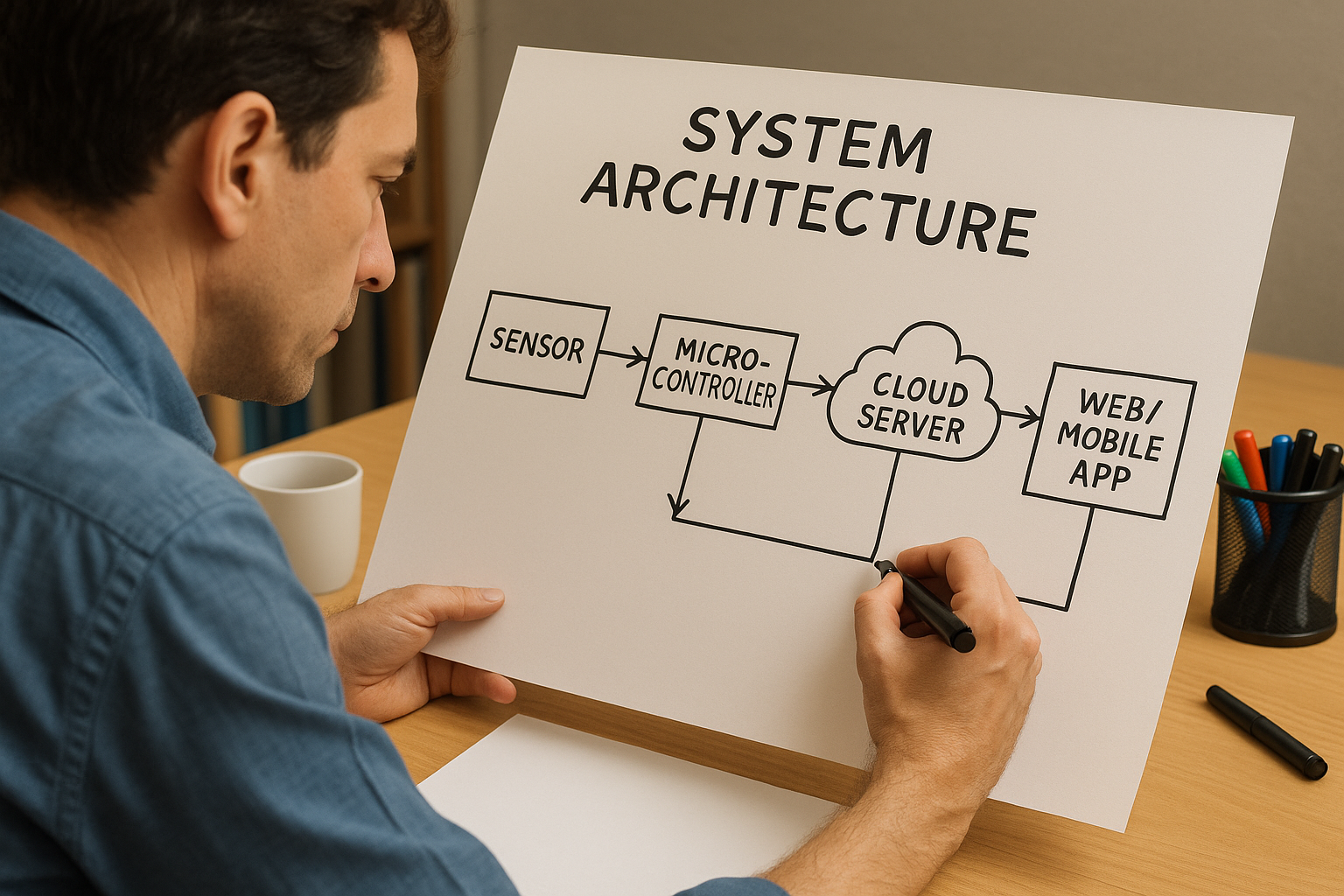
The first step in architecture planning is to draw a block diagram of your entire system. This is like an architect’s floorplan, but for your IoT device and its ecosystem. You sketch out all the major components and show how they connect and communicate. For example, a simple IoT block diagram might look like this:
- Sensor → Microcontroller (MCU/SoC) → Wireless Radio → Cloud Server → Web/Mobile App (client)
This chain represents the end-to-end data path. The sensor gathers data and feeds it to the MCU. The microcontroller might do a little processing, then uses a wireless radio (perhaps Wi-Fi, Bluetooth, LoRa, etc.) to send the data to a cloud server. The cloud server stores or analyzes the data and then makes it available to a user interface, like a web dashboard or mobile app. By laying out this flow in a diagram, you (and everyone on your team) can see all the pieces at a glance and understand how data travels through the system.
Don’t worry about art skills here – even simple boxes and arrows are fine! The goal is clarity. Your block diagram is the big-picture map of your IoT “city.” It helps everyone visualize the overall structure: what the core components are and how they interact. This prevents misunderstandings like someone thinking the device sends data directly to a phone app when you actually intended it to go through a cloud API. When everyone sees the same map, you’re less likely to get lost later.
Partitioning Decisions: Who Does What (and Where)?
Once you have the whole system drawn out, the next step is partitioning – deciding which responsibilities live where in your architecture. In other words, figure out who does what: what tasks should be handled by the hardware/device, what should be done in the firmware (on the device’s software), and what belongs in the cloud or server side. This is a crucial design decision because it affects performance, cost, complexity, and even security.
A few examples of partitioning decisions in an IoT system:
- Data Processing: Should the raw sensor data be processed or filtered on the device, or sent raw to the cloud for heavy-duty processing? (Processing data on the device reduces bandwidth and cloud load, but requires a more powerful MCU and might use more battery. Sending raw data makes the device simpler, but the cloud backend needs to be robust and your data link needs enough bandwidth.)
- Data Security: Will you encrypt or compress the data on the device before sending, or handle that in the cloud? Encrypting on the device means better security (the data is protected from the moment it leaves the sensor), but it might demand more from your MCU. If you do it in the cloud, the device can be simpler, but data travels unsecured for a while – which might be unacceptable in sensitive applications.
- Storage & Intelligence: If the internet/cloud connection is lost, does your device just buffer data locally, or even make local decisions? For instance, can the device operate in a “degraded” mode without the cloud? Deciding this now can influence whether you need extra memory or storage on the device for buffering, or extra logic to handle offline scenarios.
Partitioning is a balancing act. You want each part of the system to handle what it’s best at. Tiny battery-powered sensors are great for collecting data and maybe doing light processing, but you’d offload heavy number-crunching to a cloud server that has more power. Conversely, if your application needs ultra-fast response or must work without internet, you’d push more intelligence to the device at the edge. There’s no one-size-fits-all answer – you have to weigh the trade-offs based on your requirements from Stage 1.
It’s completely normal to iterate on these choices. You might start with the idea “our device will do everything – preprocessing, encryption, decision-making!” and then realize that your chosen microcontroller can’t handle that workload (or its memory is too small). That insight in the architecture phase might lead you to shift some tasks to the cloud to simplify the device. Or vice versa: maybe you planned to do processing in the cloud, but network latency is a concern, so you decide to handle more on the device. Catching these issues on paper is infinitely cheaper than discovering them after you’ve written a ton of code or fabricated a PCB that can’t support the needed firmware. So take the time now to divvy up responsibilities smartly.
Technology Selection: Picking the Right Tools for Each Part
Now that you have a block diagram and you’ve partitioned responsibilities, it’s time for technology selection. This is where you decide on the actual technologies or components for each block in your diagram (or at least narrow down the options). Think of it like choosing the materials and equipment for each part of a building – steel or wood frame? brick or concrete walls? In IoT terms, some key considerations include:
- Sensors: What kind of sensor(s) do you need? This flows from your requirements. For example, if you need high precision temperature readings, you might choose a digital temperature sensor with I²C interface for accuracy. If you just need a simple threshold detector, maybe an analog sensor with an ADC will do. Consider factors like accuracy, power consumption, cost, and ease of interfacing with your MCU.
- Microcontroller (MCU) or System-on-Chip: Choose a brain for your device. Does it need to be ultra-low-power (to run on a coin cell for years)? Does it need lots of processing power or memory (for on-device processing, machine learning, or handling multiple sensors)? How about the ecosystem – do you prefer a certain vendor or need specific development tools? For instance, you might narrow it down: “Probably an ARM Cortex-M4 family MCU, because we need a decent CPU and floating-point for sensor calculations, and it has low-power modes for battery operation.”
- Connectivity (Wireless Radio): Select how the device will communicate. This depends on range, power, and data needs. If it’s a wearable or something that talks to a smartphone, Bluetooth Low Energy (BLE) might be ideal. If it’s a home gadget and there’s Wi-Fi available, Wi-Fi is convenient for cloud connectivity. For remote or wide-area devices, consider cellular IoT technologies like LTE-M or NB-IoT, or go with long-range unlicensed band radios like LoRa or Sigfox for low bandwidth, long range needs. Each technology has trade-offs: Wi-Fi and cellular give internet access but can consume more power; BLE is low-power but short-range; LoRa is long-range and low-power but only for small data packets.
- Power Source: Think about how this device is powered. If it’s battery-powered, that choice immediately affects everything else. A device running on a tiny coin cell will need ultra low-power components (both the MCU and radios, and even sensor choice matter here). You might also need to plan for power management features (like sleep modes, or using a power-efficient communication protocol). If it’s mains-powered or plugged in, you have more freedom to use power-hungry Wi-Fi or powerful processors without worrying about draining a battery. Also consider battery type (rechargeable lithium-ion vs replaceable batteries) if relevant, as well as any charging circuitry needed.
- Other Components: Depending on your system, there may be other tech selections. For example, if your device needs a display or user interface hardware (like LEDs, screens, buttons), list those out now. If you need actuators (motors, relays to control something in the physical world), identify suitable options. At this stage, you don’t necessarily have final part numbers for everything, but you should have a short list of likely candidates for each major component.
By selecting technologies in the architecture stage, you ensure all the pieces of your system are compatible and meet the requirements. It also helps in rough cost estimation and feasibility. For instance, if you determine you “probably” need a high-end MCU and a specific long-range radio, you can sanity-check that the combined cost still fits your product’s budget, and that those parts can even work together (do they have the right interfaces? any driver support needed?). You might discover here that one radio module you like only comes with a certain microcontroller family or requires an external MCU – good to know now rather than later!
Also, keep power and size in mind. An IoT device that’s supposed to be tiny and battery-operated (like a wearable or a remote sensor) might force you to pick a system-on-chip that integrates the MCU + radio in one, to save space and power. Or if your device needs to be super cheap, you might lean towards using an all-in-one module that has sensor+MCU+radio combined. This is the stage to juggle these options on paper and see which tech stack best meets the project needs.
Risk and Cost Analysis: Identify Potential Pitfalls Early
Even at this early architecture stage, a savvy IoT architect will start thinking about risks and costs associated with the chosen design. It’s way better to flag these issues now than to be unpleasantly surprised later. Here are some things to consider:
- Component Availability & Lead Times: Is your design relying on a particular component that might be hard to get? In hardware, it’s not uncommon to find the “perfect” chip for your needs, only to discover it has a 30-week lead time or it’s perpetually out of stock 😫. For example, maybe you chose a cutting-edge sensor that meets all your specs, but it’s so new that supply is limited. Early in architecture, identify such parts and have backup options or sourcing plans. The same goes for any single-source components (only one supplier makes it); that’s a risk if they have shortages.
- Cost Drivers: Look at your block diagram and rough BOM and spot anything expensive. Perhaps that high-end MCU or that cellular module will dominate your cost. Does the product’s business case allow for it? If not, you might need to reconsider or find alternatives now. Also, if you’re planning to scale to large volumes, even small cost differences matter. An extra $2 per device might be fine for 10 prototypes but not for 100,000 units. Catch these cost issues early and adjust the architecture if needed (for instance, maybe you don’t actually need the MCU with 1MB of flash if 256KB and a bit more cloud processing would do).
- Single Points of Failure: Think about reliability. Does your whole system break if one component fails or goes offline? For example, if your device loses cloud connectivity, does it become completely useless? If yes, perhaps you need some local functionality as a backup (even if just storing data to send later, or basic operation in “offline mode”). Or if your entire system hinges on one cloud server, consider redundancy or at least a plan for downtime. Identifying these weak points now means you can design mitigations – maybe adding a small backup battery for real-time clock or memory to log data when power/network is out, etc.
- Regulatory and Compliance Issues: An often overlooked risk in architecture is certifications and regulations. Using a certain wireless technology might mean you need to get FCC/CE certification for radio emissions. Or using certain frequency bands could have legal restrictions in some countries. If your device will be used in healthcare or industrial settings, are there standards it must meet (like medical device regulations, or safety ratings)? Highlight any known compliance needs now so you can budget time and money for them later. For instance, if you choose a cellular module, you might need carrier certifications which take time. If you plan to use an unlicensed band like LoRa in a region, ensure you comply with duty cycle limits or power limits. By spotting these early, you won’t be blindsided later in the project when someone says “we can’t ship because we never got device certification.”
- Integration and Complexity Risks: Identify any areas that feel technically risky. Maybe you’re planning to use a very new IoT platform or an experimental library in your firmware. Acknowledge that as a risk – perhaps plan a quick prototype or research spike to test it out, or have a fallback plan if it doesn’t pan out. Early awareness of “what could go wrong” helps you either design it out or prepare plan B.
By doing a risk and cost analysis in Stage 2, you walk into development with eyes wide open. If you know the riskiest part of your design is, say, the custom machine learning algorithm on the device, you might tackle that first in development or at least keep monitoring it. If the most expensive component is a certain sensor, you’ll be careful about budget elsewhere. No product is risk-free, but proactive planning separates successful projects from the ones that scramble last-minute to solve avoidable problems.
Documenting the Architecture Clearly
At the end of the architecture stage, you’ll want to document your system architecture in a way that’s understandable and shareable for the whole team. This documentation becomes the blueprint everyone will refer to, so it needs to be clear and accessible (not locked in the lead engineer’s head!).
Key ways to capture and communicate the architecture include:
- Visual Diagrams: Create diagrams that show the system from different perspectives. You might use a simple block diagram (as discussed) for the high-level context of hardware and major software pieces. Some teams use formal notations like SysML or the C4 model for system context, but that’s optional. The idea is to illustrate how hardware, firmware, cloud services, and users all interact. For the software components (like your device firmware and cloud software), you could draw a UML component diagram or even just a annotated sketch showing which software modules run on the device vs on the server. Don’t be scared by the acronyms – even PowerPoint or hand-drawn sketches with labels like “Sensor reads data -> Processor does X -> Cloud service does Y” can be extremely effective. Use whatever style communicates best to your team.
- Written Overview: Accompany the diagrams with a brief write-up. Describe each block in your diagram and its role. For example, note “MCU: responsible for reading sensor and encrypting data” or “Cloud: responsible for data storage, analytics, and providing REST API for the app.” This helps ensure nothing is ambiguous. It can be just a few paragraphs or bullet points under the diagram.
- Preliminary Bill of Materials (BOM): It’s often helpful to start a basic BOM spreadsheet at this stage. List the key components you plan to use (sensor, MCU, radio module, etc.) along with any notes such as estimated cost, vendor, and lead time or availability concerns. This doesn’t need every resistor and capacitor (those details come later in detailed design), but focusing on the major pieces now ensures you’re aware of the cost per unit and any supply chain issues. For example, if your BOM shows the wireless module is $10 each and everything else is $2 combined, you immediately see where cost optimization might be needed. Or if two of your major parts are from the same supplier, note that (maybe it’s convenient, or maybe it’s a risk if that supplier has troubles).
- Notation & Consistency: If you have multiple people working on this, agree on naming and notation. For instance, if your diagram calls the microcontroller “Device CPU”, make sure the write-up or other docs use the same term (not “microcontroller” in one place and “CPU” in another, which could confuse). Consistent labels and version-controlled documentation (even as simple as a shared document or a wiki page) will make everyone’s life easier. Some teams put the architecture diagrams and notes into a brief Architecture Document that can be circulated for feedback and serves as a reference throughout development.
The goal of documentation is that any team member (or a new joiner to the project) can look at the architecture and quickly get up to speed on the overall design. It also helps when talking to non-engineering stakeholders – for example, product managers or executives may not dig into your code, but they can look at a high-level diagram and understand the concept of the product. Good architecture documentation bridges the gap between ideas and implementation.
“Design Twice, Build Once”: Save Time with Early Planning
There’s a mantra in engineering: “design twice, build once.” In practice, this means it’s far cheaper and easier to catch and fix issues in the design (on paper) than after you’ve built something. Stage 2 is exactly about that philosophy. By hashing out the system architecture before diving into building, you save yourself from expensive rework later on. It’s a lot less painful to move boxes and arrows around in a diagram than to rip up a printed circuit board or rewrite an entire firmware module because you realized too late that the original plan was flawed.
Use this stage to get all your team members on the same page early. It’s a multidisciplinary effort – hardware engineers, firmware developers, cloud/backend engineers, product managers, you name it. Everyone should have a voice in reviewing the architecture. Encourage team discussions and brainstorming at this point. You might be surprised: a cloud engineer might say, “If the device could tag each sensor reading with a timestamp before sending, it would make my life easier on the server side.” That’s a relatively small ask to include in the device firmware plan – if you know it upfront. Or a hardware designer could point out, “We’re using two sensors now, but if we add a third one we could also measure air quality – is that something we want to leave room for?” These insights can lead to slight tweaks in the architecture, or at least provisions for future expansion, that you wouldn’t have considered if each team worked in isolation. It’s much better to iron out these interface points and feature considerations now than to have “Oh no!” moments later when someone realizes the system can’t easily be changed.
Being thorough in Stage 2 also builds confidence. By the end of this stage, you should have a clear blueprint: a top-level design that shows how you intend to meet the requirements identified in Stage 1. It’s akin to the architectural drawing of a building – you’re not picking out the paint colors or the exact doorknobs yet, but you know how many floors the building will have, where the doors and windows will be, and how the rooms are laid out. In IoT terms, you know what the devices are, how they connect, what data flows where, and what tech you’re roughly using to do it.
With that blueprint in hand, you’re now prepared to dive into the next steps of detailed design and implementation with confidence. You’ve essentially created a map for your IoT journey, so you’re far less likely to get lost or blindsided. In Stage 3 and beyond, when you start building hardware or writing code, you’ll constantly refer back to this architecture to guide you. And if changes occur (they always do!), you can update your architecture doc so it remains a reliable reference.
In short: Stage 2, System Architecture, is where you set yourself up for success. It aligns the team, exposes risks early, and provides a clear game plan. You’ve designed it (maybe even twice 😜), so now you can build it once – and build it right! Keep this blueprint close; it will be your North Star as you move forward in developing your IoT product.